WeSpeak Tracker shows you where your customers come from and which ones end up in bookings (the bookings part, if you have a compatible tool: WeSpeak Payments or the Conversion Pixel): how many people wrote to you in the period, whether they came from Paid Ads (a paid Meta ad), from an Owned Channel (a post or WeSpeak link created by your team), or directly, and what results each origin generated.
ℹ️ WeSpeak Tracker is activated per account. If you don't see it in your menu, you can acquire it in extras.
In this article
- The three traffic sources
- How to navigate
- The main numbers
- The conversion funnel
- Paid Ads (Meta Ads): connecting with your Meta account
- WeSpeak helps optimize your ads (CAPI)
- Owned Channels (free posts and links)
- Frequently asked questions
The three traffic sources
Each customer who writes to you is assigned to a single source, so the groups don't mix:
| Source | What it is | Example |
|---|---|---|
| Paid Ads | Paid Meta advertising (Facebook/Instagram) that opens a chat | Your "Summer Promo" campaign in Meta Ads |
| Owned Channels | Free posts and links created and named by your team, measured with a WeSpeak link | An IG story, a QR code in the lobby, the newsletter link |
| Direct | People who arrive on their own, without an attributable link or ad | Someone who already had your number or found you on Google |
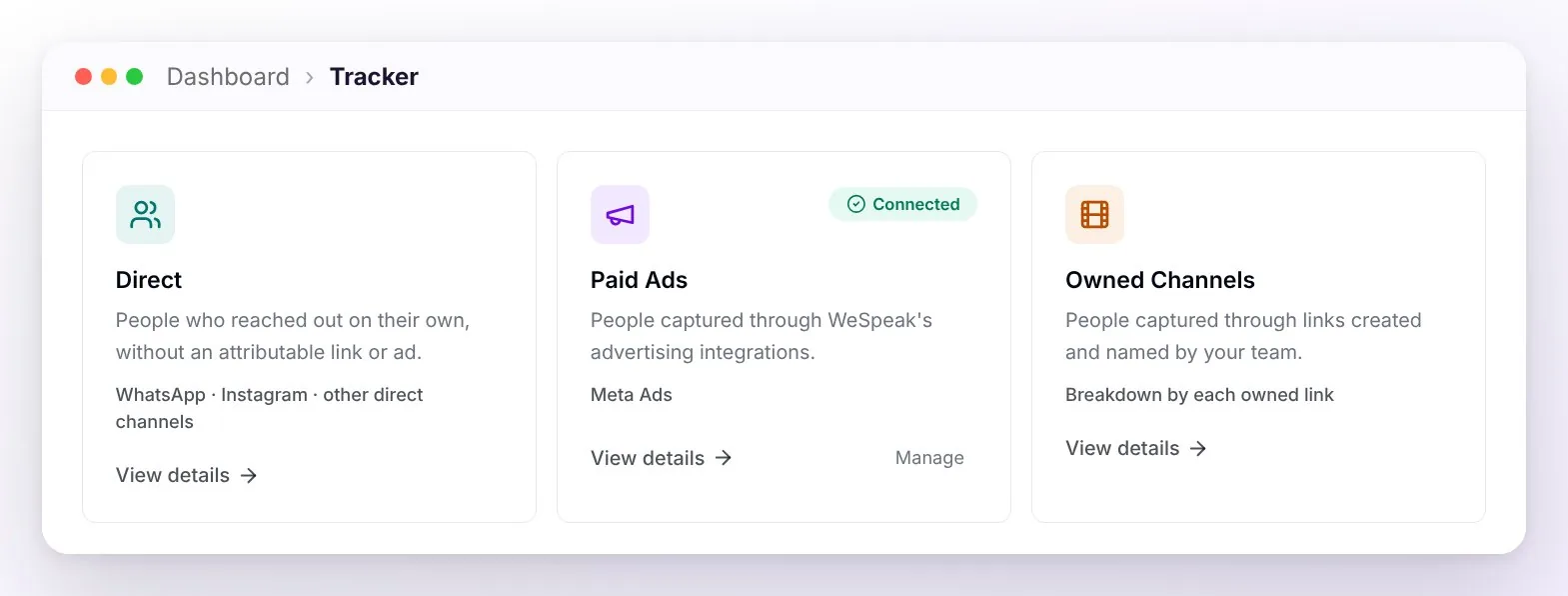
ℹ️ Coming from the previous version? They're the same sources with new names: "Paid Ads" replaces the old paid-ads view, "Owned Channels" was "Owned Campaigns", and "Direct" was "Organic Traffic".
ℹ️ Scope: WeSpeak Tracker measures Meta traffic (WhatsApp, Instagram, Facebook) and your own WeSpeak links. It doesn't include Google Ads.
How to navigate
| Control | What it does |
|---|---|
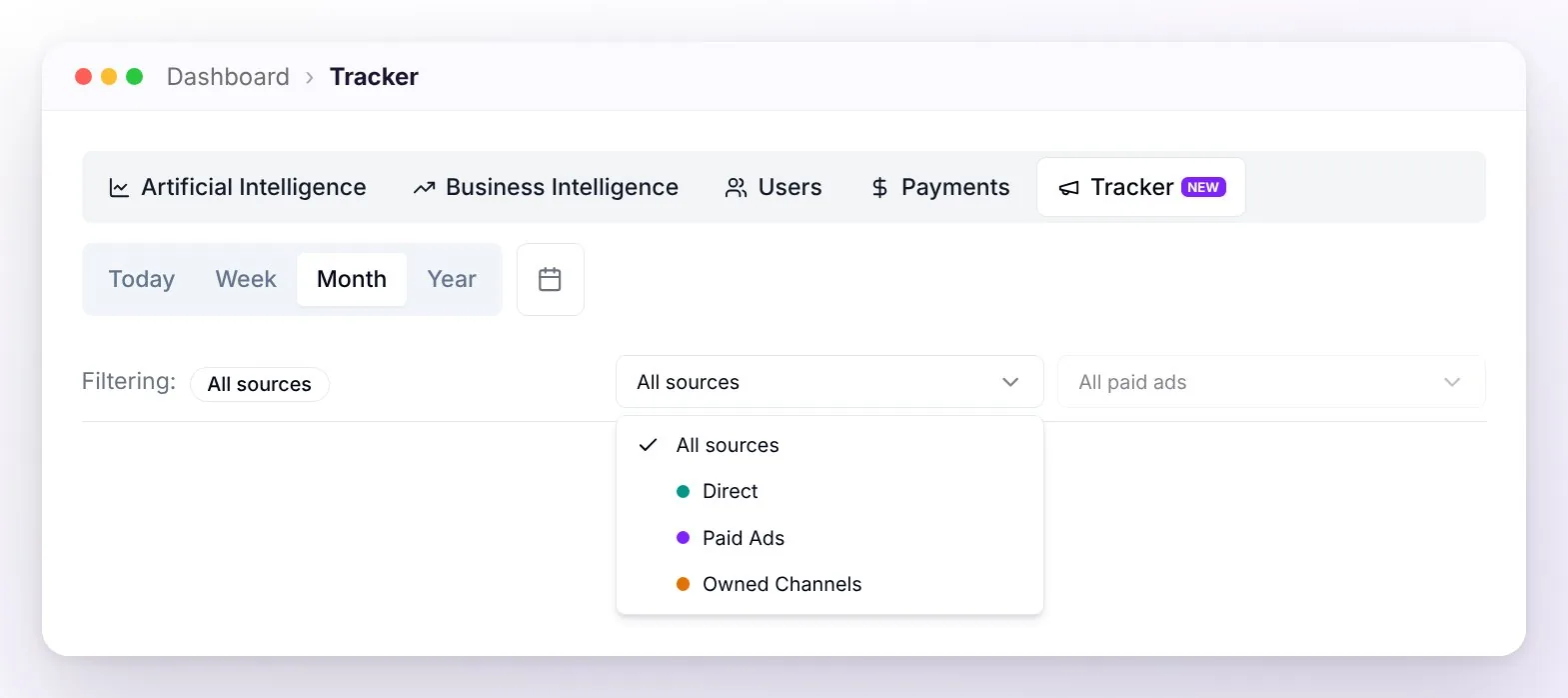
| Filtering: (top right) | Switches the view between All sources, Direct, Paid Ads, and Owned Channels. |
| Period selector | Choose Today, Last 7 days, Last 30 days, Last 12 months, or a custom calendar range (up to a year back). |
| Ads filter | Only in the Paid Ads view: focus on a specific Meta campaign, ad set, or ad with the search box. |
The main numbers
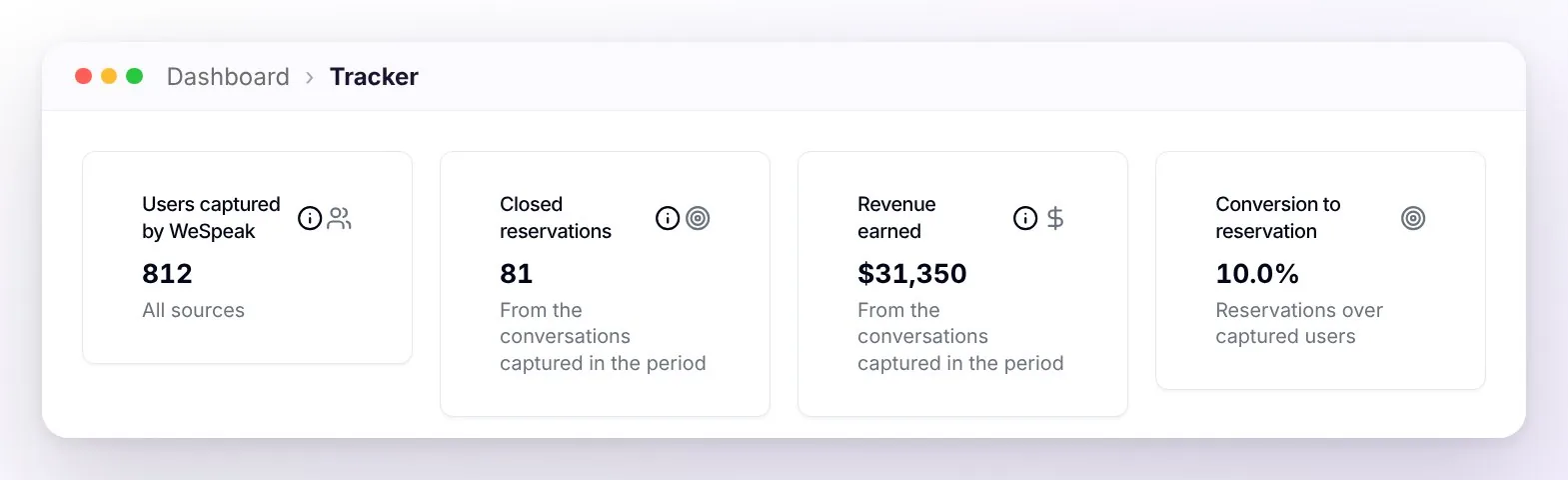
The cards at the top summarize the period. Captured users always show; the booking and money cards depend on which tool measures your bookings — WeSpeak Payments or the conversion Pixel:
| Card | What it measures | When it shows |
|---|---|---|
| Users captured by WeSpeak | How many new conversations were created. | Always |
| Confirmed bookings | The bookings charged with WeSpeak Payments and those your team marks as won with an amount, from the conversations captured in the period, plus those the conversion Pixel detects in your booking engine in the period (even if the inquiry is older). The same sale is counted only once. | With Payments or the Pixel |
| Realized revenue | The amount of those same bookings, with the breakdown of how much comes from Payments, the team, and the Pixel. If there are amounts in more than one currency, you'll see the per-currency breakdown. | With Payments or the Pixel |
| Booking conversion | Bookings from the users captured in the period over those users. E.g.: 800 captured and 80 bookings → 10%. | With Payments or the Pixel |
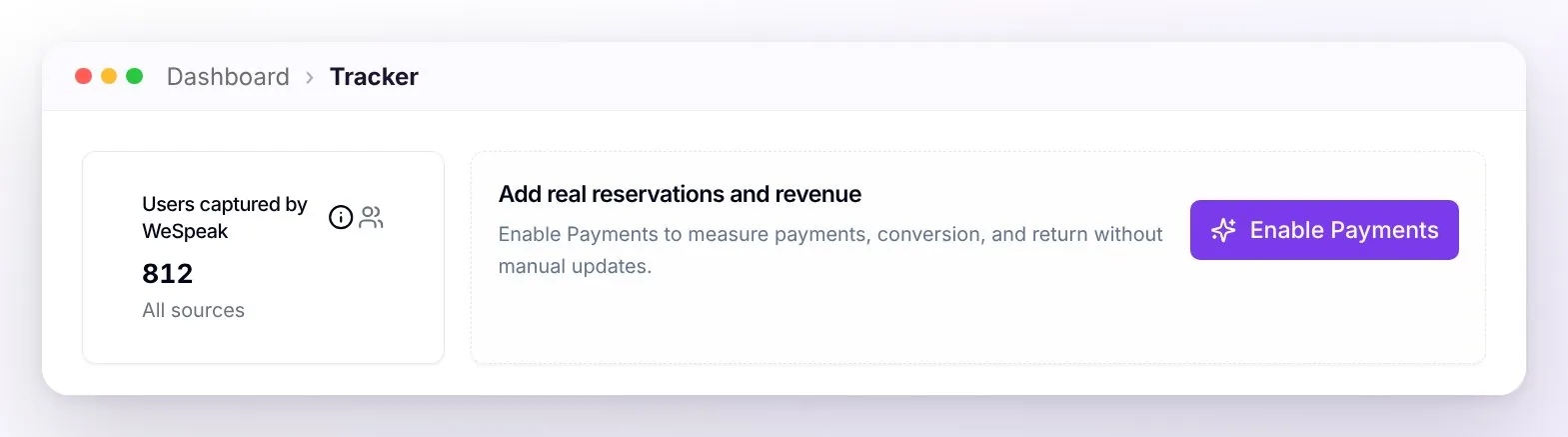
⚠️ Important: WeSpeak Tracker only shows as bookings and revenue what it can verify: WeSpeak Payments charges and the bookings the conversion Pixel detects in your booking engine (and, if you have Payments, also the sales your team marks as won with an amount). If you have neither tool, or the Pixel hasn't detected any bookings in the period yet, those cards don't appear — instead you'll see the invitation "Add real reservations and revenue" with the Enable Payments button.
💡 Do your bookings get completed in your booking engine? With the conversion Pixel you don't need Payments to see bookings: it detects each booking, adds it with its amount to Confirmed bookings and Realized revenue, and moves the conversation to the funnel's won stage — all without manual work.
Below, the source comparison shows the three sources side by side, so you can see at a glance which one brings in the most.
The conversion funnel
It shows which stage of your funnel each customer captured in the period is in today. You'll find it in the Direct and Paid Ads views:
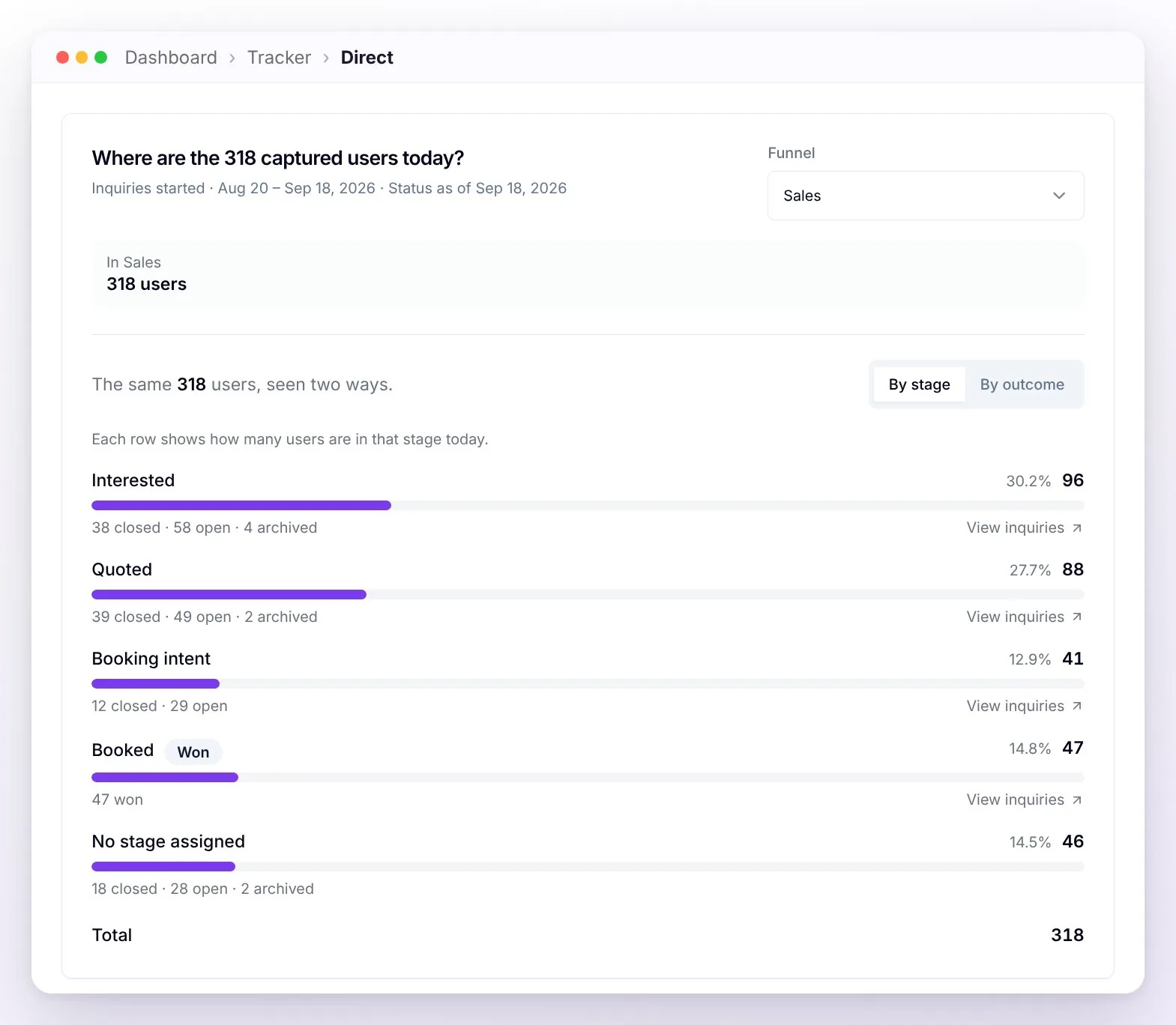
- By stage: each row shows how many users are in that stage today, with their percentage of the total and how many of them are still open or already closed. The final stage carries the "Won" badge.
- View inquiries: each stage has a link that opens those conversations in Chats, so you can see exactly who they are.
- By outcome: the other tab splits the same users by how they ended, or where they stand: won, automatic closures, lost with a reason, unresolved (open conversations), and archived, with their percentages.
- Loss reasons: a separate card gathers the concrete causes detected in lost conversations (price, availability, no response…) and, set apart and greyed out, the automatic closures and those with no reason recorded (WeSpeak automatically closes a conversation after 7 days without activity — or after 2 days if check-in has already passed). Each reason opens those conversations in Chats.
- If you have more than one funnel configured, a selector lets you choose which one to look at.
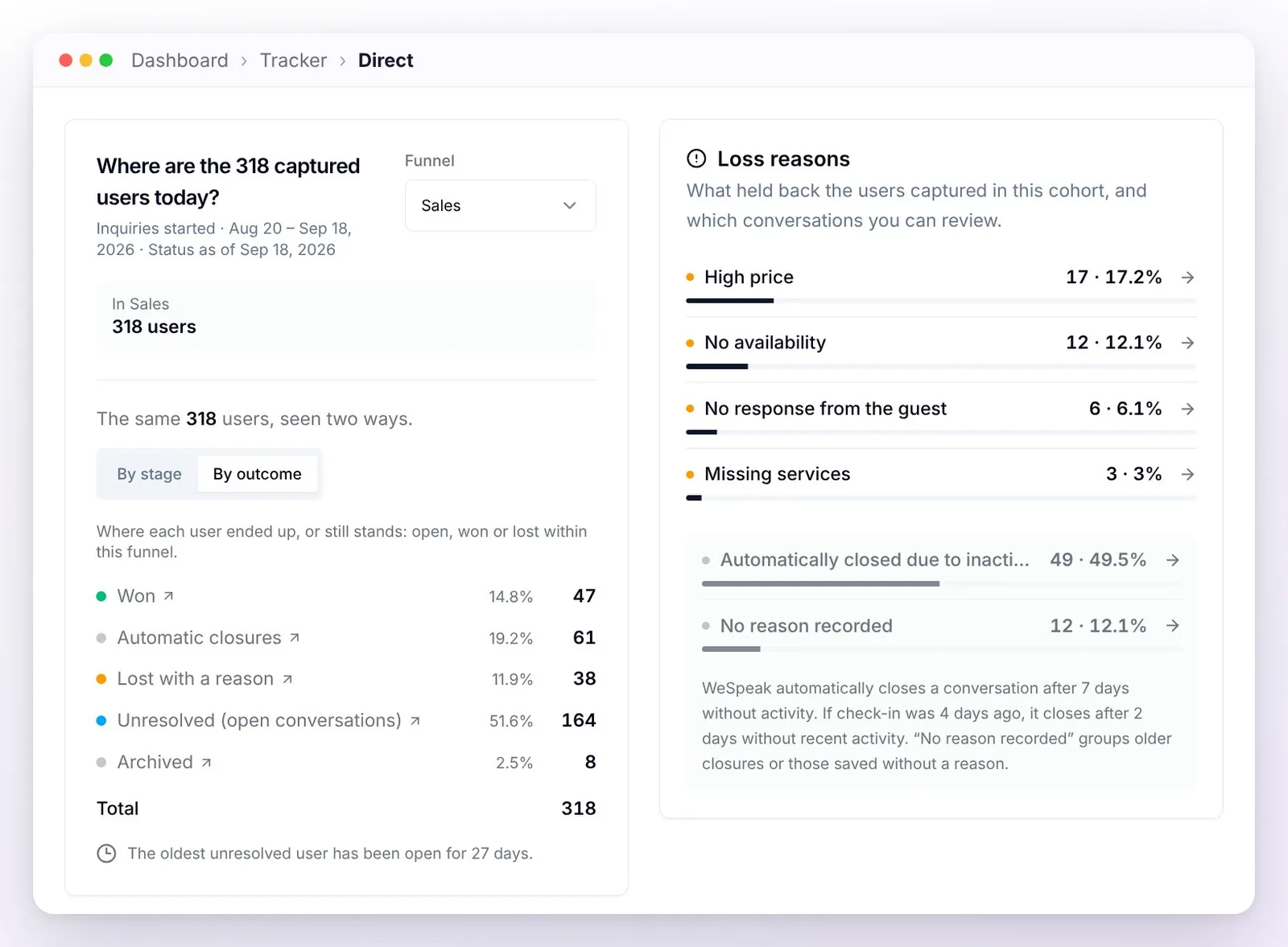
💡 Tip: the funnel reads "as of today": a customer captured in May who booked in June appears as won when you look at May — this is on purpose, to measure each cohort's real conversion.
You also have Daily Evolution (customers captured per day), Geographic Origin (countries, based on the phone prefix), and Origin by Channel (WhatsApp, Instagram, Facebook).
Paid Ads (Meta Ads)
Connect your Meta Ads account and WeSpeak joins what you spend with what actually happens: who wrote to you from each ad, who booked, and how much you billed. When someone taps one of your ads and opens the chat (WhatsApp, Instagram, or Facebook), the conversation is connected to that ad automatically — without you doing anything.
Connecting with your Meta account
Connecting is now direct: you sign in with your Meta account and that's it. No more generating tokens or visiting Meta's developer sites.
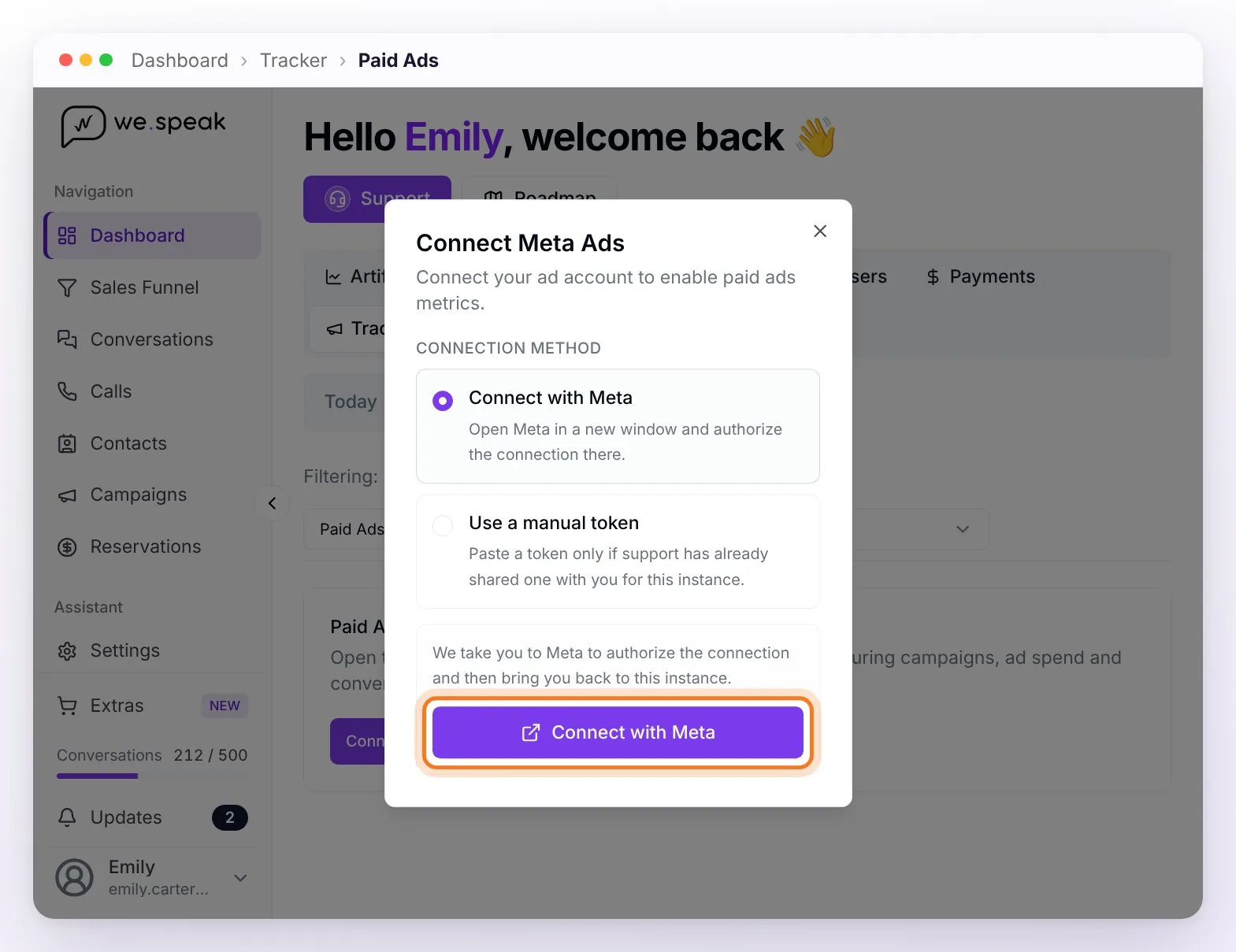
Go to the Paid Ads view and click Connect Meta Ads.
Choose the Connect with Meta method. A Meta window opens: sign in with the account (the email) you use to manage the business's ads and authorize the connection. WeSpeak asks for read-only access to your ads — it can't modify campaigns or spend your budget.
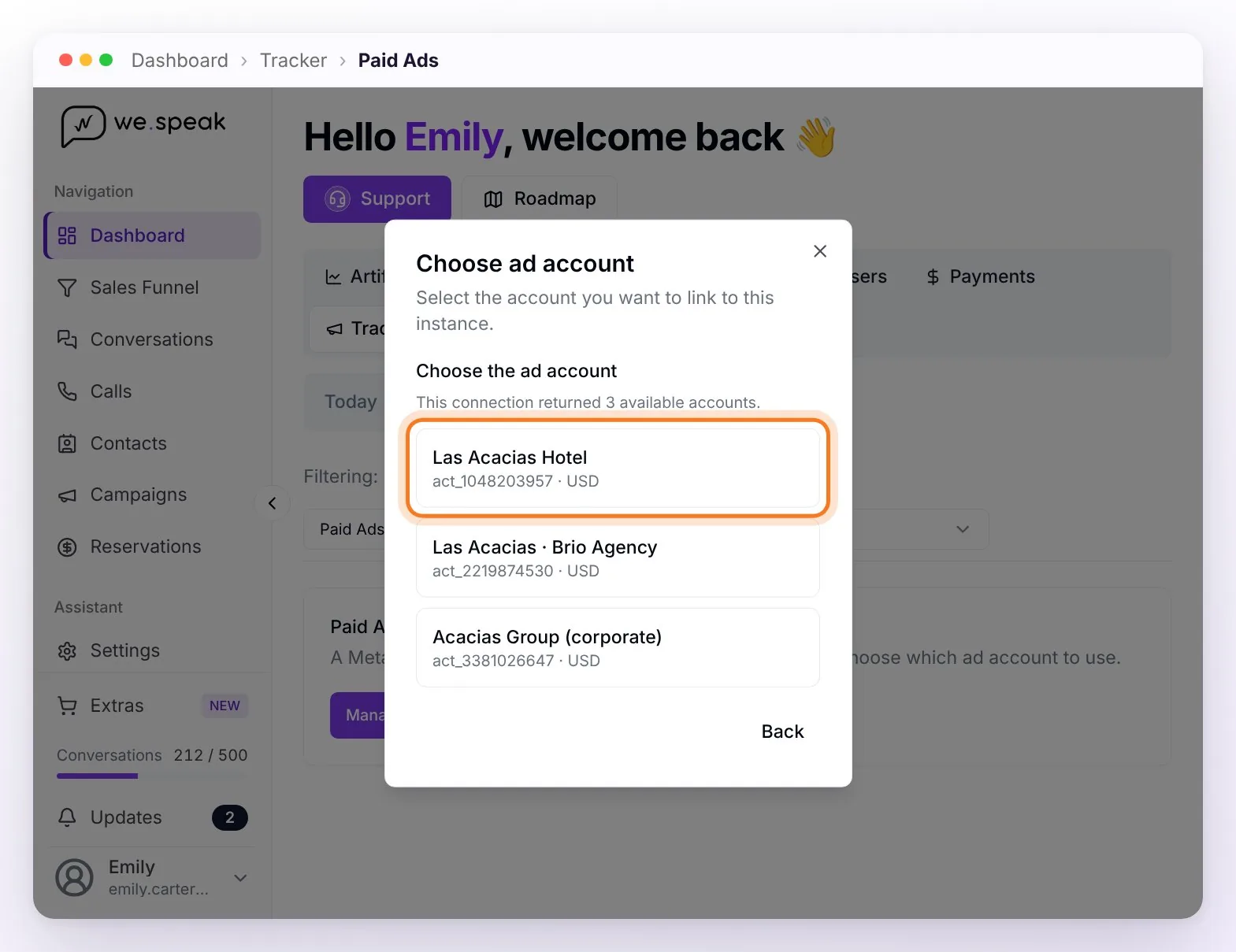
Back in WeSpeak, choose the ad account (more on this below). If your account manages only one, it's selected automatically.
Wait for the initial sync: WeSpeak reviews your existing conversations and connects them with their ads. It usually takes between 5 and 30 minutes depending on how many conversations you have; meanwhile you'll see the "Syncing…" indicator. If more than 30 minutes have passed and you still have no data, write to your advisor.
ℹ️ Which account do I sign in with? The one that has access in Meta to the hotel's ad account — typically, the person who opens Ads Manager to check the campaigns. If an agency runs your ads, ask someone with access to do this step: it's two clicks and doesn't touch anything the agency has set up.
ℹ️ What about the token? The old method is still available as "Use manual token", but it's now for special cases: use it only if the WeSpeak team shared a token for your account. If you're still connected with an old token, nothing changes; the day that connection expires, the simplest way to renew it is Connect with Meta.
⚠️ Requirement: measuring paid ads needs your WhatsApp connected officially (WhatsApp API). When someone taps an ad, Meta sends, along with the message, the data of which ad originated it — and that data only arrives via the official API. If your number isn't connected that way, the same screen tells you. Owned Channels work with any connection.
The ad account
The ad account is the Meta Ads Manager account where your campaigns and their billing live. A business can have several — for example, one per hotel, or its own plus the agency's — which is why, when connecting, WeSpeak shows you the list of accounts your user has access to (with name, number, and currency) so you can pick the one that contains the hotel's campaigns.
That choice matters twice: it defines which campaigns WeSpeak Tracker measures (spend, clicks, and the per-ad detail come from that account) and it's the base the optimization improvement works on (next section).
ℹ️ Several hotels, each with its own portfolio or ad account? For now, only one can be connected per WeSpeak account. The frequently asked questions explain how to organize your advertising so you can measure all of them.
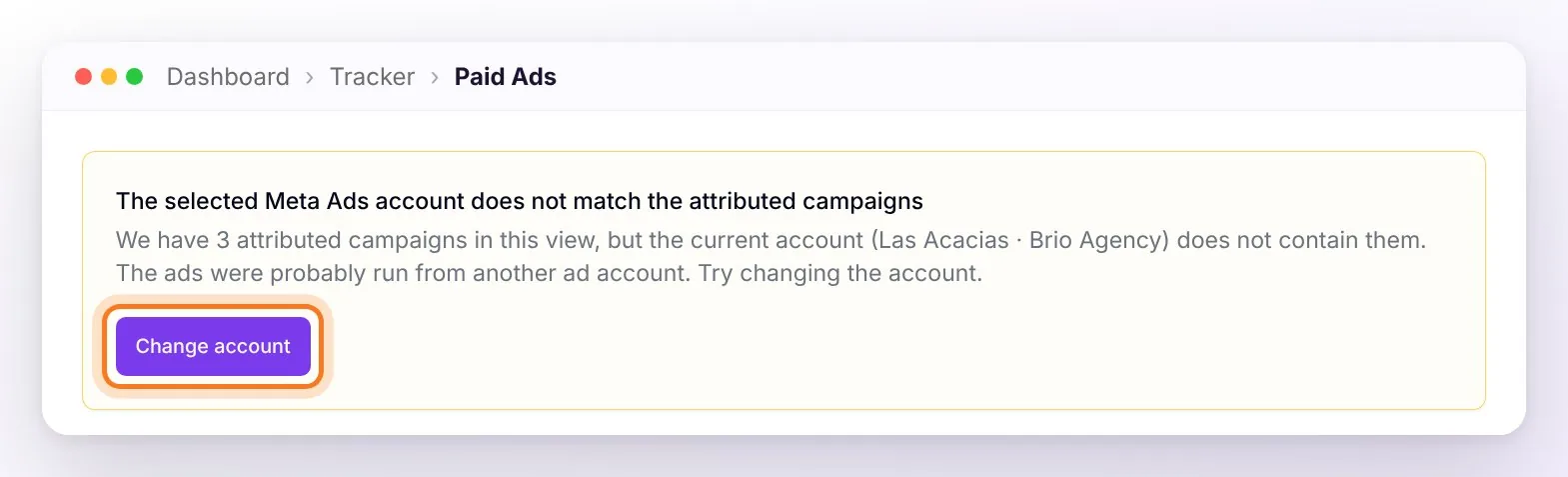
Picked the wrong one? No problem: if WeSpeak detects that the chosen account doesn't contain the campaigns that generated your conversations, it shows the notice "The selected Meta Ads account doesn't match the attributed campaigns" with the Change account button — you switch it right there, without disconnecting anything or authorizing again.
The connection statuses:
| What you see | What it means |
|---|---|
| Connect Meta Ads | You haven't connected any account yet. |
| Manage connection | There's a saved connection but the ad account still needs to be chosen, or the connection expired or couldn't be used — open it to complete the connection, change the account, or reconnect with Meta. |
| "Account doesn't match the attributed campaigns" notice | The chosen ad account doesn't contain the campaigns that generated your conversations (happens when the business has several accounts). Click Change account and pick the right one. |
| Connected ✓ | All good: the card shows the selected account and data loads normally. |
What the view shows
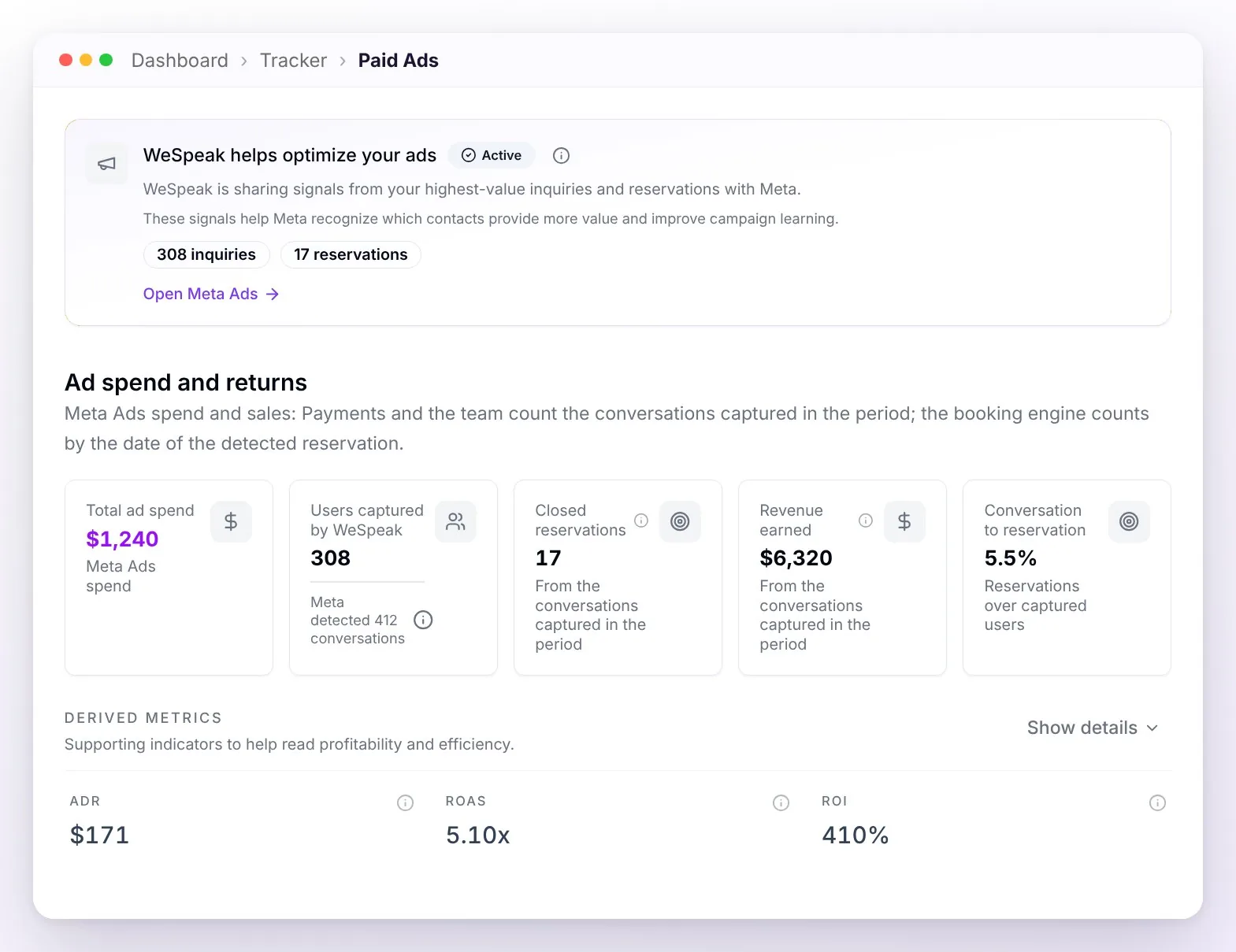
| Metric | What it is |
|---|---|
| Total spend | Your Meta campaigns' spend for the period, along with clicks and impressions. |
| Users captured by WeSpeak | The people who actually wrote to you from an ad. |
| Confirmed bookings & realized revenue | Those users' bookings — charged with WeSpeak Payments, marked as won by your team (if you have Payments), or detected by the conversion Pixel — and how much they billed. From them come the returns: ROAS, ROI, ADR, and net return against spend. |
| Total clicks & click-to-conversation | If you have neither Payments nor Pixel bookings: the clicks Meta reports and the estimated click-to-conversation ratio. |
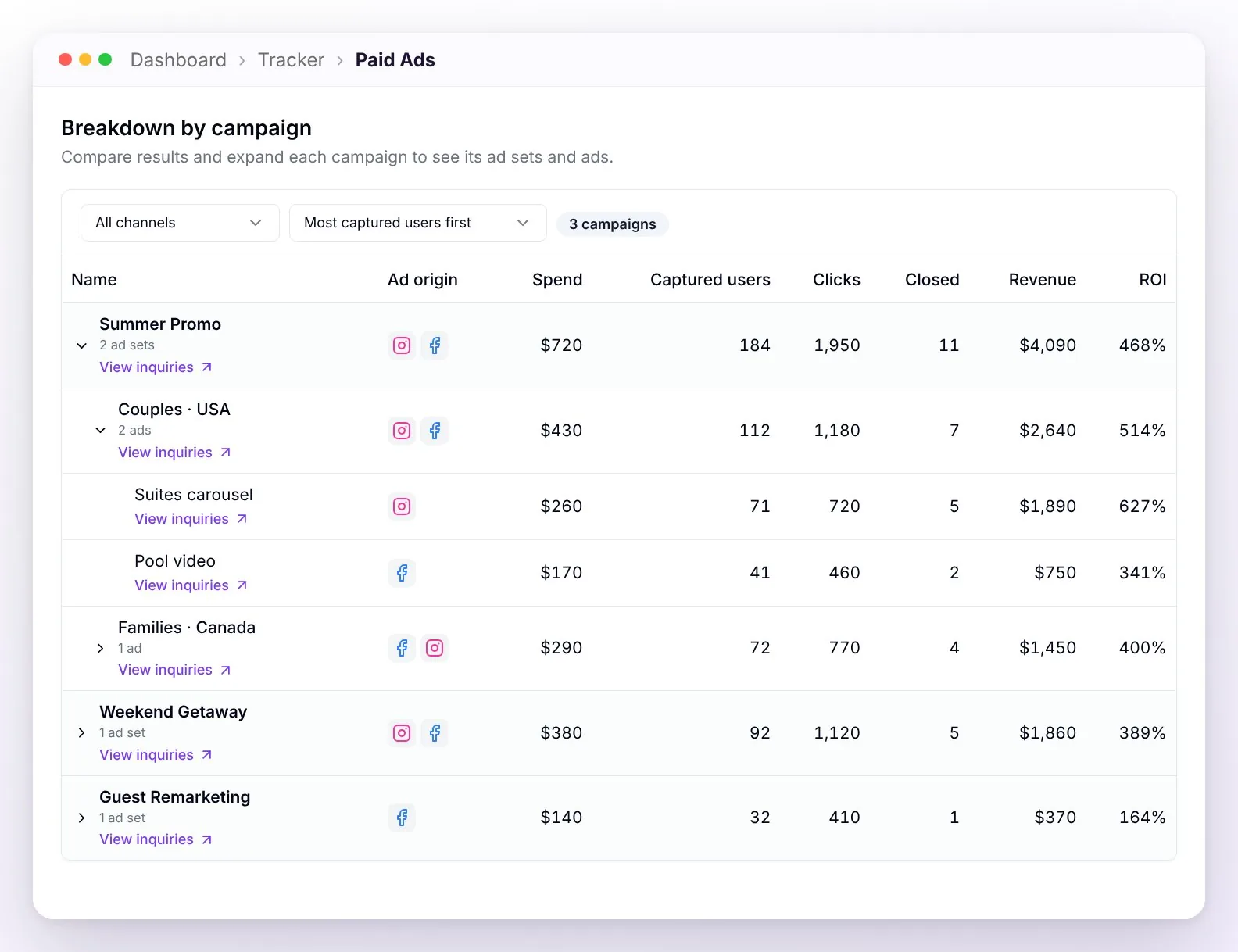
| Breakdown by campaign | The tree of campaigns, ad sets, and ads: which brings the most conversations and bookings, so you can move your budget with data. |
💡 "Meta reports X · WeSpeak confirmed Y": Meta always shows a higher number, because it counts clicks and estimates — even people who opened the chat and never wrote. WeSpeak counts only those who actually wrote to you. It's not an error: WeSpeak's are your real contacts, and the return is always calculated with them.
WeSpeak helps optimize your ads (CAPI)
Measuring is half the circle; the other half is feeding what WeSpeak learns back to Meta. With the optimization improvement — Meta's Conversions API (CAPI) — WeSpeak reports to Meta the real outcomes of the people who arrived through your ads:
- the new inquiry: someone tapped your ad and actually wrote to you;
- the confirmed reservation, with its value: that conversation ended in a booking.
With those signals, Meta stops optimizing blindly for clicks: it learns which kind of contact ends up booking and adjusts who it shows your ads to. On top of that, its reports get closer and closer to WeSpeak's real numbers.
⚠️ Meta needs volume to optimize. WeSpeak sends every signal from day one, but for Meta to put them to use — for example, to show your ads to an audience similar to the people who already messaged you or booked — it needs at least about 50 inquiries in a week. With less volume, the signals are still recorded in Meta, but they aren't enough yet to adjust your campaigns.
How to enable it:
In WeSpeak Tracker, look for the "WeSpeak helps optimize your ads" card (it appears once Meta Ads is connected).
Click Enable improvement in Meta: the Meta window opens to authorize the improvement — just once.
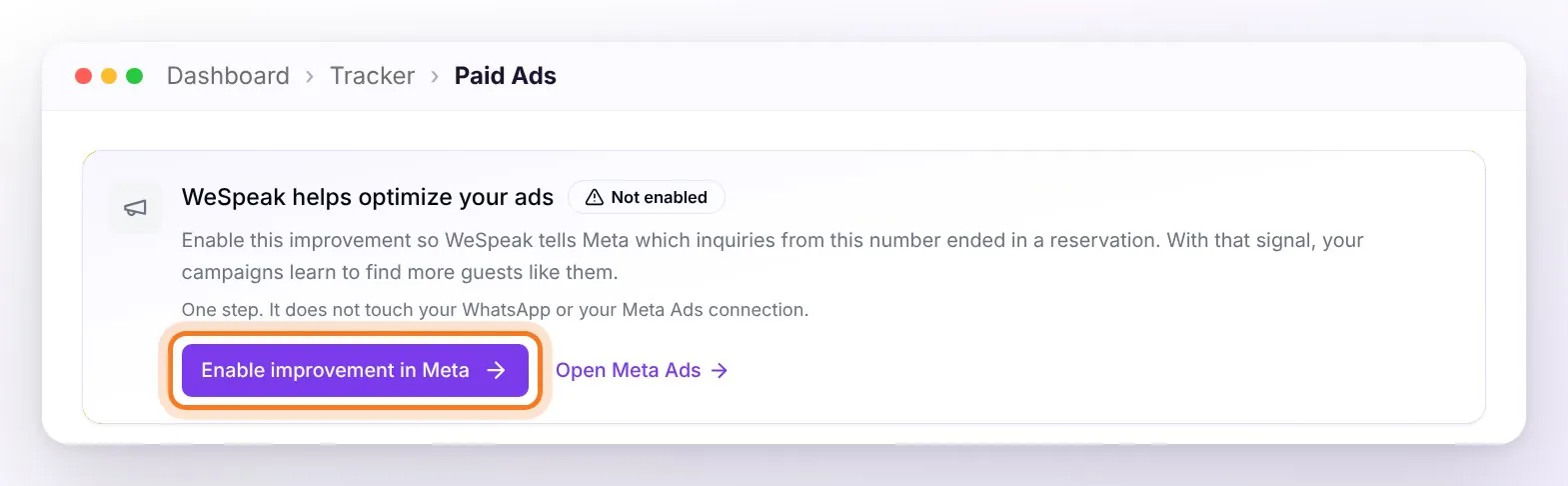
Done. It does not disconnect WhatsApp or modify your ads connection: it's an additional, independent authorization. If you have several WhatsApp numbers or accounts, the card walks you through authorizing each one until they're all done.
The card's statuses:
| Status | What it means |
|---|---|
| Active | WeSpeak is sharing signals with Meta. The card shows how many inquiries and reservations it reported in the period. |
| Connected | The improvement is ready, waiting for the first signals to share. |
| Not enabled | At least one number still needs to be authorized (or its authorization renewed). One click on the button solves it. |
| Review connection | The last signal exchange couldn't be confirmed. Your ads metrics remain available separately. |
| Unavailable | This improvement needs a connection compatible with Meta Ads and WhatsApp (official API). |
Fine print:
- The signals arrive in a "Meta dataset" that WeSpeak creates and manages automatically — you don't have to configure anything in Meta. Depending on how your campaign is set up, Meta uses them to optimize; changes take 2 or 3 days to show in Ads Manager.
- Only outcomes are shared, never chat content: at most one inquiry and one reservation (with its amount) per conversation, and only for conversations that arrived from an ad.
- The reservation is reported with its amount: if your team marks a conversation as won without an amount, that reservation isn't shared — add the amount and save it again.
- In each conversation you can see what was reported: the "Results shared with Meta" row in the Chats side panel.
Owned Channels (free posts and links)
For measuring what you post without paying for ads: stories, posts, your bio link, a printed QR, the newsletter.
How it works:
Create a campaign (e.g. "Summer 2026") and, inside it, an ad for each piece (e.g. "January 14 Story"). You can group them into ad sets, just like in Meta.
Each ad gives you a unique short link (like
wspk.link/a/summer-story14). Paste it into your post, bio, QR, or newsletter.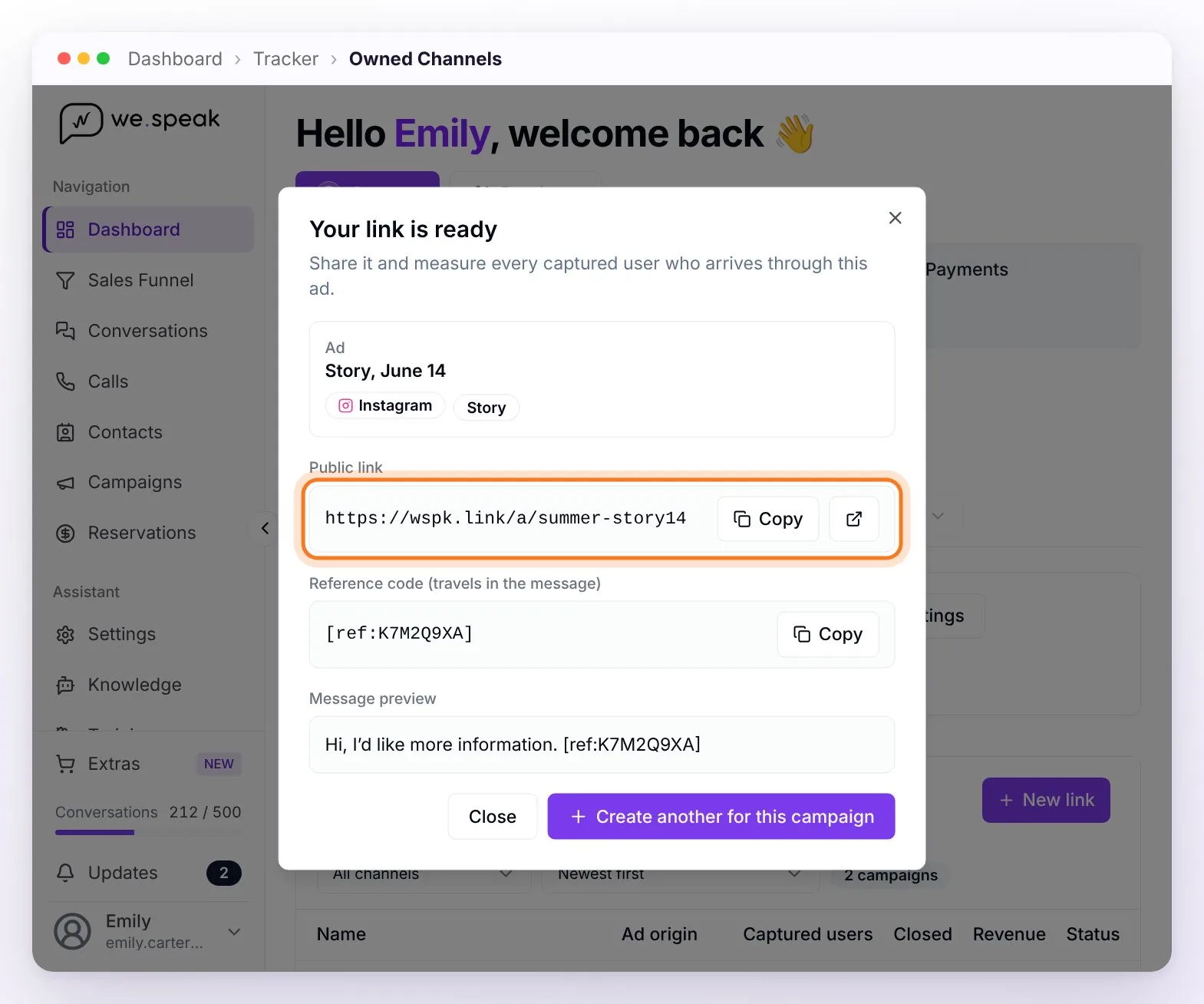
When someone taps the link, WhatsApp opens with a preloaded message. When they send it, the conversation is connected to that post — WeSpeak removes the measurement marker from the message, so no technical trace is left in the chat.
In the panel you see, per post: clicks and conversations — and, if you charge with Payments, the revenue — with the breakdown by channel (e.g. "Instagram → Reel: 24 customers, 3 bookings").
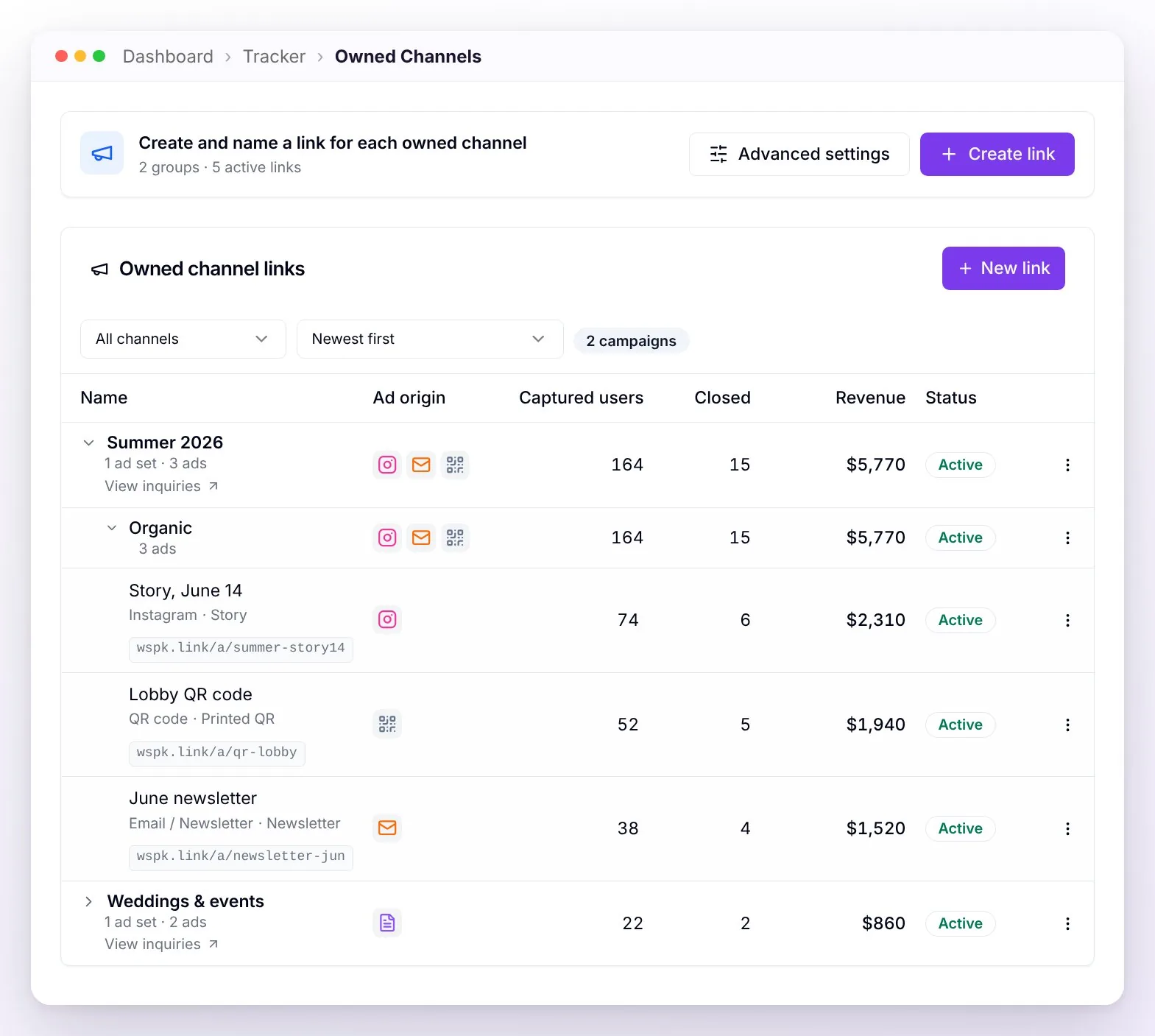
Channels available for the link: Instagram, Facebook, TikTok, X, YouTube, blog/website, email/newsletter, QR, and printed flyers.
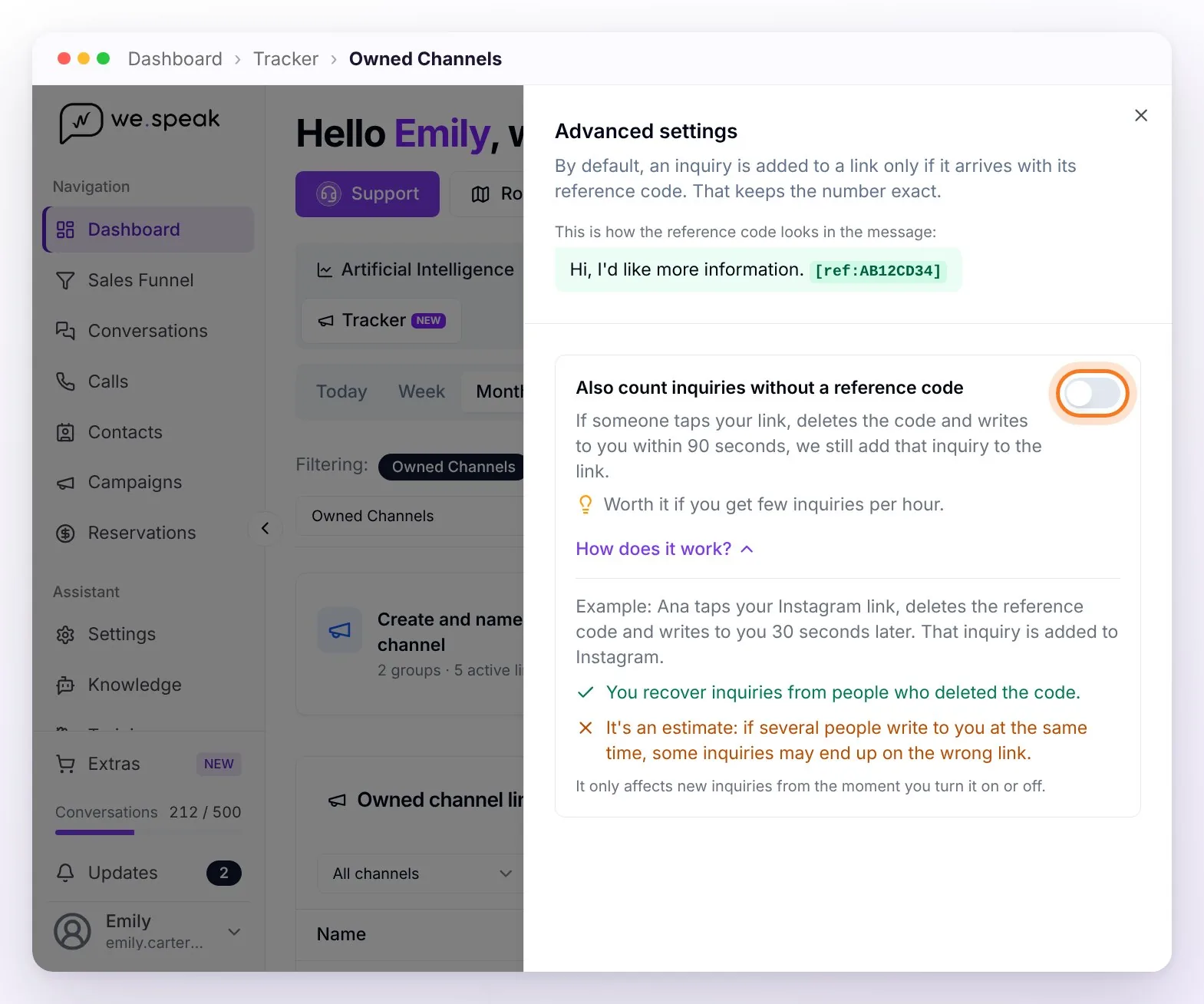
ℹ️ If the reference code gets deleted. By default, measurement is exact: an inquiry is added to your post only if it arrives with its reference code (the
[ref:…]that travels in the preloaded message). If the person deletes it before sending, that inquiry isn't added to your link.
To recover those cases, the Advanced settings button in the Owned Channels view lets you turn on Also count inquiries without a reference code: if someone taps your link, deletes the code, and messages you within 90 seconds, WeSpeak still adds that inquiry to the link. It's an estimate based on timing, not exact data: it works well if you get few inquiries per hour, but if many people message you at once — for example, after a mass send — some inquiries can end up on the wrong link. It's off by default, turning it on asks you to confirm you understand it's an estimate, and it only affects new inquiries from the moment you turn it on or off.
Frequently asked questions
Do I still need to generate a token in Meta?
No. The connection is now direct: Connect with Meta, sign in with your account, and authorize. The manual token remains only for special cases guided by support. If you're still connected with an old token, it keeps working — when it expires, reconnect with Connect with Meta instead of generating another one.
What exactly does WeSpeak get authorized to do in my Meta account?
The ads connection asks for read-only access: seeing campaigns, spend, and results; it can't edit campaigns or spend. The optimization improvement adds the permission to send Meta your WhatsApp conversion signals. Neither touches your WhatsApp connection.
Can I connect more than one Meta business portfolio, or more than one ad account?
No. For now, each WeSpeak account connects to a single Meta business portfolio and, within it, to a single ad account: that's where the spend, clicks, and per-campaign detail you see in WeSpeak Tracker come from. Giving one user access to the ad accounts of several portfolios doesn't change that: they'll all show up in the list when you connect, but you pick only one. The connection is per WeSpeak account — if each hotel has its own WeSpeak account, each one connects its own portfolio and measures its advertising separately.
I have several hotels in the same WeSpeak account and each one has its own Meta portfolio. How do I measure all the advertising?
If you manage several hotels from the same account — a chain, or a multichannel account with one number per hotel — bring everyone's advertising together in a single portfolio, with a single ad account, and separate each hotel inside it: one campaign per hotel (with its ad sets and ads), with the hotel's name first — e.g. "Downtown Hotel · Summer Promo". That way each hotel keeps its own budget and, in WeSpeak Tracker, gets its own row in the Breakdown by campaign; with the Ads filter you search for the hotel and see only its spend, conversations, and bookings. If the budget is small and you'd rather share it across all of them, a single campaign with one ad set per hotel works too. There's no need to move each hotel's Facebook Page and Instagram account: they can stay in their own portfolio and be shared with the main one as a partner, so each ad runs under its hotel's name. Two things to keep in mind: Meta doesn't let you move campaigns from one ad account to another — you have to create them again in the chosen account (Ads Manager lets you export and import them so you don't start from scratch) — and, as long as ads keep running in other accounts, their conversations still reach WeSpeak but without their spend: the Paid Ads return stays incomplete until you finish consolidating.
Why don't I see the Bookings and Revenue cards?
Because they only show verifiable sales: WeSpeak Payments charges or bookings the conversion Pixel detects in your booking engine. With neither, WeSpeak Tracker shows captured users, spend, and clicks, and invites you to enable Payments. If you already have the Pixel, the cards appear as soon as it detects the period's first booking. Bookings closed through other channels (phone, front desk) can be marked as won in the funnel; with Payments, the ones you enter with an amount also add to the cards.
The bookings don't match what I actually charged.
"Confirmed bookings" adds up what WeSpeak can verify: Payments charges, the bookings the Pixel detects and, with Payments, the sales your team marks as won with an amount. What closes by phone, at the front desk, or through an OTA and nobody marked in the funnel doesn't show up. Also, the Pixel reports what the guest's browser managed to send, so its figure is a floor.
Why does Meta show me more conversations than WeSpeak?
Meta counts clicks and estimates (includes those who opened the chat without writing). WeSpeak counts only the people who actually wrote to you. That's why Meta's number is always higher.
Can enabling the improvement in Meta disconnect my WhatsApp?
No. It's a separate authorization: it doesn't disconnect WhatsApp or modify your ads connection. And if you cancel halfway through, everything stays as it was.
WeSpeak Tracker doesn't appear in my menu.
It's activated per account: write to your WeSpeak advisor or check in extras whether you have it enabled.
A customer who had already written to me came back through a post, does it count as new?
No: their conversation already existed, so it's not counted as a new customer (unless your account has the multi-conversation feature enabled, where each visit opens a new conversation and is attributed to its source advertising).
Does it measure Google Ads?
No — WeSpeak Tracker measures Meta traffic and your own WeSpeak links. Google Ads is not included.