A call flow is what happens from the moment someone dials one of your numbers until the call is answered: who gets the ring, whether there's an options menu, where it's forwarded if nobody picks up. By default, a call rings straight to the available assigned users; with flows you decide, for each number, what happens when a call comes in — adding menus, forwarding, automatic follow-ups or the AI voice assistant. Each number has its own flow, independent of the rest.
In this article
- How it's configured
- The templates
- The actions you can chain
- How the team rings: at once, in order or round robin
- The fallback: "if nobody is available or answers"
- The options menu (IVR) in detail
- The AI voice assistant inside the flow
- Limits and behavior on failures
- What happens without a flow
- Requirements
- Frequently asked questions
How it's configured
- Go to Calls → Settings: the screen is the list of your numbers connected to the Calls channel.
- Choose the number you want to give a flow to (Configure button) and open its Call flow tab. Each number has its own: the flow you edit is always that number's (it appears in the screen's title).
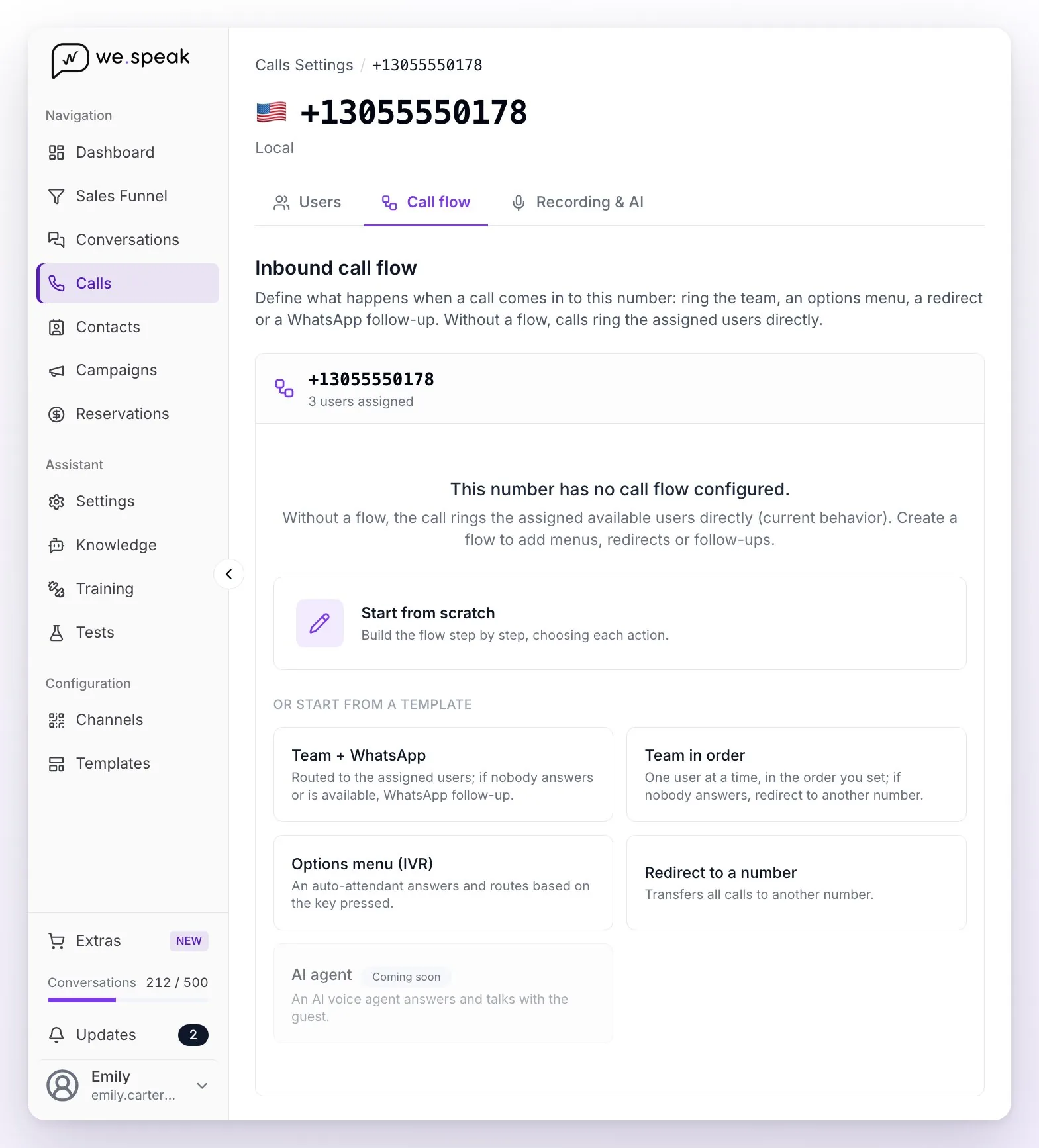
- Build the flow with Start from scratch or from a template, chaining actions (for example: rings the team → if nobody answers, redirect to another number). The editor works with cards: under "When a call comes in, it's handled by:" you choose the action and only then its fields appear.
- Review the plain-language summary the panel shows as you build the flow: it describes what will happen with each call.
- Check the Active toggle (at the top, next to the number: a new flow is already on) and click Save.
Each number has its Active toggle and you can Save or use Delete flow whenever you want. The Save button is enabled when there are changes and the flow is complete: if a field is missing in some branch, you'll see the notice "Some fields are missing to save the flow.".
ℹ️ The Active toggle lets you turn off a flow without deleting it: the number goes back to the default behavior (rings the assigned users) and you can reactivate it later exactly as it was.
💡 Typical example: "Ring Front Desk for 25 seconds → if they don't answer, redirect to my cellphone." Or: "Ring the team → if nobody answers, send a WhatsApp follow-up." A redirect is always the last step: once the call is transferred to another number, the flow ends there.
The templates
To avoid starting from scratch, you can start from a template and adjust it:
- Team + WhatsApp — rings your team; if they don't answer, it sends a WhatsApp follow-up.
- Team in order — rings one user at a time, in the order you define (it comes pre-filled with all the assigned users); if nobody answers, it redirects to another number.
- Options menu (IVR) — an auto-attendant answers and forwards based on the key.
- Redirect to a number — transfers all calls to another number.
- AI agent — shown as Coming soon and not selectable yet. In the meantime, the voice assistant joins any flow through the Let an AI agent answer action (see below).
The actions you can chain
| Action | What it does |
|---|---|
| A team member | Rings the assigned users who are available at that moment. With "How the team rings" you choose whether it rings everyone at once, in order or round robin (see the next section) and how many seconds each one rings (60 by default when everyone rings at once, 15 per user in order and round robin; always between 5 and 120). Right there you also configure the fallback action "If nobody is available or answers". |
| Options menu (IVR) | An auto-attendant says a message ("For reservations, press 1…") and forwards based on the key. You define the voice language and what happens if they press an invalid option or don't press anything. Each option can even open another menu (nested submenus). |
| Redirect to another number | Transfers the call to another external number, in international format (for example, +5491122334455). It's a final step: after the redirect, the flow ends. |
| Send WhatsApp follow-up | Sends a WhatsApp with an approved template to the number that called (for example, when nobody answered). Requires an active WhatsApp API connection. One single follow-up per call is sent. |
| Hang up | Ends the call, with an optional message that the auto-attendant reads before hanging up (for example, "Thanks for calling. We're outside business hours."). |
| Let an AI agent answer | Your AI voice assistant answers the call: it talks with the guest, quotes with real availability, can close the booking by sending the payment link and hands off to a person when needed. It's in beta and requires the assistant to be configured and active (see WeSpeak Voice). With "Set a plan B if the assistant can't answer" you choose what happens if the assistant can't take the call; without a plan B, it rings the assigned users. |
ℹ️ The editor is recursive: each menu option and each fallback action is configured with the same cards. You can nest a submenu inside an option or put a WhatsApp as the fallback for an unanswered menu. Not every action is available everywhere: the first step can be A team member, Options menu (IVR), Redirect to another number or Let an AI agent answer; a menu option accepts all six; and a fallback ("If nobody is available or answers", "If they press an invalid option or nothing") accepts Send WhatsApp follow-up, Redirect to another number, Let an AI agent answer or Hang up.
How the team rings: at once, in order or round robin
Inside the A team member action, the "How the team rings" field decides how the ring is spread across the available users:
- Everyone at once (the default) — every available user rings at the same time and the first to answer takes the call; it stops ringing for the rest on its own. With "Ring for" you define how many seconds it rings in total (60 by default). Optionally you can narrow the ring to some of the assigned users with "Choose which users ring".
- In order (cascade) — rings one user at a time, in the order you define: Reservations first, then the Front Desk, the manager last. With "Ring each user for" you define how many seconds each one gets (15 by default). If they don't answer, decline, are busy or don't have the panel open, the call moves to the next one instantly.
- Round robin — same as in order, but each new call starts with the next user in the list relative to whoever answered the previous one, so calls spread evenly. Anyone who was outside their hours, unavailable or on another call is skipped and doesn't lose their turn: it comes round to them on the next call anyway.
In order and round robin you also get the Ring order list: you tick who rings and sort the list with the arrows. It comes seeded with the users assigned to the number; unticking someone takes them out of this flow, not out of their assignments.
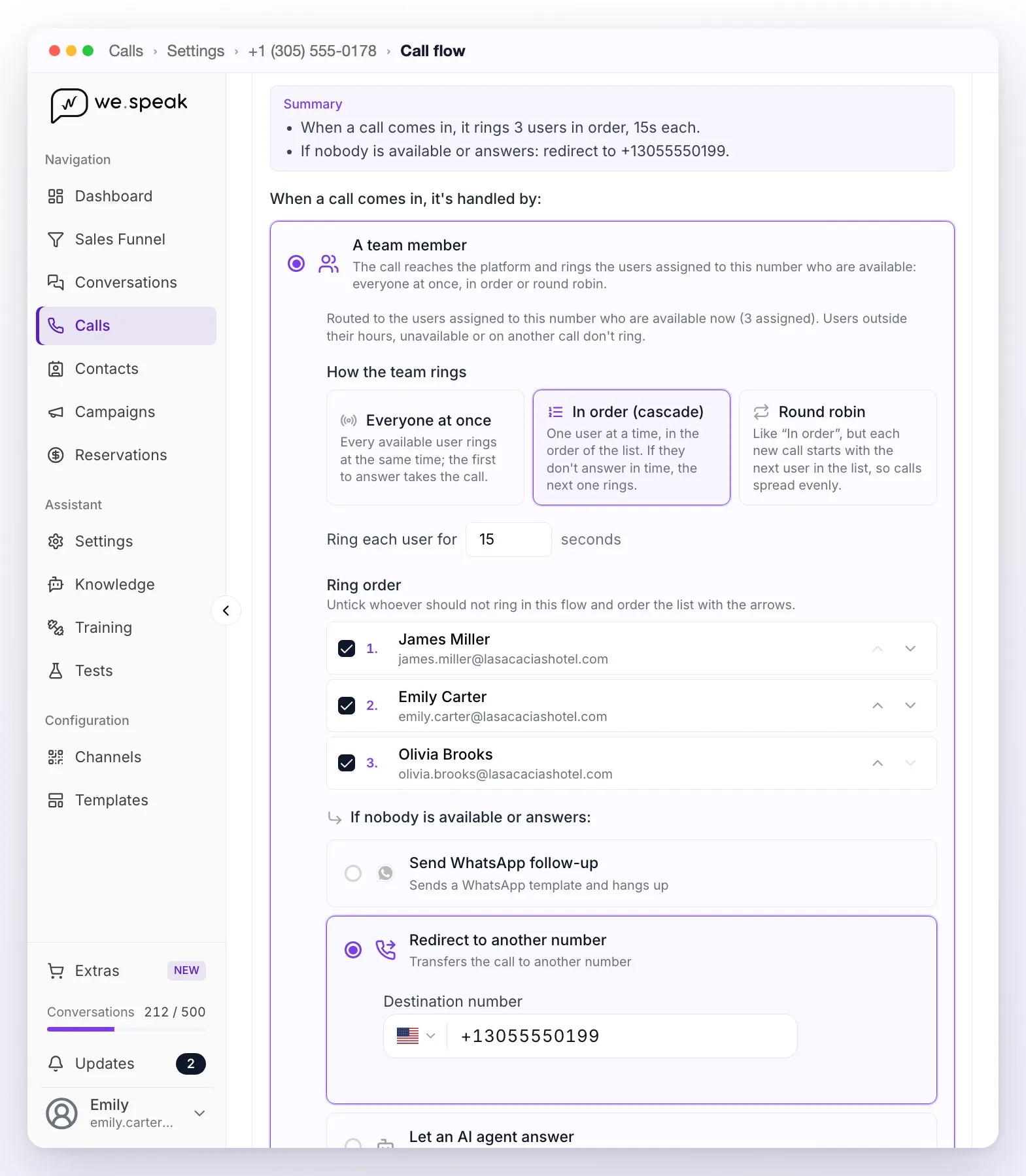
⚠️ Mind the total. In order and round robin the caller hears the ringback until someone answers or the list runs out — and calls tend to drop after about 2 minutes. The editor warns you when users × seconds goes over 120 seconds: trim the list or lower the seconds per user.
ℹ️ When the team changes: a user you assign to the number after saving the flow appears at the end of the Ring order but unticked — they don't ring until you include them, so review the flow every time someone new joins. And a user you unassign from the number stops ringing even if they were still ticked.
💡 Which one to pick. Everyone at once is the fastest for a small front desk. In order works when there's a clear priority of who should answer first. Round robin is for sales teams, where the calls — and the commissions — have to be split evenly.
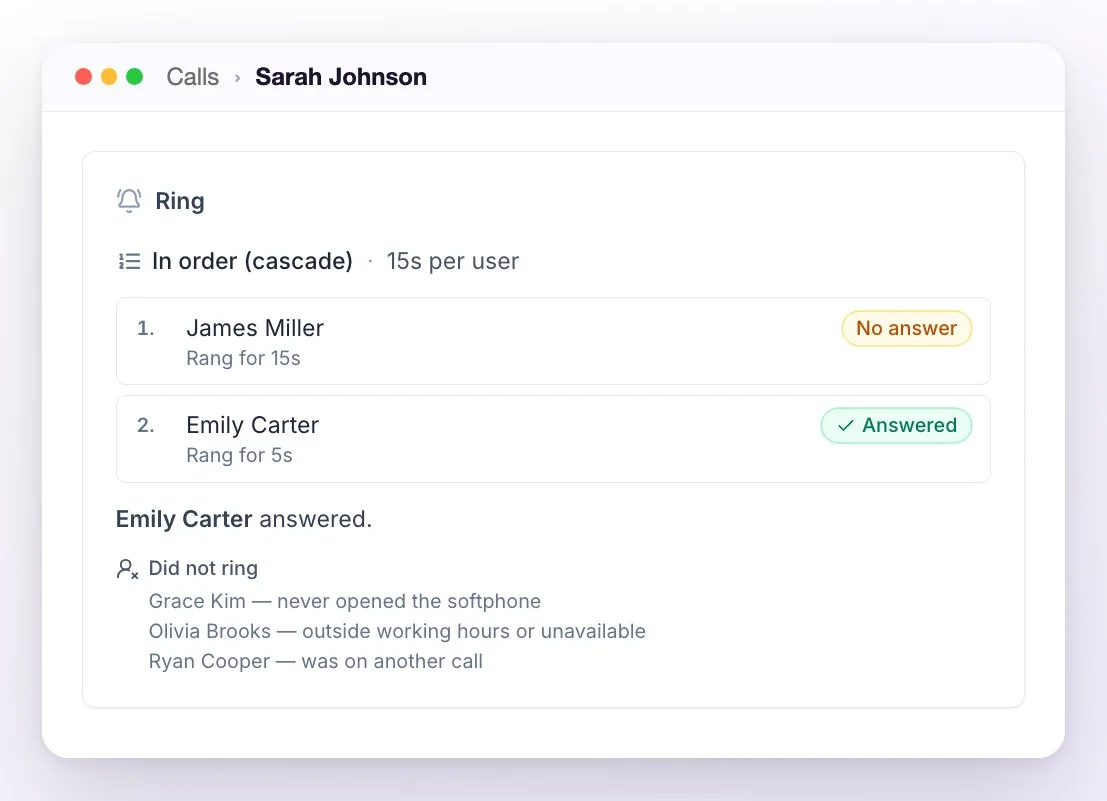
How to check it came out the way you expected. Each call's detail, in the Calls history, carries the Ring block: which strategy it rang with, who it rang and in what order, how long each one rang, who answered or declined, and who was skipped and why (outside working hours or unavailable, on another call, never opened the softphone, no longer assigned to the number or not in this flow's list). Someone with the panel closed is still tried: their attempt shows as No softphone and the call moves on to the next one. It's the fastest way to answer "why didn't it ring for me?".
The fallback: "if nobody is available or answers"
When the action is A team member, you define what happens if the call isn't answered. The system distinguishes two situations:
- Nobody available — no assigned user can answer at that moment (all outside their working hours or with their presence set to "unavailable"). In this case the call doesn't even ring: it goes straight to the fallback action.
- Nobody answers — the call rang for the configured seconds and nobody picked up. With in order and round robin this only happens once the whole list has run out, or when the last user left declined the call.
In both cases the action you define in the "If nobody is available or answers" branch is executed: redirect to another number, send a WhatsApp follow-up, hang up with a message or have the AI voice assistant answer.
Each user's availability is configured separately from the flow:
- Each user's working hours and time zone, from the team's user management.
- The presence (available / unavailable), which each user changes from their own profile.
A user outside their hours, or with their presence set to "unavailable", doesn't get the ring. This is how the classic setup works: during the day the team answers; outside hours, the call is forwarded, triggers a WhatsApp or is answered by the AI assistant automatically.
The options menu (IVR) in detail
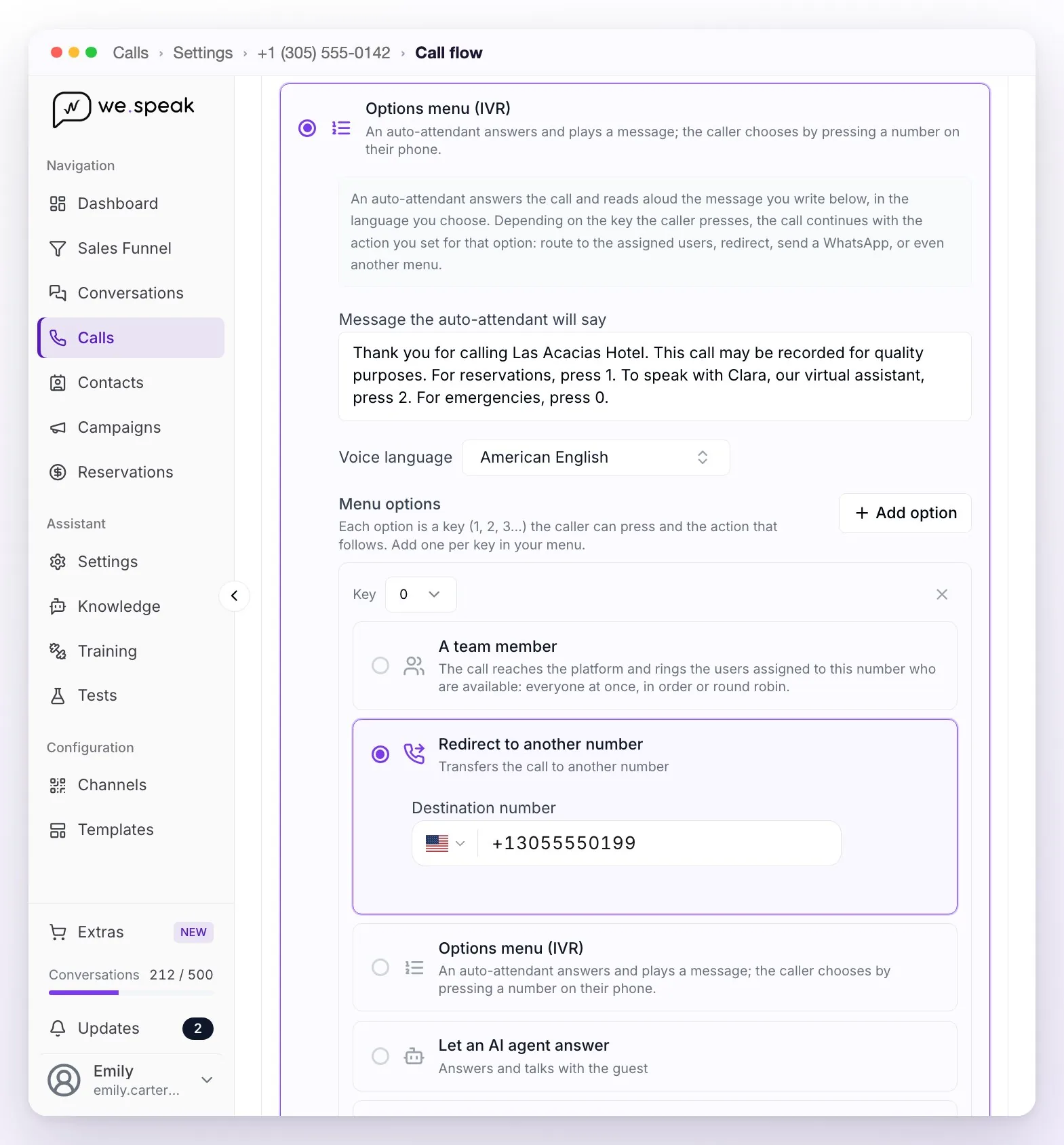
The menu answers with an auto-attendant that reads aloud the text you write and forwards based on the key the caller presses. Its fields:
- Message the auto-attendant will say — the text that's read (up to 3000 characters), for example "For reservations press 1, for the front desk press 2".
- Voice language — the language in which the auto-attendant reads that message, with a premium neural voice. Spanish (Mexico, US or Spain), Brazilian Portuguese and English (US, UK, Australia or India) have their own voice; by default the one matching your panel's language is preselected. The selector lists more languages, but those not on this list are read with the default voice: pick one of these.
- Menu options — one per key, added with Add option: digits 0 to 9 work, and also * and #, one key per option. Each option has its own action: ring the team, forward, send WhatsApp, end, have the AI agent answer or open another menu.
- If they press an invalid option or nothing — the fallback action for when they press a key that doesn't exist or don't respond in time.
ℹ️ Retries: if the caller doesn't press anything, the auto-attendant repeats the message up to 3 times before moving to the fallback branch. If they press a key that isn't among the options, the call continues down that same fallback branch.
💡 Each node that speaks (menus and goodbye messages) has its own voice language: new steps inherit the parent step's language and you can change it. This allows, for example, a bilingual menu where option 1 continues in Spanish and option 2 opens a submenu in English.
⚖️ Recording notice. If your country requires telling callers that calls are recorded (or asking for consent), the menu message is the place to do it: WeSpeak doesn't play an automatic notice, and under the terms and conditions that obligation is your business's.
The AI voice assistant inside the flow
The Let an AI agent answer action connects your voice assistant (configured once for the whole account, in Calls → Settings → Your voice assistant) to a number. You can use it in three ways:
- Direct answering: the assistant answers every call to that number.
- Menu option: "press 1 to talk to our assistant".
- Fallback: in the "if nobody is available or answers" branch — the team answers during working hours and the assistant covers nights and weekends.
The assistant answers 24/7, quotes with real availability, can close the booking by sending the payment link — over WhatsApp (QR connection, or API with the reservation-link template approved by Meta) or by email — and hands the call off to your team when needed (which is why it must have at least one transfer destination configured). It's in beta and its calls are paid with your Call credit: with no credit, it doesn't answer. An assistant that's active but not used by any flow doesn't answer anything. How to configure it and test it from the browser is in WeSpeak Voice.
Limits and behavior on failures
- Flow depth: you can nest actions and submenus up to 8 levels.
- One flow per number: each number connected to Calls has at most one flow, independent of the rest.
- Fail-safe: a disabled, incomplete or invalid flow never cuts a call. If something fails, the call automatically falls back to the default behavior: it rings the available assigned users.
- Validation when saving the WhatsApp: when saving a flow with Send WhatsApp follow-up, the panel checks that the template exists approved in one of your WhatsApp connections; if it doesn't exist in any, it won't let you save.
- If the WhatsApp can't be sent at the moment of the call (for example, the WhatsApp API connection disconnected after saving), that step is skipped and the call is logged as missed in the history — the flow doesn't retry the send.
- Redirects: the destination number must be in international format, with
+and country code. - Recordings: calls are recorded when a team member or the AI assistant answers them. The segments where only the auto-attendant speaks (menu, goodbye messages) don't generate their own recording.
What happens without a flow
A number without a flow keeps working as always: the call rings in the browser of all users assigned to that number, the first one to pick up answers and, if nobody answers, the call is logged as missed — visible in the history and as an unread conversation in Conversations, so you can call back with one click.
Requirements
- Have at least one active number connected to Calls (see Buy numbers) and Call credit to operate.
- Have users assigned to the number — without an assignment, nobody gets the ring.
- Each user must have WeSpeak open in the browser and the microphone permission granted: if they close the tab, new calls don't ring for them.
- The Send WhatsApp follow-up action requires an active WhatsApp API connection and an approved template.
- The Let an AI agent answer action requires the voice assistant to be configured and active.
Frequently asked questions
I set up the flow but the call still rings straight to the team.
Check two things: that the flow's Active toggle is on, and that you edited the flow of the correct number (each number has its own Call flow tab, and the number appears in the screen's title). A flow that's off or belongs to another number changes nothing.
Can I have a different menu depending on the time?
The case "during the day the team answers, at night something else" is built with the A team member action and its fallback: outside your users' working hours (or with their presence set to "unavailable"), the call goes straight to the "If nobody is available or answers" branch — that's where you put the forwarding, the WhatsApp, the nighttime closing message or the AI assistant.
Can I make calls ring one at a time, or spread them across the team?
Yes, both are picked in the same place: the A team member action, "How the team rings" field. In order (cascade) rings one at a time, in the list you define; Round robin does the same but starts each call with the next user in the list, to spread them evenly. The detail is in the How the team rings section.
I declined a call from the softphone and the caller kept hearing the ringback.
That's expected: Decline means "not me". If the number rings in order or round robin, the call moves to the next user in the list; if it was ringing everyone at once, it keeps ringing for the rest; and if nobody is left, the "if nobody is available or answers" branch runs. The call is only hung up when there's nobody left to pass it to.
If the call rings for several people and one answers, what do the others see?
When the number rings everyone at once, on everyone else's screens the call stops ringing instantly. If two people answer at the exact same time, the first one stays connected and the other's drops immediately; the history shows a single user as the one who answered.
Can the same number have two calls at once?
Yes — the number doesn't get "busy": two simultaneous calls to the same number ring for all the assigned users and can be answered by different users, each with its own record and recording. What one user can't do is answer two at once: while on a call, the second incoming one appears with a notice but without the answer button (a teammate can take it).
I have WeSpeak open in several tabs and the call rings in only one.
That's intentional: each user has a single line, and the most recently connected tab answers it. Work your calls from a single tab; if you close the one that was ringing, another open tab picks the line back up within a few seconds.
The WhatsApp follow-up didn't reach the caller.
Check that the WhatsApp API connection is still active and that the flow's template is still approved. The editor validates the template when saving, but if the connection drops afterward, that step is skipped (the call is logged as missed in the history).
I put the AI agent in the flow and it doesn't answer.
Check that the voice assistant is configured and active (Your voice assistant card in Calls → Settings), that the number's flow is Active and that the account has Call credit: with no balance, the assistant doesn't answer.
Can I announce in the menu that the call is recorded?
Yes, and it's the recommended way to do it: write the notice into the auto-attendant's message (for example, "This call may be recorded for quality purposes") before the options. WeSpeak doesn't play an automatic notice; determining whether your country requires it and giving it is your business's responsibility.
ℹ️ Note: there's no voicemail yet — an unanswered call is logged as missed (and you can cover it with a WhatsApp follow-up or with the AI assistant inside the flow).