Cancelling your subscription is requested from the panel, through a guided 6-step form. It is not an instant cancellation: it's a formal request that puts your decision on record, stops the charges and brings the team in to support you until the cutoff date. Until that date you keep using WeSpeak as usual.
⚠️ Cancellation is only requested from the platform. The Billing → Cancel subscription form is the only official channel and the only one that counts as a cancellation: it's what puts your request on record, sets the cutoff date and stops the charges. A heads-up by email, WhatsApp or phone doesn't count as a cancellation request — not even if you mention it to your Account Manager, to support or to your sales advisor. Until you submit the form, your subscription stays active and renews as normal.
Cancellation or guarantee? Which one applies to you
It depends on whether your plan includes the Money-Back Guarantee — the annual plan does, also when it's paid in instalments or by bank transfer — and on how many days into your plan you are. In Billing you always see a single button, the one that applies to your case:
| Your situation | The button you see | What happens |
|---|---|---|
| Plan without the guarantee (for example, monthly) | Cancel subscription, as long as the subscription is active | The cancellation in this guide: it's processed on your next expiration date and doesn't refund any money |
| Plan with the guarantee, days 1 to 30 | Request Guarantee (the cancellation button doesn't appear) | You ask for a refund of 100% of what you paid for the subscription for any reason, with nothing to justify, and that same request already registers your cancellation: there's no other form to submit. Details in Guarantee request |
| Plan with the guarantee, days 31 to 60 | Request Guarantee (the cancellation button doesn't appear) | The refund is only approved with verified technical failures of the tool: at least five incidents reported in writing to support, an audit and board authorization. The assistant not replying the way you want doesn't count. If no refund applies, the request still stands as a cancellation request and follows the process in this guide |
| Plan with the guarantee, day 61 onwards | Cancel subscription | The guarantee has expired: the cancellation in this guide applies, on your next expiration date and without a refund |
In both cases the subscription ends up in the same place: charging stops, Billing shows the Cancellation request label with your expiration date, you keep full access until that date and your Account Manager contacts you. The difference is what happens to your money.
Before you start
| Detail | What to know |
|---|---|
| Where to request it | Billing → Cancel subscription ("Request cancellation of your current plan") |
| Who can request it | Only the Administrator role. Supervisor and Operator don't see the button |
| When the button appears | Only if your subscription is Active or In trial and the guarantee doesn't apply: if your plan includes it and is within its first 60 days, you'll see Request Guarantee instead. If a request is already registered (cancellation or guarantee), the account is in negotiation or there's a pending payment, no button is shown |
| Only valid channel | The form in the platform. A request by email, WhatsApp or phone doesn't count as a cancellation and doesn't stop the billing |
| Cutoff date | Your next expiration date — the form shows it to you from the very first step |
| Notice period | As per the terms and conditions, cancellation is notified 30 days in advance, and the 3-month minimum term from the start of the implementation applies |
| Money-back guarantee | If your plan includes it (the annual plan), during its first 60 days the button you'll see is Request Guarantee instead of this one, and that request registers the cancellation at the same time. Within the first 30 days it refunds 100% of what you paid for the subscription, for any reason, and releases you from the minimum term; between day 31 and 60, only with verified technical failures. A regular cancellation doesn't refund any money. How it works in Guarantee request |
💡 Before cancelling, talk to your Account Manager. Many situations get solved without closing the account: adjusting the plan, reviewing the assistant's setup, picking the implementation back up or arranging a pause. And if your plan includes the Money-Back Guarantee — the annual plan —, during its first 60 days you won't see this form but the Request Guarantee button instead: it's the way to ask for your money back (100% of what you paid for the subscription within the first 30 days, released from the minimum term) and, at the same time, it registers your cancellation. How it works, deadlines and step by step in Guarantee request.
How to request it, step by step
How to reach the form
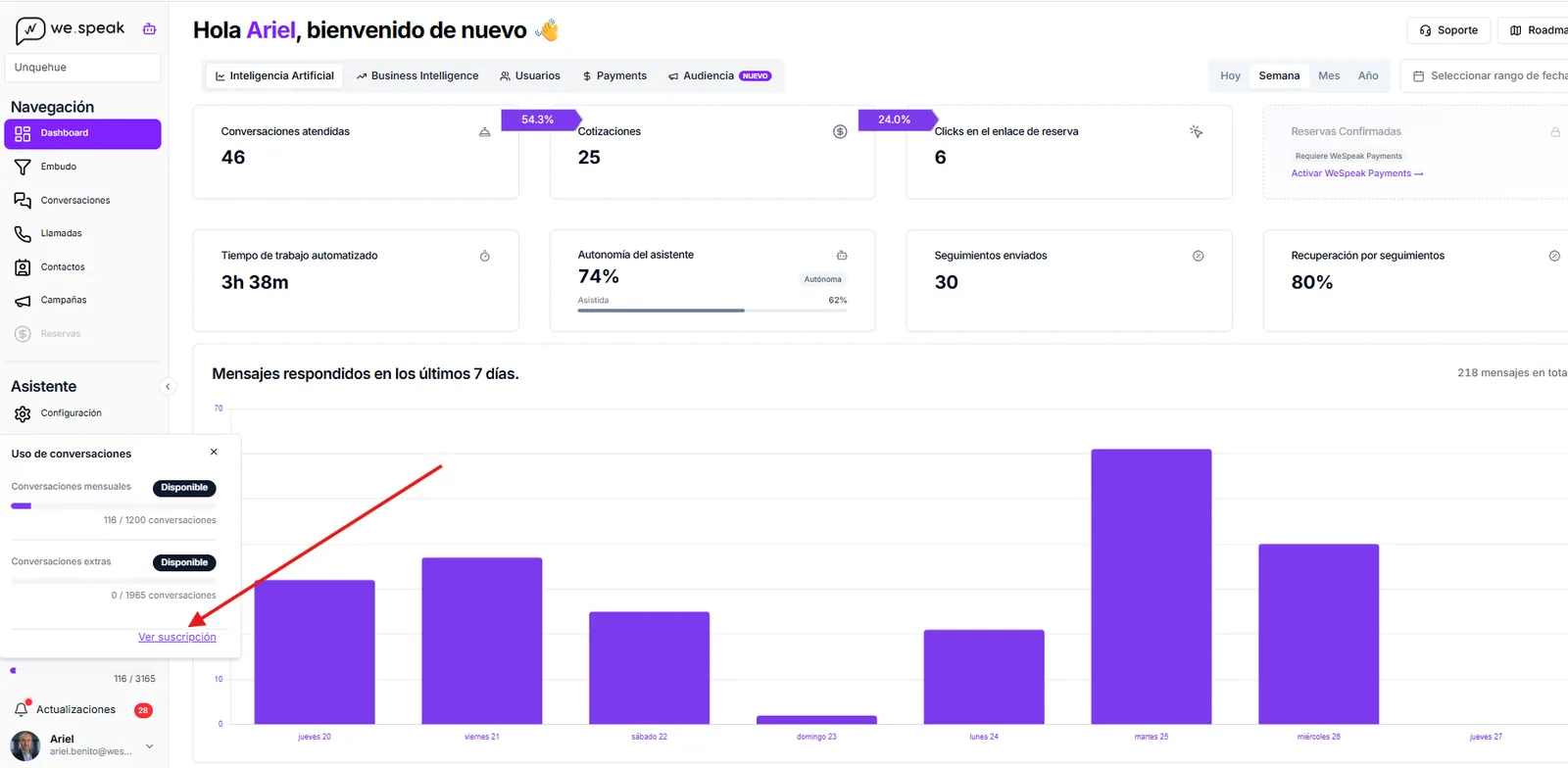
From the Dashboard, open the Conversation Usage panel (bottom left) and click View subscription. You can also get there through Billing, in the sidebar.
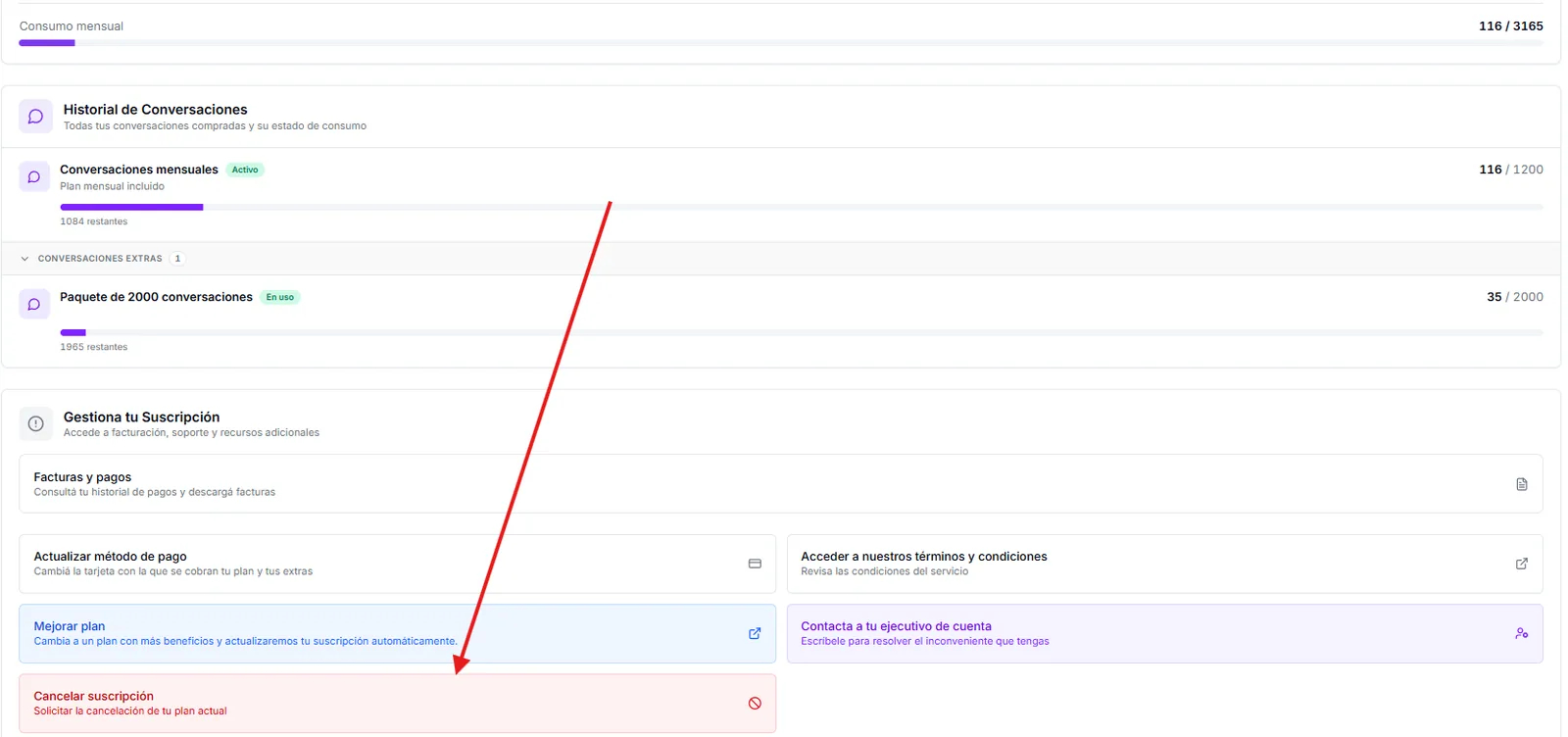
Scroll down to the Manage Your Subscription block and click Cancel subscription — "Request cancellation of your current plan". The Cancellation Request window opens, with a progress bar and the 6 numbered steps.
The 6 steps of the form
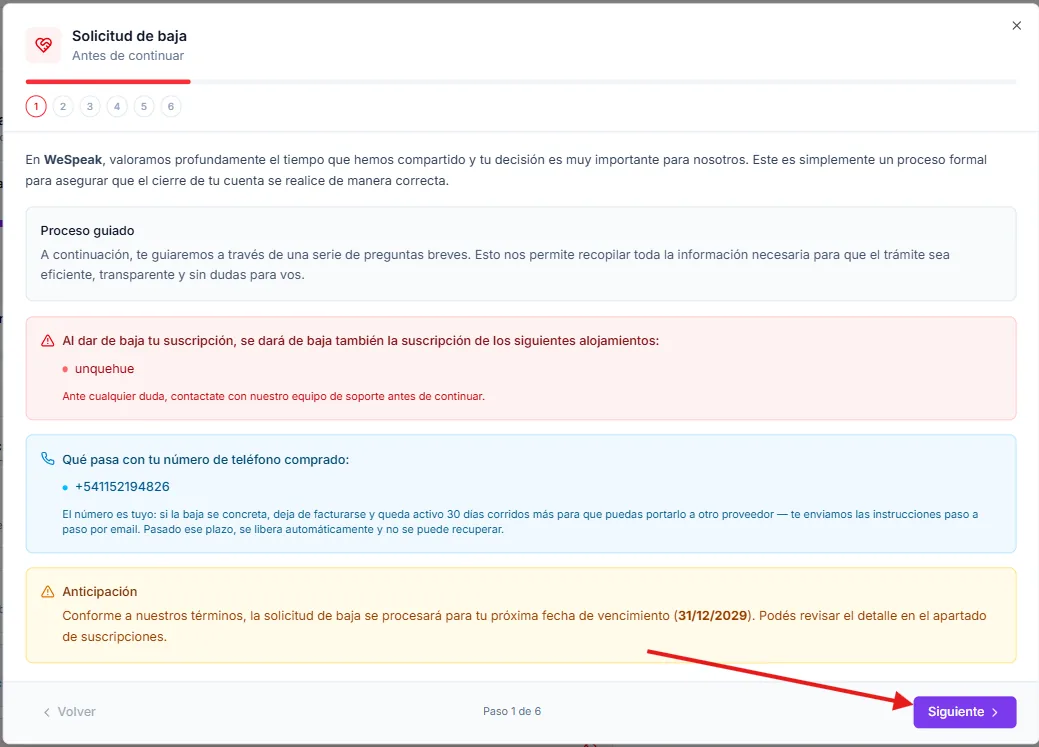
Before you continue. Information only: how the process works, the cutoff date that applies to your subscription, the properties that will be cancelled along with yours, and what happens to your purchased phone numbers, if you have any — they stay active for 30 days so you can port them. Read it through and click Next.
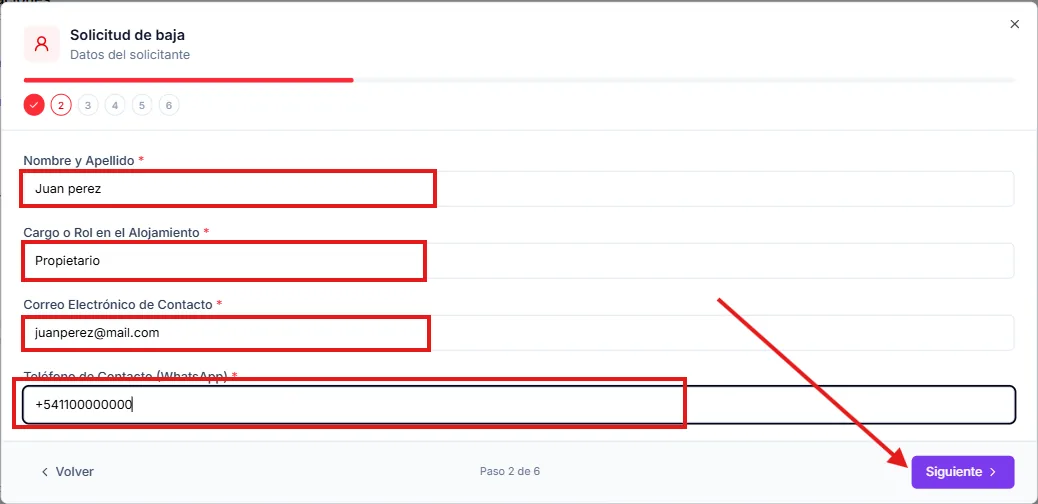
Requester details. Full name, role at the property, contact email and WhatsApp phone. All four are required.
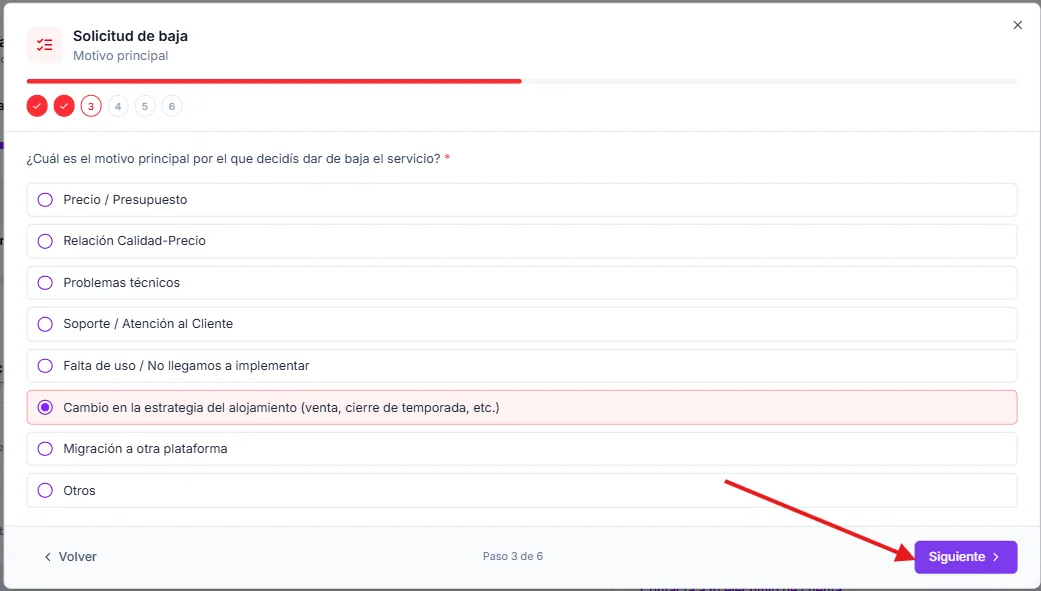
Main reason. You pick one option: Price / Budget · Value for Money · Technical issues · Support / Customer Service · Lack of use / We never fully implemented it · Change in property strategy · Migration to another platform · Other. If you choose Other, a field opens up to describe it.
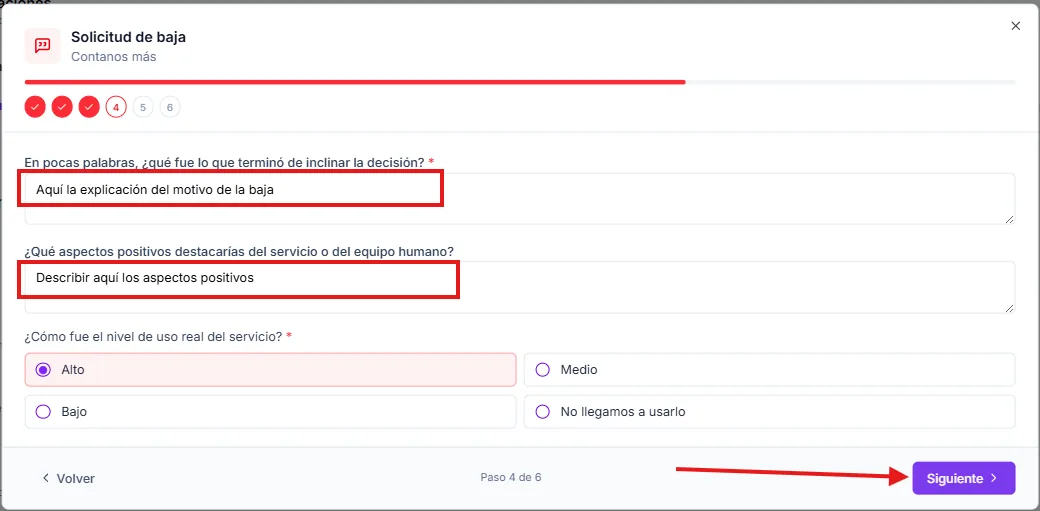
Tell us more. What the tipping point for the decision was (required), which positive aspects of the service or the team you'd highlight (optional) and your actual usage level of the service: High, Medium, Low or "We never really used it".
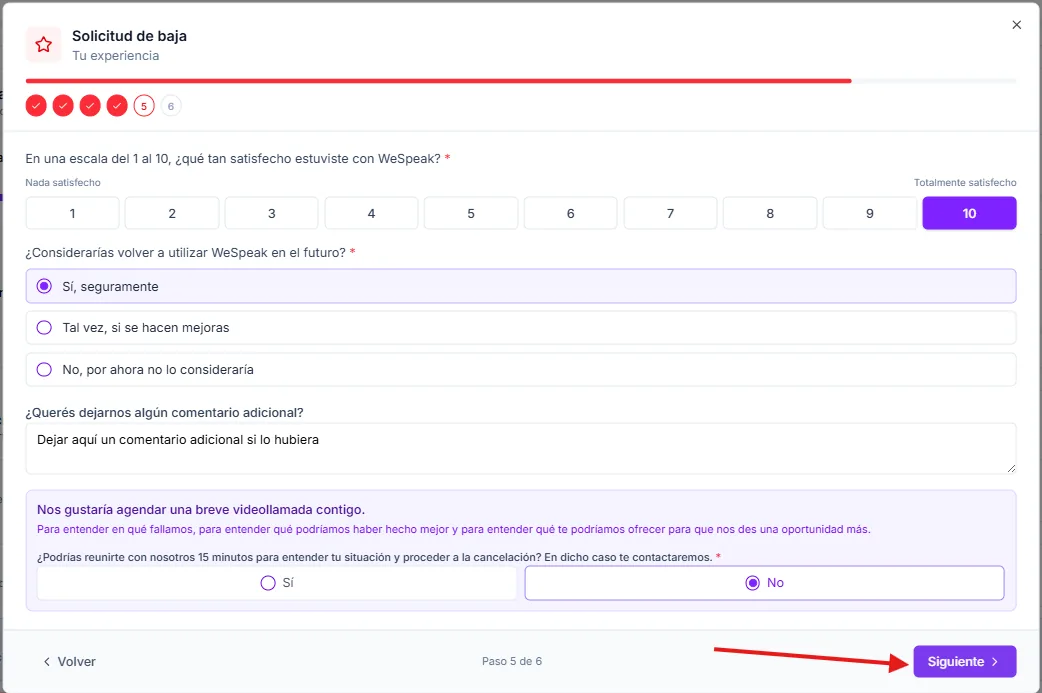
Your experience. Your satisfaction from 1 to 10, whether you'd use WeSpeak again, a free comment (optional) and whether you accept a 15-minute video call with the team. If you say yes, we reach out to you.
Final confirmation. Check that the details are correct and tick the three required checkboxes: the cutoff date, that your social channels (WhatsApp, Facebook, Instagram) get disconnected on that date, and that your access to the platform will be limited from then on. With all three ticked, Submit request is enabled.
You can move between steps with Back and Next: until you press Submit request on step 6, nothing is registered. If you close the window before submitting, the form is discarded and you have to start over.
The screenshots are for illustration only: the data shown in them is sample data.
Once it goes through, you'll see the "We received your request" screen, with the date until which your account stays active.
What happens as soon as you submit it
- Charging stops. No new subscription charge is generated, and you'll no longer get the renewal or bank-transfer payment reminders.
- Your subscription status changes. In Billing the Cancellation request label appears, along with the notice "We received your cancellation request — your account will remain active until the expiration date", with the cutoff date in plain sight.
- You get a confirmation email with the date until which your access is guaranteed and the name of your Account Manager. It's sent to whoever filled in the form and to the company contacts linked to the properties of that subscription.
- The team contacts you. The request opens an internal alert the same day so your Account Manager can reach out, clear up any doubts about the closing or propose an alternative if there is one.
- You keep working as usual. Until the cutoff date you retain full access: the assistant replies, the channels stay connected and your team logs into the panel normally.
What happens on the cutoff date
- The channels get disconnected: WhatsApp, Facebook, Instagram, the connected email and the integrations with your PMS (Cloudbeds, for example). The assistant stops replying.
- Access to the panel becomes limited: when you log in you'll see the "Account cancelled" screen, with shortcuts to Billing and to your company details, plus the buttons to contact support by WhatsApp or email.
- The modules and extras you contracted are cancelled along with the subscription.
- Your data isn't deleted when the account closes: the knowledge you loaded, the history and the contacts are kept, so a future reactivation doesn't start from scratch. Even so, export whatever you need to keep at hand beforehand (contacts, reports), because after the cutoff date you won't be able to do it from the panel.
What happens to…
Your WhatsApp number.
It's yours and it stays in your Meta Business account. On the cutoff date it gets disconnected from WeSpeak; you can keep using it wherever you want. To move it to the WhatsApp app, you first have to free it up from the API in Meta: see Disconnect WhatsApp API and free up your number.
Your WeSpeak Voice number (calls).
It's yours too. Once the cancellation goes through it stops being billed and stays active for 30 more calendar days so you can port it to another provider: we email you the step-by-step instructions and reminders as the deadline gets closer. After that window it's released automatically and can't be recovered. Porting is started by the operator receiving the number, so it's best to kick off the process as soon as the cancellation is confirmed — the Voice service terms ask you to tell us in writing what you want to do within the following 10 business days.
The other properties on your account.
If your subscription includes several, all of them are cancelled. Step 1 of the form lists them by name so there are no surprises: if your intention was to cancel only one of them, don't submit the form and arrange it with your Account Manager first.
Unused balance.
If you have extra conversations, call credits or service hours left unused, check with your Account Manager before the cutoff date.
If you change your mind
The request isn't irreversible: as long as the cutoff date hasn't arrived, write to your Account Manager or to soporte@wespeak.pro and we'll review it with you.
- If you agree to carry on, your account first moves to In negotiation — you keep your access while you talk it through — and then goes back to active. In the panel you'll see the notice "Your account is in negotiation".
- Keep two things in mind about coming back: the channels that had already been disconnected have to be reconnected manually from your panel (WhatsApp, Facebook, Instagram, email, PMS), and charging is reactivated with the finance team, not on its own.
- If the account stays in negotiation and no agreement is reached, 30 days after the expiration date it's closed due to non-payment.
- After the cutoff date it can still be reactivated, but that's already a reactivation process: write to soporte@wespeak.pro or use the contact buttons on the "Account cancelled" screen.
Frequently asked questions
I can't see the "Cancel subscription" button.
It's down to one of three reasons: your plan includes the money-back guarantee and is within its first 60 days (in that case the button you see is Request Guarantee, which is the right one and registers the cancellation too); your user isn't an Administrator (Supervisor and Operator can't request the cancellation — check it in Team); or your subscription isn't active right now (there's already a request registered, it's in negotiation or it has a pending payment). In that last case, write to soporte@wespeak.pro so they can help get the account ready for you to complete the process from the panel.
I told you by WhatsApp or email that I wanted to cancel, is that enough?
No. No notice by email, WhatsApp or phone counts as a cancellation request, not even if you told your Account Manager or support: the only official way is to submit the form from Billing → Cancel subscription. Until you submit it, the subscription stays active, renews and keeps being billed. If you can't get into the panel or the button doesn't show up, write to soporte@wespeak.pro and we'll help you complete it from the platform.
Is the cancellation immediate?
No. It's processed for your next expiration date, and you keep full access until that day.
Will I still be charged after submitting it?
No. Once the request is registered, subscription charging stops. If you still get a charge or renewal notice, write to finanzas@wespeak.pro.
Can I cancel just one of my properties?
Not with this form: it cancels the whole subscription, with every property listed in step 1. For a partial cancellation, talk to your Account Manager.
I already submitted the request and I want to correct something.
Reply to the confirmation email or write to soporte@wespeak.pro: the request is recorded with what you entered, and the team updates it with you.
Do I lose my WhatsApp number when I cancel?
No. The number is yours (it lives in your Meta Business); it's only disconnected from WeSpeak.
I'm on the annual plan with the guarantee: do I request the guarantee or the cancellation?
It depends on how many days into your plan you are. During the first 60 days you don't have to choose: in Billing you'll only see Request Guarantee, and that request registers the cancellation and, where it applies, the refund (100% of what you paid for the subscription within the first 30 days, for any reason; between day 31 and 60, only with verified technical failures: at least five incidents reported in writing to support, an audit and board authorization). It's also requested from the platform (not by email or WhatsApp). From day 61 the guarantee has expired and the button you'll see is Cancel subscription: the cancellation in this guide, on your next expiration date and without a refund. All the details in Guarantee request.