Everything about your plan lives in Subscriptions, the panel's billing page: at the bottom left, click your name and choose it (the browser tab shows it as Billing). Only the Administrator role sees it. That's where your usage for the month, the subscription status, the invoices and the access to buying extras are.
Where do I do each thing
A quick map of where each task on your account is handled:
| I want to… | Where |
|---|---|
| See my payments and download the invoices | Subscriptions → Invoices and payments. Details in Invoices and billing email |
| See how many conversations I've used | Subscriptions → Subscription Plan (Monthly usage bar) |
| See my plan and my next expiration | Subscriptions → Subscription Plan |
| Change my card | Subscriptions → Update payment method (Stripe's secure portal) |
| Upgrade my plan | Subscriptions → Upgrade plan (available on card plans) |
| Buy conversations or add modules | Buy extras, which takes you to Extras (only the Administrator can buy) |
| Request cancellation | Subscriptions → Cancel subscription (Cancellation request form) |
| Change the email that receives the payment notices | Company → Tax and Billing Information → Billing email |
| See and update my tax details | Company → Tax and Billing Information (company name, tax ID, fiscal address, country and zip code). To correct invoices already issued, write to finanzas@wespeak.pro |
What counts as "a conversation"
Your plan includes a number of conversations per month (for example, 1000). The rule is simple and works in your favor:
- 1 conversation = 1 contact handled by the assistant in the calendar month, no matter how many messages are exchanged. If a guest writes to you 40 times in the month, it consumes one single conversation.
- The counter resets to zero on the 1st of each month (in your time zone).
- Automatic follow-ups don't add extra usage: they're part of the conversation already counted.
Your usage, live
In Subscriptions you see:
- Subscription Plan — the Amount, the Frequency, the Next expiration and the Monthly usage bar: how many conversations you've used out of your total.
- Status — your subscription's label:
| Status | What it means |
|---|---|
| Active | Everything working. |
| Payment pending | There's a charge to settle (see If a charge fails, below). |
| No credits | The available conversations ran out. |
| Cancellation request | You requested cancellation: the account stays active until the expiration date. |
| In negotiation | You're working things out with WeSpeak; if it isn't settled, the account is canceled due to non-payment 30 days after the expiration date. |
| Canceled / Canceled due to non-payment | The subscription ended. |
- Conversation history — your included monthly plan and, if you bought packs, the extra conversations and how many are left. Each pack has its status: In use (being consumed), Active (on standby, not yet used), Depleted or Consumed.
💡 Automatic notices: if your account has a strict limit, we notify you when you reach 80%, 95% and 100% of usage — by email, with the direct link to top up. They go to the billing email and to the emails that have Conversation limit checked in Notifications.
Running short? Buy extra conversations
With Buy extras (top right in Subscriptions) you go to the Extras section, where you buy conversation packs. Packs are paid online, have no expiration and are stackable, and are consumed only when you run out of your plan's monthly allowance — what you don't use carries over to the next month. When buying it you can set up automatic repurchase: when the balance drops below the threshold you choose (10%, 5% or 1%), it buys again on its own, so the assistant never stops for lack of conversations.
Your plan and the invoices
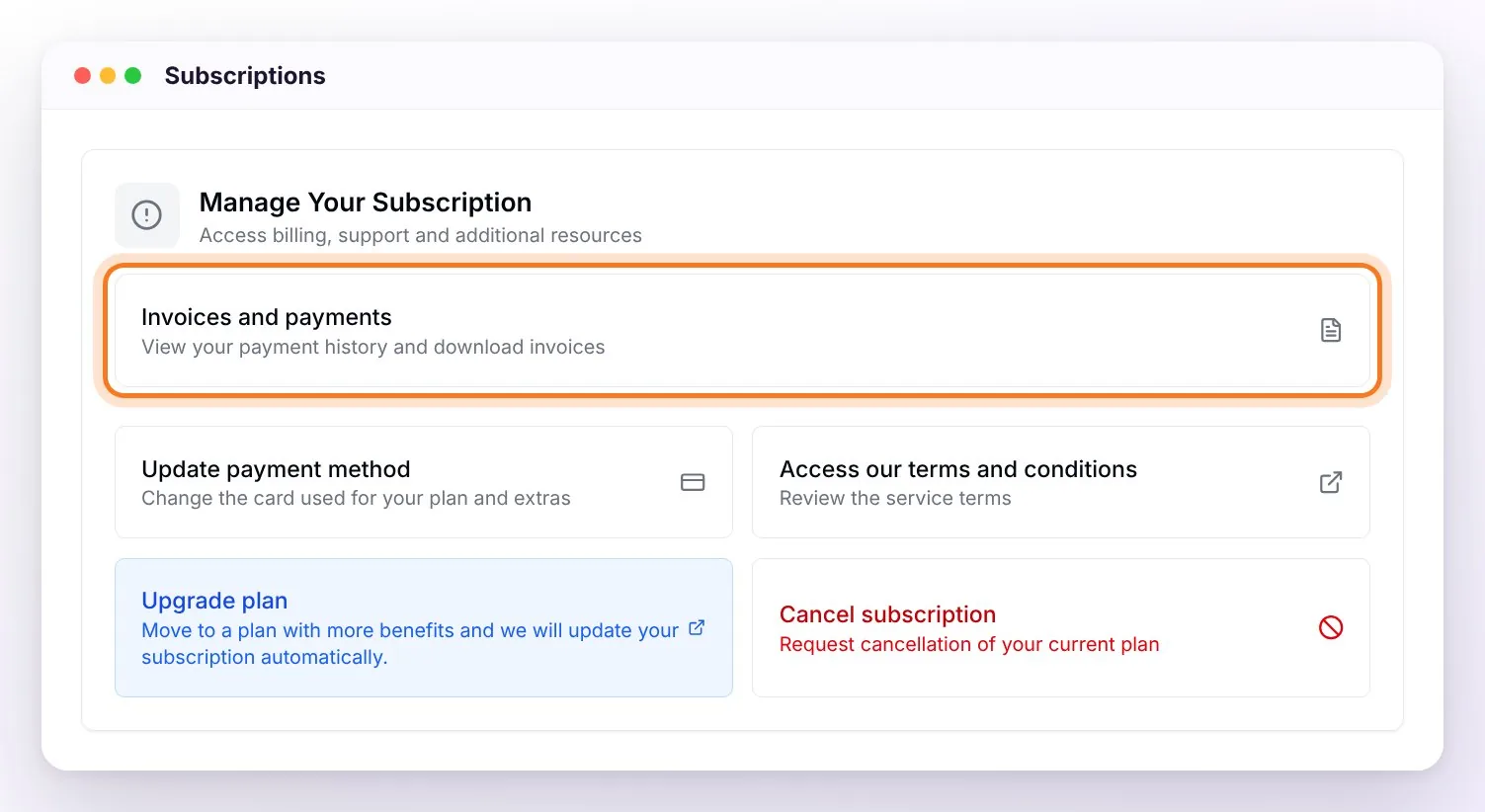
- In Subscription Plan you see your plan's frequency (Monthly, Semiannual or Annual), the amount and the next expiration. With Upgrade plan you move up a plan.
- In Manage Your Subscription → Invoices and payments is each payment with its date, reference, type (subscription or extra), status (Paid, Pending, Failed, Refunded) and amount — with View to open and download the invoice and Pay if there's something pending. The list shows the 12 most recent payments; ask finanzas@wespeak.pro for older invoices.
- With Update payment method (Stripe's secure portal) you change the card your plan and extras are charged to.
- Payment notices go to your company's billing email, which you change in Company. All the details — who sees the invoices, how to add the person in accounting — in Invoices and billing email.
How your plan is charged
- By card: the plan is charged automatically on each due date (monthly, semiannual or annual). When the charge goes through, the invoice shows up in Invoices and payments. If it fails, it's retried automatically and we notify you (see below).
- By bank transfer (available on the annual plan): you get a reminder 10 days before the due date and, once the payment is recorded, a confirmation email. For any question, write to finanzas@wespeak.pro.
If a charge fails
The service isn't cut off immediately — there's a grace period with clear notices:
- As soon as a card charge fails, a payment problem email reaches the billing email, the payment shows as Failed in Invoices and payments, and a yellow notice appears at the top of the panel: "Problem with your payment method" with the Pay now button (which takes you to Invoices and payments). The charge is retried automatically: if it goes through, the subscription goes back to Active without you doing anything. If you pay by transfer, the notice is "Subscription payment pending", with the finance contact.
- If more than 5 days pass after the due date, the notice turns red — Payment Pending — with the estimated suspension date: 10 days after the due date.
- 7 and 9 days after the due date you get reminders by email (your subscription has expired).
- If the account gets suspended (10 days after the due date), the subscription becomes Canceled due to non-payment: the assistant stops responding, the channels are disconnected and the panel shows the suspended account page. Once the payment is recorded, the subscription goes back to Active automatically; just keep in mind that the channels (WhatsApp, Instagram, Facebook, PMS) have to be reconnected from your panel.
Renewal, pause and cancellation
- Renewal:
- Monthly plan by card: it's charged automatically on each due date, with no email beforehand. The invoice stays in Invoices and payments.
- Annual and semiannual plans: you get a reminder by email 30 days before the due date.
- Bank transfer payment: the reminder arrives 10 days before, with the instructions to pay.
- Can the subscription be paused? There's no "pause" as such — to evaluate it, write directly to your Account Manager by email. If it's agreed, your account is kept with everything configured (knowledge, history, contacts) to resume it later. Canceling doesn't erase your data either.
- Cancellation: it's requested from Subscriptions with Cancel subscription, which opens the Cancellation request form. The cancellation is processed on your next due date: meanwhile the subscription shows as Cancellation request, you keep access until the end of the period already paid, and the WeSpeak team will contact you to accompany the closing (or find an alternative). After the cutoff date, access is closed and the contracted modules are canceled. Details in Cancellation request.
- Guarantee: if your plan includes the Money-Back Guarantee (for example, the annual plan), within the first 30 days you can request a refund of 100% of what you paid for the subscription with the Request Guarantee button in Subscriptions (while the guarantee is in force, that button appears instead of Cancel subscription). It's requested only from the platform. Details in Guarantee request.
- WeSpeak Voice number: if you have a number, after the cutoff date it stops being billed and stays active for 30 calendar days so you can port it to another provider — we email you the deadline and reminders; the terms ask you to tell us in writing, within the following 10 business days, whether you want to port it or release it. After that window it's released and can't be recovered. Details in Cancellation request.
Frequently asked questions
How do I save conversations?
Remember that individual messages don't count: only the distinct contacts of the month. Usage goes down by filtering the origin of your chats (for example, avoiding campaigns to cold lists) — not by cutting off already open conversations, which are already counted.
A notice to renew appears, does the service get cut off?
Not immediately: the notice arrives before the due date and you have a grace period. Sort it out from Pay now or reply to the renewal email.
I can't find an invoice.
The Invoices and payments list shows the last 12 payments. If the invoice you're looking for is older or doesn't show up, write to finanzas@wespeak.pro with your account's company name and the invoice's month.
The invoices don't reach me by email.
The invoices are always in Subscriptions → Invoices and payments. Payment notices go to the billing email: check which one it is in Settings → Notifications (the row with the padlock) and, if needed, change it in Company. Details in Invoices and billing email.
Who can see the invoices?
Only users with the Administrator role. If the person who handles payments has no access, an Administrator invites them from Team with that role.
Where do I request an invoice with my tax details?
Enter or correct your details in Company → Tax and Billing Information before the next charge: the following invoices are issued with them. To correct an invoice already issued, write to finanzas@wespeak.pro.
I paid and it still shows me as suspended.
Write to finanzas@wespeak.pro with the receipt — it's reviewed and reactivated promptly.
If I cancel, do I lose my WhatsApp number?
No: your number is yours (it's in your Meta Business). When the account is closed it's disconnected from WeSpeak and you can keep using it wherever you want.