A virtual number is a phone number that lives in the cloud: it needs no physical line or SIM, and your team answers it from the browser. You can have several (for example, one for Reservations and another for Front Desk). The number is the door into WeSpeak Voice: once it's active, the whole Calls module is enabled. And the same number also works as your WhatsApp Business (API) number.
ℹ️ Numbers are bought from the Extras section of your panel. If you don't see it yet, check with your WeSpeak advisor.
In this article
- What's included and what it costs
- Step by step
- Number types
- Number statuses
- The notices you'll receive (and why they matter)
- About the documentation
- Your numbers in Extras
- Disconnecting or cancelling a number
- Frequently asked questions
What's included and what it costs
- One-time setup fee + subscription: when you buy, you pay a setup fee (equivalent to one month) and a subscription billed together with your WeSpeak plan, on the same cycle (monthly, semi-annual or annual) and prorated to it. The last step of the purchase (Purchase summary) shows you the setup fee, the subscription and the estimated total today before paying; your card is charged and the number is only requested from the carrier once the payment is confirmed. Numbers have a fixed price per country, with no annual-plan discount; the only exception is a benefit WeSpeak may have granted your account, shown next to the number's price as "Benefit −X% · first invoice": it discounts the first invoice only (setup fee + first period) and renewals are at list price.
- Admins only: only the account's admin profiles (the Administrator role) can buy and cancel numbers.
- Test calls: if you haven't topped up Call credit yet, a newly activated number includes 5 inbound test calls (only answered ones count; outbound calls stay disabled and the AI assistant doesn't answer these calls). Once they run out, further inbound calls are rejected until you top up credit; and once your account loads credit for the first time, test calls no longer apply.
- Usage is paid separately, with Call credit: a prepaid balance in USD from which traffic, recording, transcription and the AI assistant are debited. The details are in WeSpeak Voice → How you pay and you can estimate your monthly spend in the WeSpeak Voice calculator.
Step by step
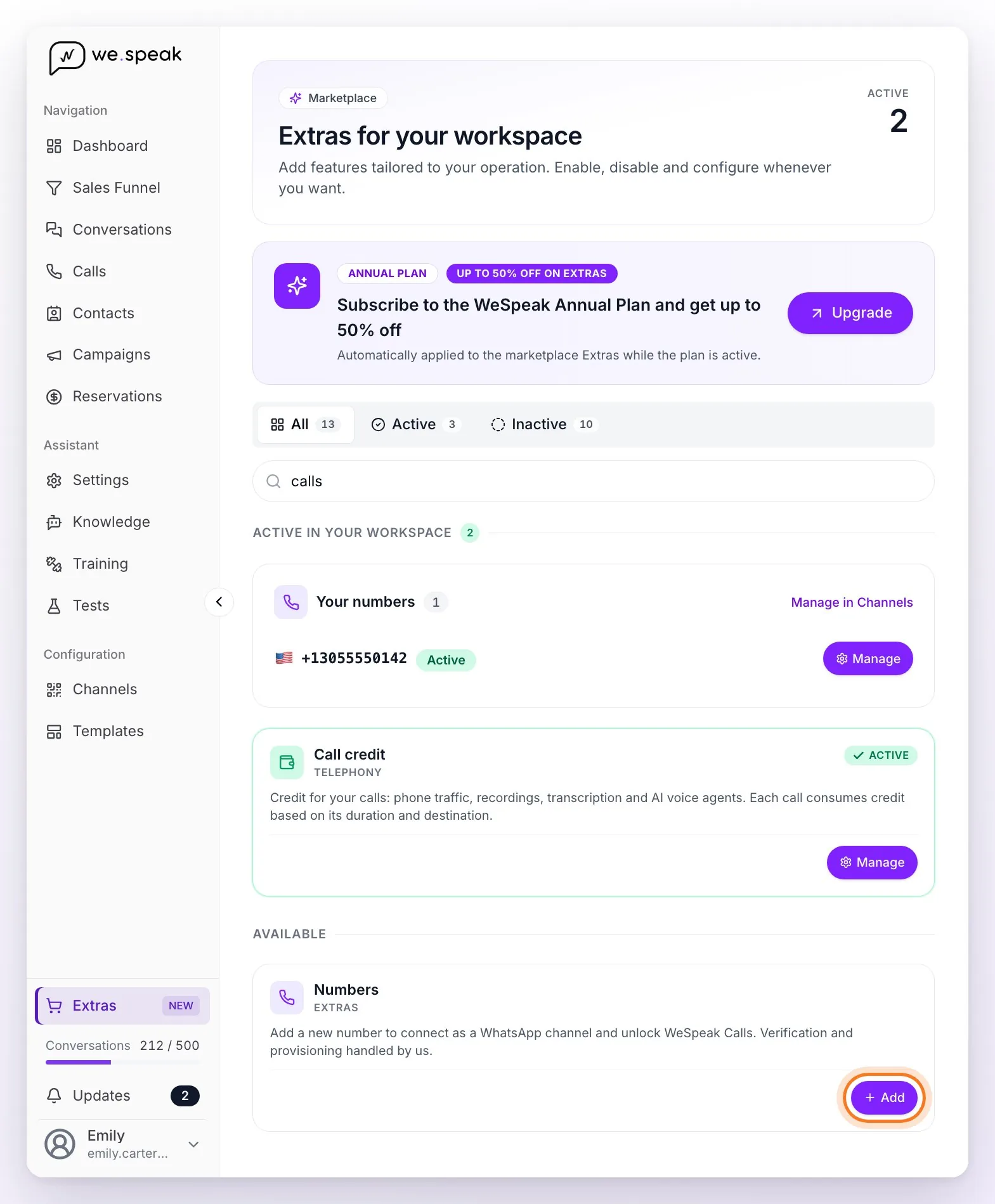
Go to Extras and, on the Numbers card, click Add. A panel opens with what the number includes: click Continue to go to the search. The purchase then goes through three screens of that same panel: Add a new number (search), Confirm your number (requirements) and Purchase summary.
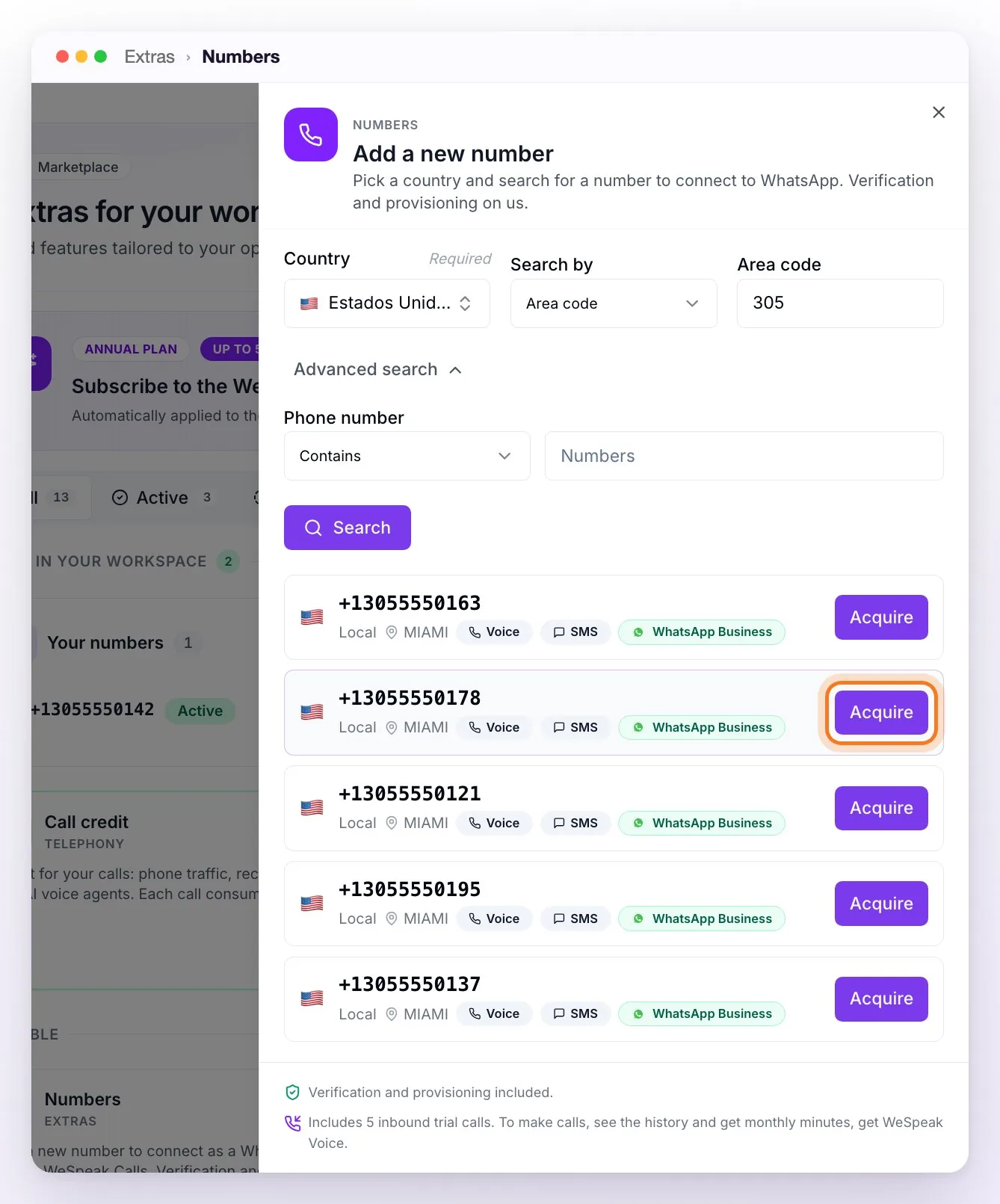
Search: choose the country and search by area code, city / region or state / province (Search by); with the advanced search you can request a number that contains, starts with or ends with certain digits. Only numbers available to activate at that moment are shown; each row shows its type, region and capabilities (Voice, SMS, WhatsApp Business). Click Acquire on the one you want.
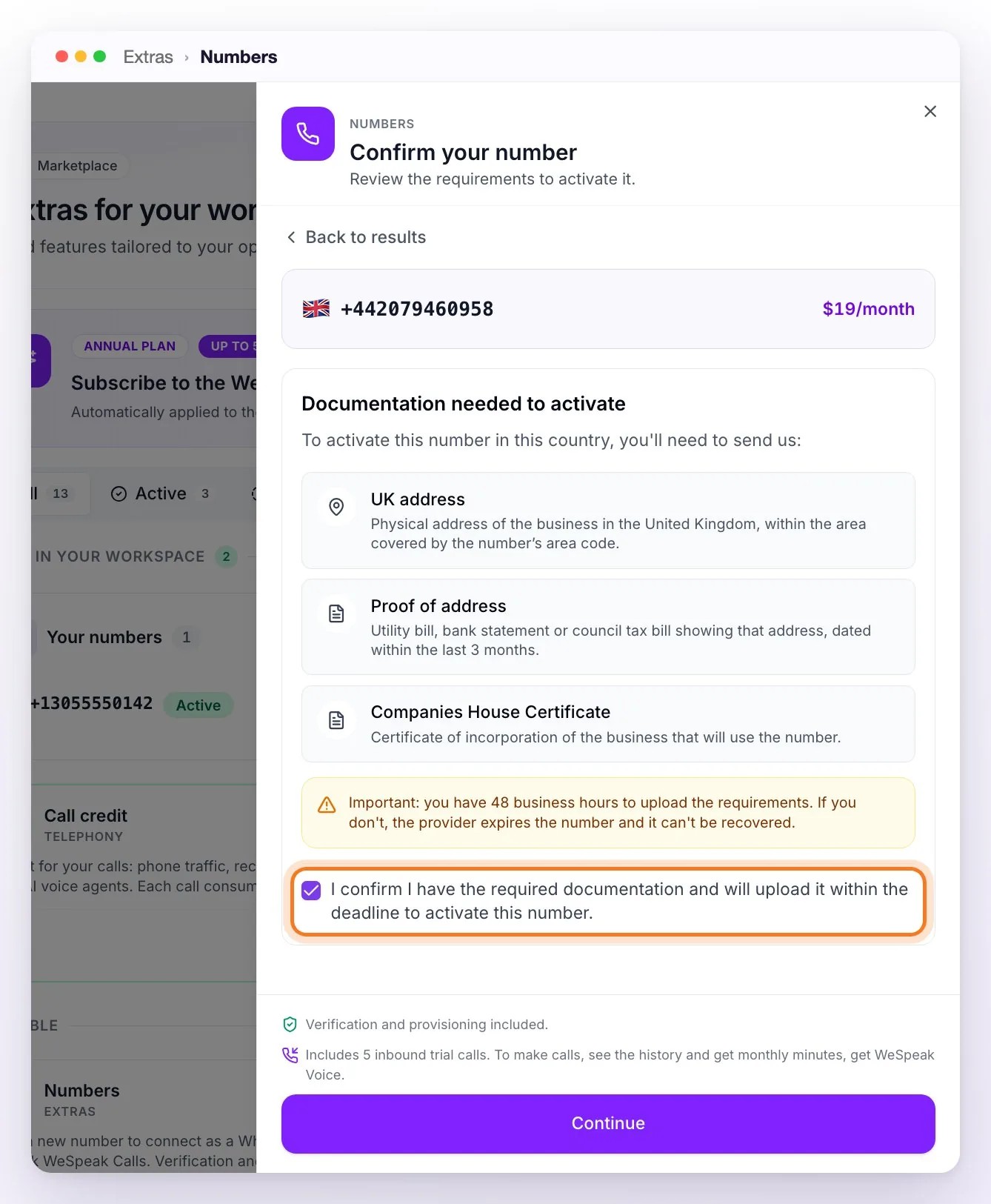
Requirements: on Confirm your number, the Documentation needed to activate section tells you whether that country requires business documentation (and which). If nothing is required, you'll see "This number activates automatically with no additional documentation." Where it applies, check the box "I confirm I have the required documentation and will upload it within the deadline to activate this number": Continue stays disabled until you do.
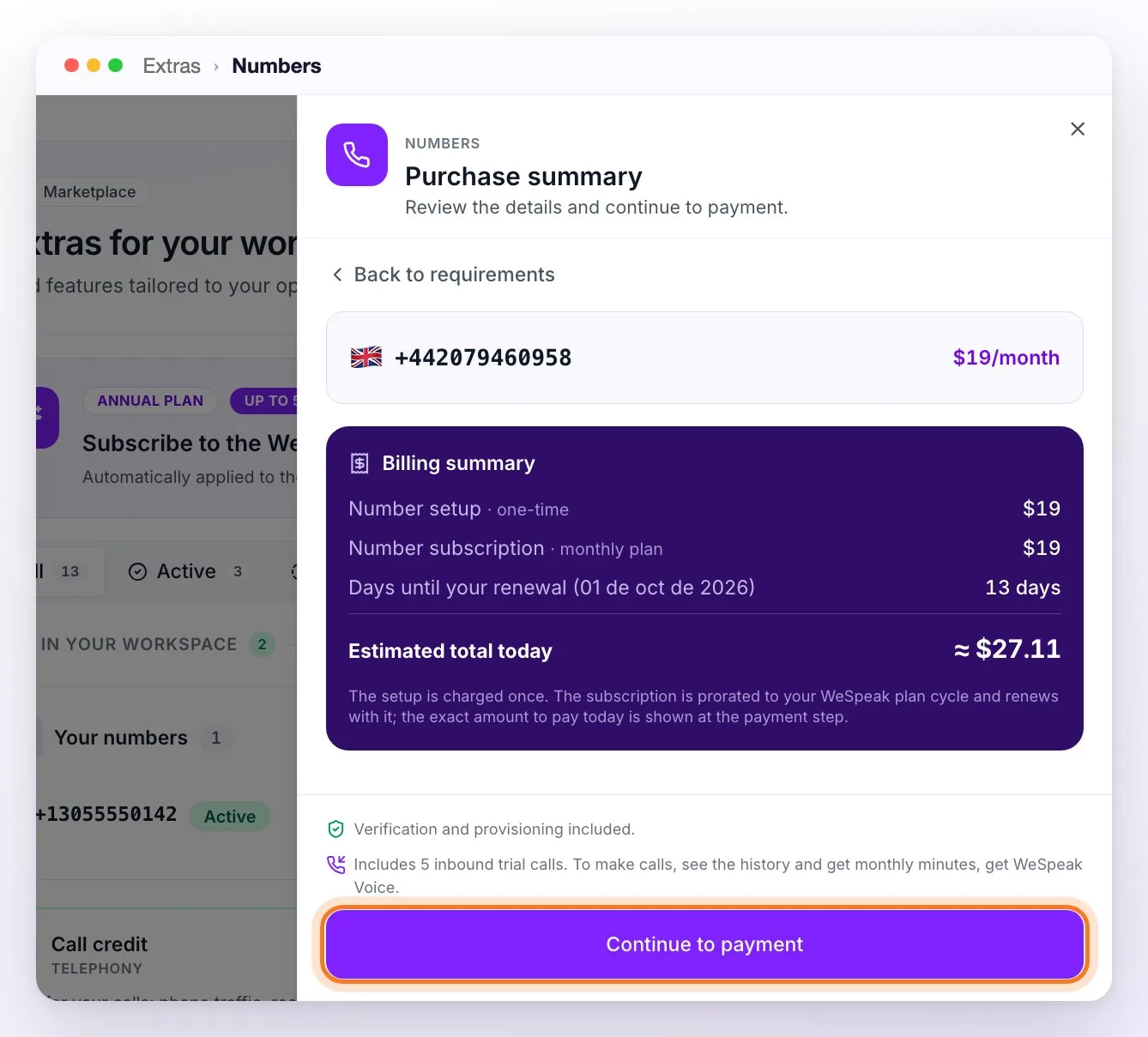
Summary and payment: on Purchase summary you review the number setup (one-time payment), the number subscription and the days until your renewal, with the estimated total today (the subscription is prorated to your plan's cycle). Click Continue to payment and pay with your card: once it's confirmed you'll see "Payment confirmed!" and the number shows up under Your numbers as Activating (in its Manage panel: "We’re activating your number. We’ll let you know as soon as it’s ready.").
Wait for activation — the status updates on its own on the page, without reloading. Once it's Active, the number is connected to Calls automatically and assigned to the users that already existed in your account.
Review the assigned users in Calls → Settings → your number → Users (anyone you add to the team later isn't assigned automatically), and test it by calling the number from a cellphone: it should ring in the browser of the assigned users.
ℹ️ Buying a number doesn't ask you to accept terms and conditions: the telephony terms (the Voice annex) are accepted on your first Call credit top-up, and they apply from the moment you activate or use the service.
Number types
Today WeSpeak offers Local numbers: a geographic number tied to a city or region (for example, the Buenos Aires area code +54 11), ideal for showing a familiar local presence.
ℹ️ Other number types (mobile, toll-free, national) are not offered at the moment. If you need a number type, city or country that doesn't appear in the search, ask your advisor: under our terms, WeSpeak assesses whether it can be obtained, with no guarantee that it will be possible or of any timeframe, and it may involve additional requirements or costs.
Number statuses
Activation isn't always immediate. Here's what each status means:
| Status | What it means | What you do |
|---|---|---|
| ⏳ Activating | The purchase is being processed | Wait (in the US, less than a minute) |
| 📋 Documents needed | The country requires documents | Upload them with Complete requirements, from the number's detail — you have 48 business hours from the purchase |
| 🔍 Under review | Documents submitted | Wait 24–48 business hours (up to 5 days in some countries) |
| ⚠️ Documents rejected | Something wasn't approved | Read the reason in Complete requirements, correct it and resubmit |
| ⏳ Provisioning | Last step of activation underway | Wait |
| ✅ Active | The number works | Nothing — it already receives and makes calls |
| ❌ Purchase failed | It couldn't be acquired | Try with another number |
| 🟠 Suspended | The number was suspended | Contact WeSpeak support |
| ⚫ Cancelled by operator | The order was canceled automatically because the requirements weren't completed in time | The number is no longer available (it no longer shows under Your numbers) and there's no refund — you can buy a new one whenever you want |
ℹ️ If you cancel your whole WeSpeak account, your numbers move to Port-out window open until you port them to another provider or the deadline passes (see the Disconnecting or cancelling a number section below).
The notices you'll receive (and why they matter)
Every time your number changes status, we send you an email — to the address your account is registered with and to your company's contacts responsible for onboarding — plus a platform alert (bell → Alerts). You don't need to keep checking the panel: the notice reaches you on its own. The notices that exist:
| Notice | When it arrives |
|---|---|
| Number active | The number finished activating and already works |
| Documentation needed | The country requires business documents: upload them from Complete requirements within 48 business hours |
| Documents rejected | The provider rejected a requirement — the notice includes the rejection reason, so you can fix and resubmit |
| Purchase failed | The purchase couldn't be completed |
| Number cancelled | The order was cancelled (for example, because requirements weren't completed in time) |
| Number suspended | The number was suspended — contact support |
⚠️ Act on these notices as soon as they arrive — especially the documentation ones. You have 48 business hours from the purchase to upload the requirements (the service terms ask you to upload it within 48 hours of the purchase). If they stay pending, or rejected without being corrected, the carrier cancels the order automatically (Canceled by the carrier status) and you lose the number and the purchase, with no refund. Check your account's email (and the spam folder) during the days after the purchase.
ℹ️ The "Under review" status (documents submitted, awaiting approval) notifies only in the platform — no email, because it requires no action from you.
About the documentation
Most Latin American countries require documents before activating a number: identification, address and business details. The panel warns you before you buy what they'll ask for, and then you complete everything from the number's detail, on the Complete requirements screen:
- Each requirement appears with its status: Pending, Submitted, Approved or Rejected.
- Depending on the requirement, you fill in a text field, upload a file (PDF, PNG, JPG, DOC or XLS, up to 20 MB) or load the business address (legal name —or first and last name—, country, province or state (optional), city, street and number, postal code).
- Click Submit: each item you send shows as Submitted, with the "Submitted · In review" box. The review takes 24–48 business hours (up to 5 days in some countries) and the status updates on its own.
- If something is rejected, the red "Some submissions were declined" notice shows up at the top with the reason for the rejection, and each item to correct is marked Rejected — you correct and resubmit from the same screen.
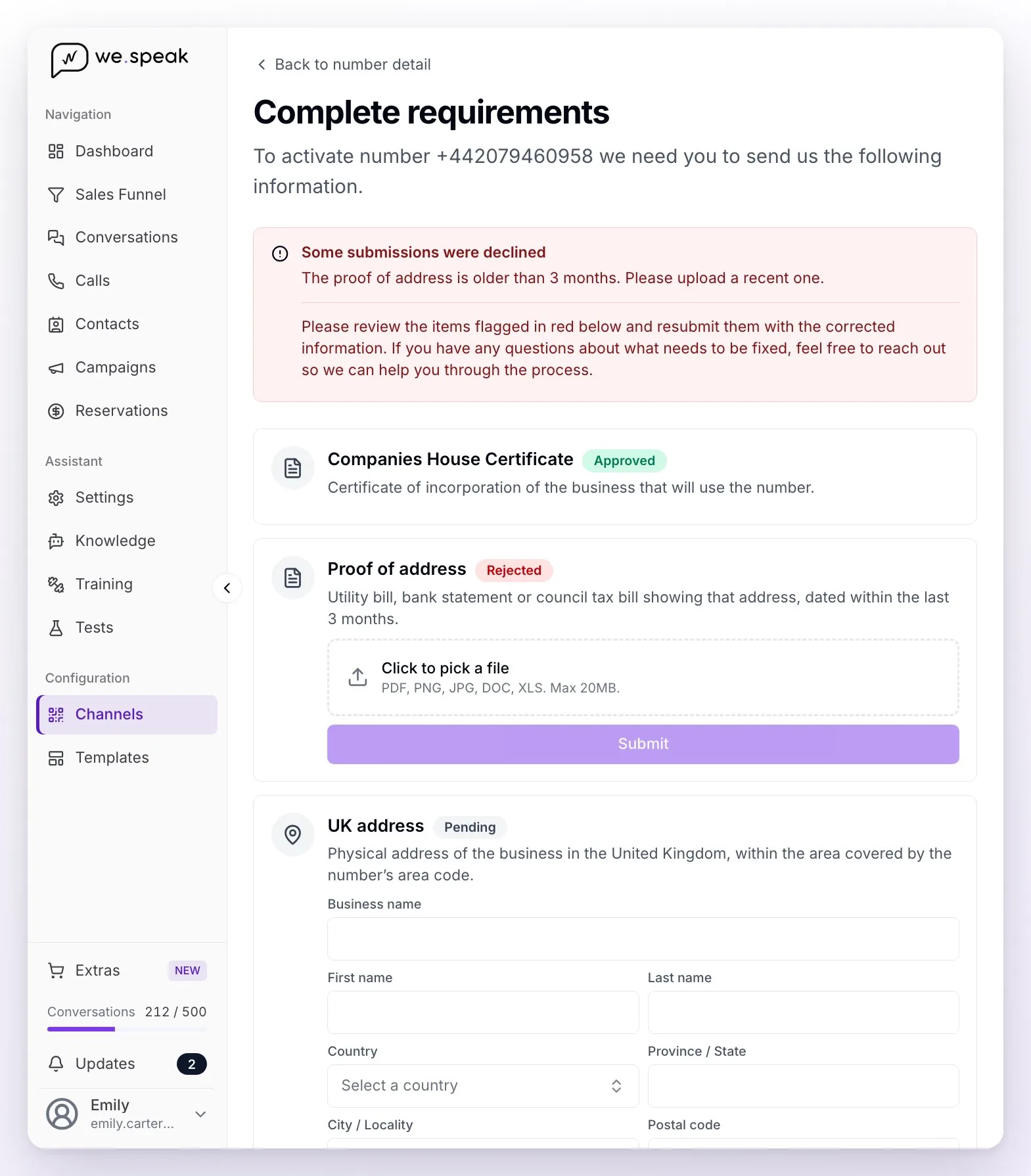
⚠️ Don't leave the documentation pending: you have 48 business hours from the purchase. If the requirements aren't completed in time, the carrier cancels the order automatically (Canceled by the carrier status), the number stops being available and the purchase is not refunded.
Your numbers in Extras
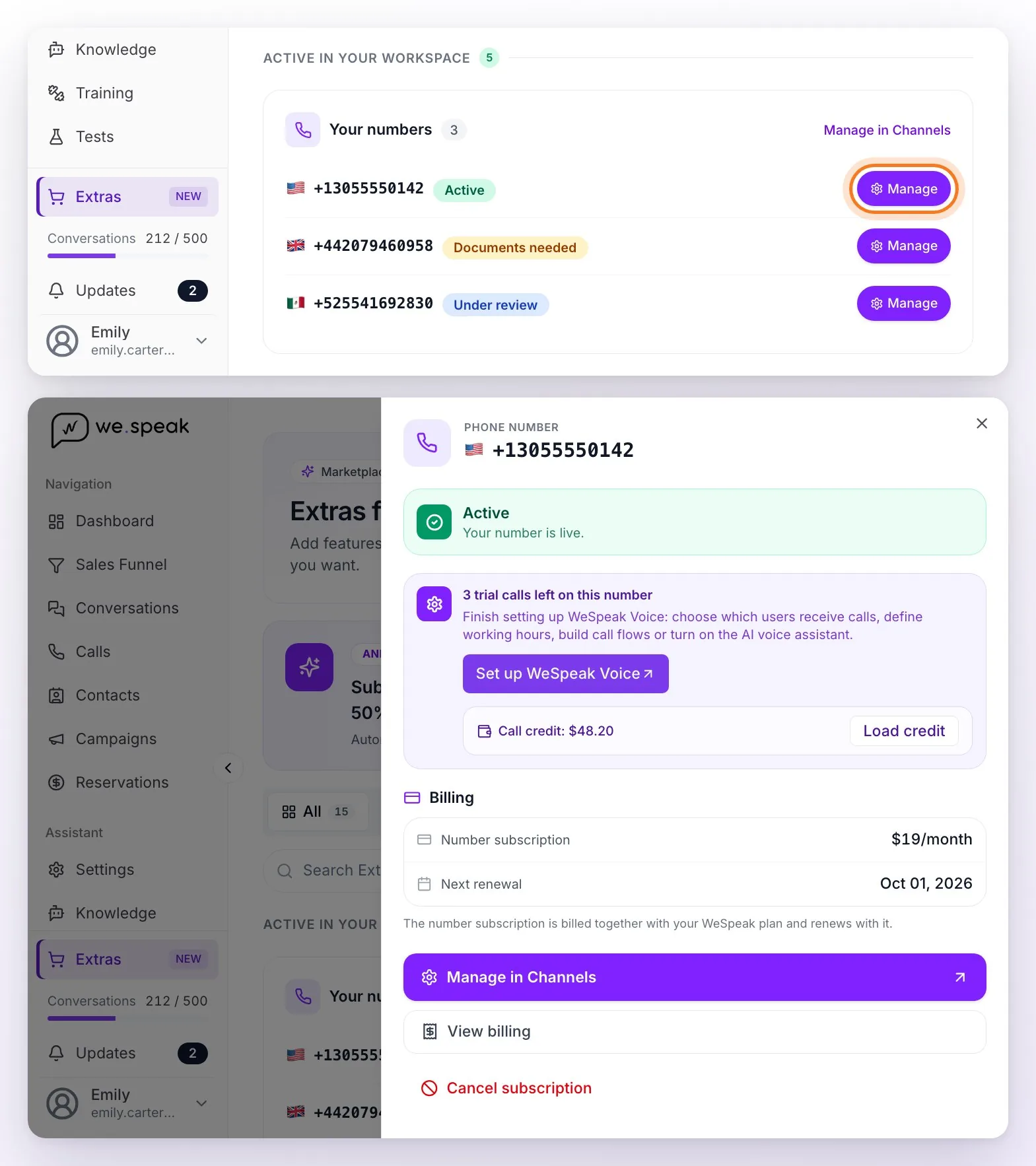
Purchased numbers appear in Extras, on the Your numbers card: each with its status and a Manage button that opens its billing detail (subscription and next renewal, which matches your plan's), the View billing link and the link to its full management (Manage in Channels: status, regulatory requirements, connection to Calls). If the number has pending or rejected documentation, you also get to Complete requirements from there. View billing and Cancel subscription are for admin profiles only.
Disconnecting or cancelling a number
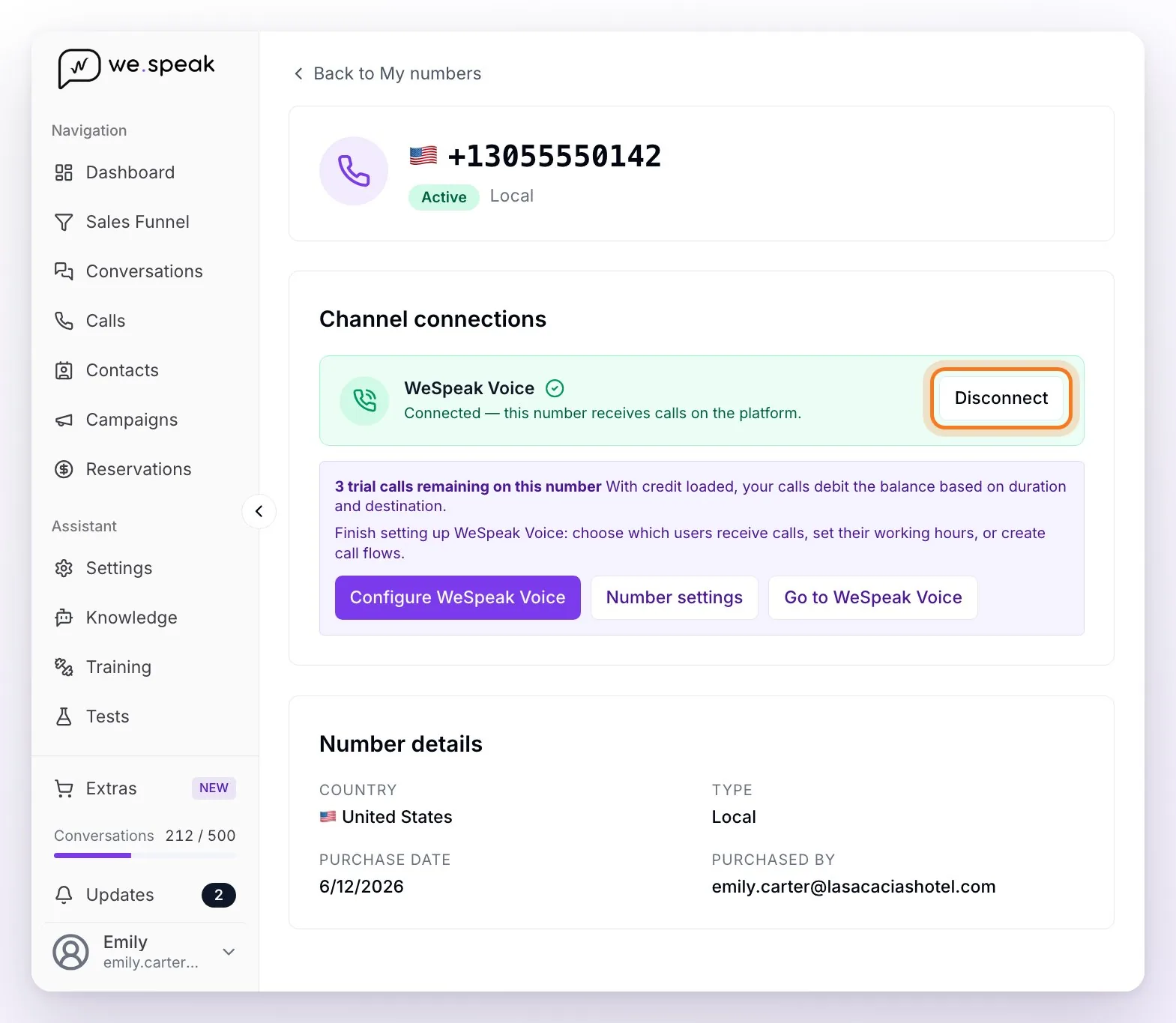
- Disconnecting from Calls (in the number's detail: Extras → Your numbers → Manage in Channels, Channel connections → WeSpeak Voice → Disconnect block) only removes it from the channel: it stops receiving and making calls, but it's still yours, it keeps being billed and you can reconnect it whenever you want from the same place with Connect. It's the option if you only want to pause the line. Only admin profiles can do it.
- Cancelling the number (Extras → Your numbers → Manage → Cancel subscription) is immediate and irreversible: the number is released from the system on the spot, its billing stops, nobody else in WeSpeak will be able to use it and there's no refund of what you already paid. If you want to keep the number, port it to another provider before cancelling: a released number can't be recovered. Only admin profiles see this option.
- If you cancel your whole WeSpeak account (cancellation request), the process is different: when you submit the request, the cancellation wizard shows you your numbers and what will happen to them. Once the cancellation takes effect (the cut-off date of the period you already paid for), the number is not released on the spot: it stops being billed and remains yours during a porting window so you can port it to another provider — we email you the exact deadline and the instructions, remind you as the deadline approaches, and your Account Manager walks you through the process. Our terms guarantee a minimum of 10 business days and ask you to tell us in writing whether you want to port it or release it; today the platform gives 30 calendar days from the cut-off date. Porting is always started by your new provider; if you complete it within the deadline you don't need to tell us. After the deadline without porting, the number is permanently released and can't be recovered.
Frequently asked questions
How long does it take to activate?
In countries without requirements (like the US), less than a minute. Where they require documentation, it activates when the review is approved (24–48 business hours from when you submit the documents; up to 5 days in some countries).
In which countries are there numbers?
There's good coverage in Latin America, the United States and Europe. The search includes, among others: Argentina, Mexico, Colombia, Chile, Brazil, Peru, Uruguay, Ecuador, Costa Rica, Panama, Dominican Republic, United States, Canada, Spain, Portugal, Italy, France, United Kingdom and Germany — and shows you instantly what's available in each one.
Is there a document listing the requirements of each country?
You don't need a separate list: the requirements are shown by the purchase wizard itself, before you pay. Go to Extras, click Add on the Numbers card and then Continue, pick the country, click Acquire on the number you're interested in and, on Confirm your number, the "Documentation needed to activate" section details which business documentation that country requires for that number — or tells you it activates with no additional documentation. That way you can compare your options before buying. Requirements depend on the country and the number type and are set by the local carrier, so they can change over time: what the wizard shows at the time of purchase is always the current one.
How much does a number cost?
A one-time setup fee plus a recurring subscription, billed together with your WeSpeak plan. You see the exact price in the last step of the purchase, before paying. Usage (calls, recording, transcription, AI assistant) is paid separately with Call credit — you can estimate your monthly spend in the WeSpeak Voice calculator.
Can I buy two or more numbers?
Yes — you can buy as many numbers as you need (for example, one for Reservations and another for the Front Desk). Each one is connected, assigned and configured separately, with its own users and its own call flow.
Who can buy or cancel a number?
Only your account's admin profiles (the Administrator role). The Supervisor and User roles see the Extras section in read-only mode.
Can I receive SMS?
No — for now, WeSpeak numbers work for voice calls and as a WhatsApp Business (API) number, but not for SMS: sending and receiving text messages isn't available, even if the number's card lists SMS among its capabilities. If Meta asks you to verify the number when connecting WhatsApp API, choose verification by phone call.
Can I use the same number for WhatsApp and for calls?
Yes, and it's what we recommend: the number you buy in WeSpeak answers calls and, at the same time, can be your WhatsApp Business (API) number — you register it with Meta when you connect WhatsApp API, with verification by phone call. A single number for telephony and WhatsApp, with no SIM card or physical phone.
Does Voice handle WhatsApp calls?
No — the numbers and WeSpeak Voice only handle regular phone-line calls: WhatsApp calls (the call button in the chat) don't come through this channel yet.
Can I use my usual number instead of buying one?
Not for now: number portability is not available yet. To use Calls you need to buy a number from WeSpeak, following the step by step in this same article. If you are interested in porting the one you already use, mention it to your WeSpeak advisor.
Can I request a number that doesn't appear in the search (another type, city or country)?
You can ask your advisor. Under our terms, WeSpeak assesses whether it can be obtained, with no guarantee that it will be possible or of any timeframe, and it may involve additional requirements or costs. Today we mainly offer Local numbers from the inventory available in each country.
Do I have to accept terms and conditions to buy a number?
Buying a number doesn't ask you to tick any box, but the telephony service is governed by the Voice annex of the terms and conditions (also in Spanish and Portuguese), which applies from the moment you activate or use the service. You formally accept them in your panel on your first Call credit top-up. They're worth reading: they describe the number's conditions (documentation deadline, no refund, what happens when you cancel).
Is there a refund if the number is cancelled over incomplete documentation?
No. If you don't upload the documentation within 48 business hours, or if it's rejected and not corrected, the carrier cancels the order for good and what was already charged (setup fee and subscription) isn't refunded — the terms provide for this. The number's future billing stops on its own, and you can buy another number whenever you want.
What's the difference between disconnecting and releasing a number?
Disconnecting from Calls only removes it from the channel: the number is still yours (and keeps being billed) and you can reconnect it whenever you want from the number's detail (Channel connections → WeSpeak Voice). Releasing the number (cancelling from Extras) is irreversible: it's released from the system, disconnected from all channels, nobody else in WeSpeak will be able to use it, and there's no refund of what you already paid.
What happens to my number if I cancel the service?
It depends on what you cancel. If you cancel only the number (from Extras → Your numbers → Manage → Cancel subscription), its billing stops and the number is released on the spot, with no port-out window and no refund — so, if you want to keep it, port it to another provider first. If you cancel your whole WeSpeak subscription (cancellation request), the number stops being billed and stays active for 30 more calendar days from the cut-off date so you can port it to another provider — we email you the deadline and reminders, and your Account Manager walks you through the process; the terms guarantee a minimum of 10 business days and ask you to tell us in writing whether you want to port it or release it. After the window it's released automatically. In no case is what you already paid refunded. The details are in WeSpeak Voice.
I bought the number but I can't connect it to Calls.
Most often the number isn't Active yet: it's only connected once activated (and it usually connects on its own). Check its status and the notices you received — if it's in Documentation missing, you need to complete the requirements. If it's already Active and doesn't show up in Calls, connect it from its detail (Extras → Your numbers → Manage in Channels → Channel connections → WeSpeak Voice → Connect). Keep in mind that a newly activated number includes a few inbound test calls: to keep operating afterwards you need Call credit.