The Sales Funnel is your visual CRM: a board with columns per sales phase and a card per contact. At a glance you see where each possible booking stands — and the AI moves the leads on its own as the conversation progresses.
Your account starts with two funnels that you can rename, edit or delete: a sales funnel with four phases (interested → quoted → booking intent → booked, the last one marked as won) and an operations funnel (pre check-in → check-in → check-out). Every new conversation enters the first phase of the first funnel.
The board
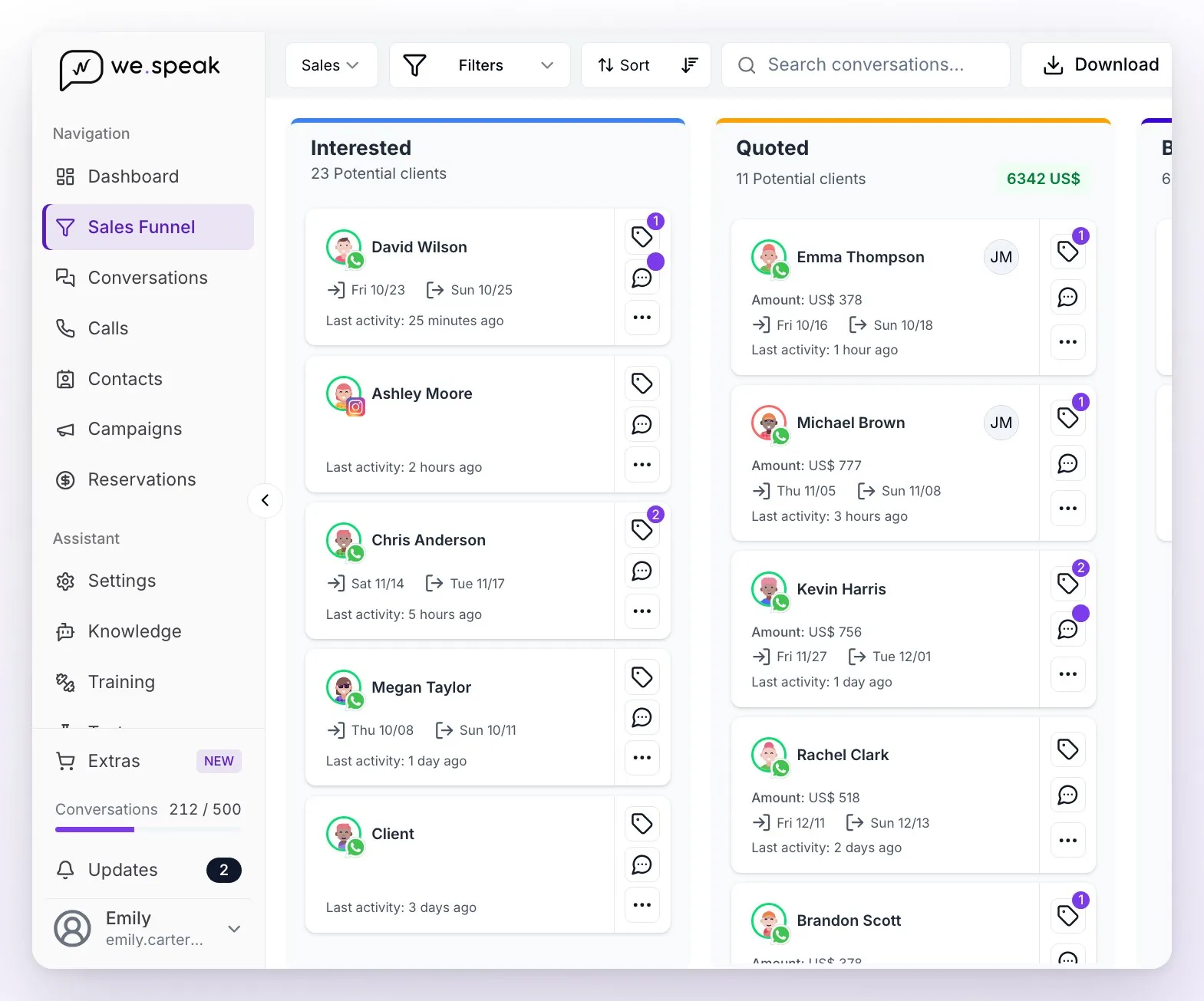
- At the top left you choose which funnel you see (the selector shows its name, for example Sales). Next to it are Filters, Sort, the search box (Search conversations...), Download and, on the right, Configure your funnels.
- Each column is a phase. Its header shows how many Potential clients it has and, in green, the sum of the quoted amounts in that phase (if there are amounts in several currencies, hover over the total to see each one). Each column loads 40 cards; at the bottom you have Load older conversations.
- Each card is a contact: their name with the channel icon, the assigned users, the Amount:, the check-in and check-out dates, and the Last activity:. The border of the picture tells you what the assistant is doing in that conversation: green if it's active, red if it's paused, and gray if it can't reply (for example, outside business hours) — hover over the picture for the details.
- On the right of each card there are three buttons: labels (the number shows how many it has; hover to see them), the chat (a purple dot means there are unread messages; hovering shows the last message, and clicking opens the conversation in a panel over the board, without leaving the funnel) and …, which opens Change funnel.
- With Sort you choose the order of the cards within each column: Update date or Amount, Ascending or Descending.
- By default the board shows the leads with No status and won: lost and archived leads don't appear until you ask for them in Filters → Customer status.
- If your account has Restrict contacts to users enabled, each user with the User role only sees the conversations assigned to them or unassigned.
With Download you export an Excel of the funnel you're viewing, with one sheet per phase: it includes name, phone, email, channel, country, phase, check-in/check-out, date and time of the 1st and 2nd follow-up, estimated amount and currency, last update, and one column per label. It respects the active filters (by default, the leads with no status and won), brings all the matching contacts —not only the ones you see on screen— and shows the dates in your account's time zone, not your browser's.
ℹ️ Phase and status are different things. The phase is the step in the process (Interested, Quoted…). The customer status is the outcome: No status (still open), Won, Lost, or Archived. In Conversations and Contacts the filters let you combine both; in the funnel, the columns already are the phases.
Moving leads by hand
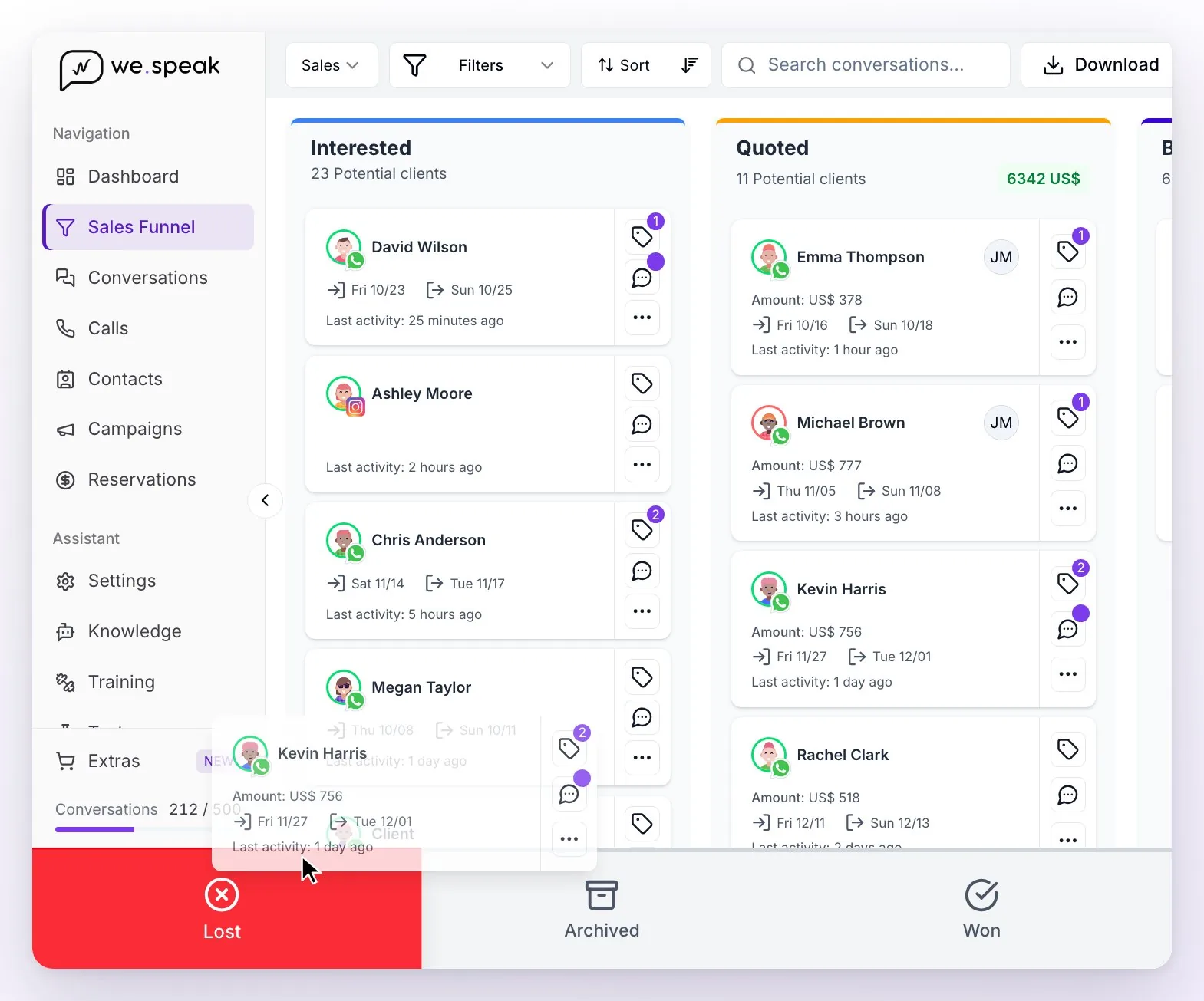
Drag and drop a card onto another column to change its phase. If you drop it on a phase marked as won, the lead becomes Won (you'll see Lead marked as won). Watch the reverse path: if you take a Won lead to a phase that isn't marked as won, its status goes back to No status (you'll see Customer status updated).
While you drag, three zones appear at the bottom to change the lead's outcome (they don't appear when you drag from a phase marked as won):
| Zone | What happens when you drop |
|---|---|
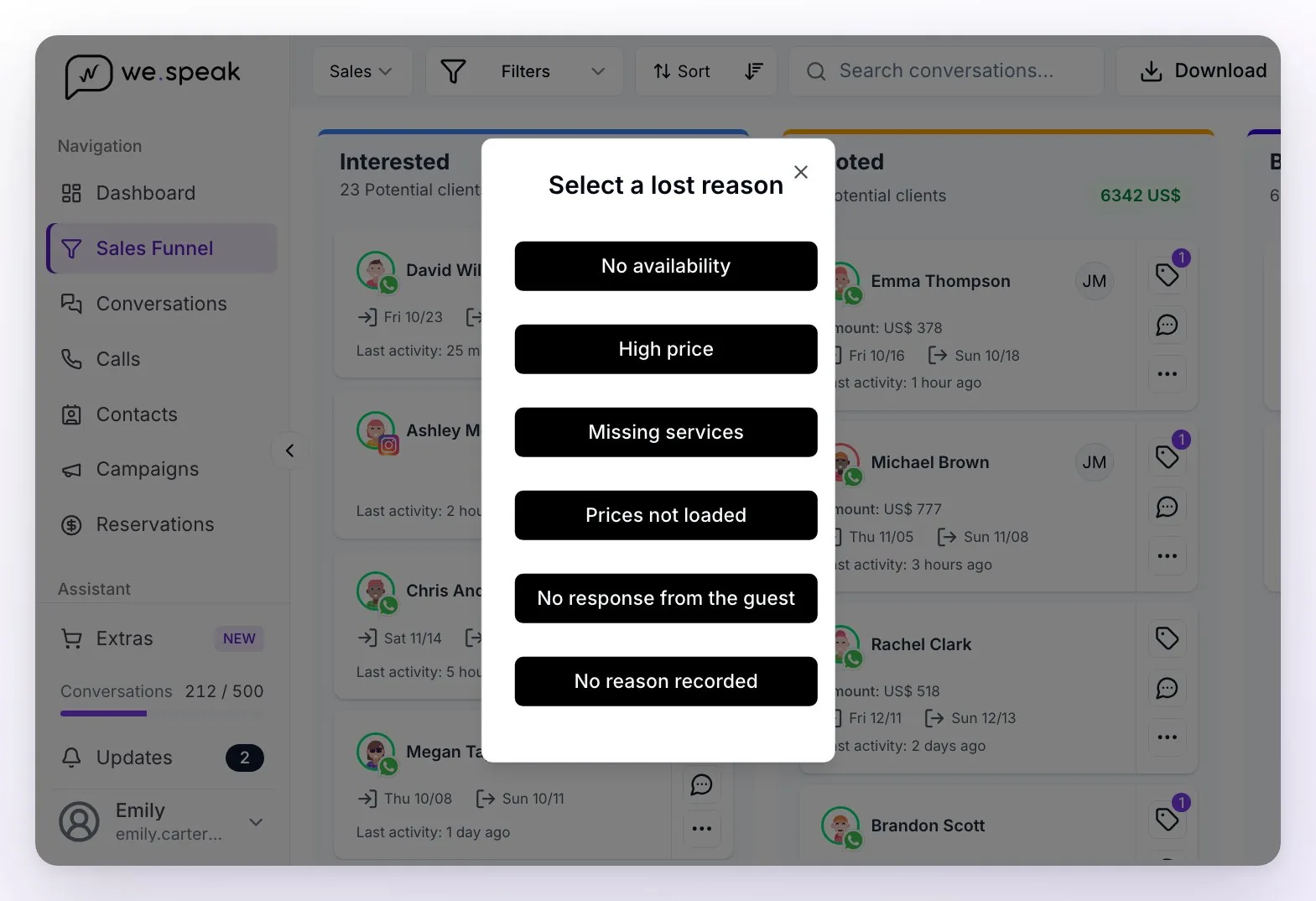
| Lost | Select a lost reason opens: choose the reason (it's recorded and feeds the statistics). The lead leaves the board, which doesn't show lost leads by default. |
| Archived | The conversation is closed and the assistant is paused in it. If you later change its customer status, it reopens and the assistant replies again. |
| Won | If the card isn't in a phase marked as won, it moves on its own to the first phase marked as won in the funnel (you'll see Lead moved automatically). That's why, to use this zone, the funnel needs at least one phase marked as won. |
To move a contact to another funnel (for example, from Sales to Operations once they've booked), use the … button on their card: Change funnel opens, you choose the funnel and the phase and confirm with Update.
If you see Failed to move the card. Reloading data..., the change wasn't saved: the board shows the real phase again and you can retry.
The AI moves the leads for you
After each assistant reply, the AI analyzes the conversation and assigns the phase automatically — but only among the phases where you allow it, and always within the funnel the conversation is already in:
- In each phase's settings, enable AI-managed phase and fill in the Clarify the purpose or utility of this phase and when it should be assigned field (up to 500 characters; e.g. "when the hotel already sent prices" for a quote phase). A phase with the option enabled but no instructions isn't used.
- Phases without that option are only assigned by hand. And if a lead is in one of them, the AI no longer moves it: it stays there until someone changes it (that's why the booked phase and the operations phases come without the option, and why your first funnel's first phase should have it).
- If you give the option to a phase marked as won, the AI can also leave leads as Won.
- If a conversation is already Won or Lost, the AI doesn't touch it.
- Besides the phase, the AI fills in the quoted amount, the check-in and check-out dates, the guest's email, and the labels where you checked Enable auto-assignment by artificial intelligence.
ℹ️ AI auto-assignment works only when the assistant is active in the conversation: if you turned it off for a contact (or only your team handles it), that conversation is moved by hand.
When a lead becomes Lost
A lead can end up as Lost through three different paths:
| Path | When it happens |
|---|---|
| The AI detects it in the chat | Only when the guest explicitly declines ("I already booked elsewhere", "it's too expensive", "I'm not traveling after all"). The analysis runs automatically after each assistant reply and chooses the reason on its own. Silence doesn't count: the guest going quiet doesn't make the AI mark them lost. |
| Someone on the team marks it by hand | By dragging the card to the board's Lost zone, or from the conversation: in the contact panel, State section → Edit, choose Lost under Customer status and the Lost reason, which is mandatory there. What the team marks stands: the AI doesn't reverse it. |
| Automatic closing due to inactivity | A platform process closes conversations with no activity for 7 days, and also those with a check-in date that passed more than 4 days ago and 2 days without activity. If the lead still had no status, it becomes Lost with the reason Automatically closed due to inactivity. Snoozed conversations are respected until the snooze expires, and a Won lead is never overwritten: its chat is closed, but it keeps the Won status. |
The reasons your team can choose are: No availability, High price, Missing services, Prices not loaded, No response from the guest, and No reason recorded. The platform also uses Automatically closed due to inactivity for losses due to inactivity.
ℹ️ The No response from the guest reason can only be chosen by your team by hand — the AI never assigns it (if the motive doesn't fit any reason, it uses No reason recorded), and losses due to inactivity always appear as Automatically closed due to inactivity. A Lost lead can always be reopened: in its conversation, State section → Edit, change the Customer status to No status. Dragging it to another column of the board only changes its phase: it stays Lost (unless you drop it on a phase marked as won, which makes it Won).
Configure your funnels
From the funnel, go to Configure your funnels. There you see one card per funnel, with its phases:
- You can have several funnels: Create Funnel adds one, and each card has buttons to open it on the board, edit it or delete it (it asks for confirmation and can't be undone).
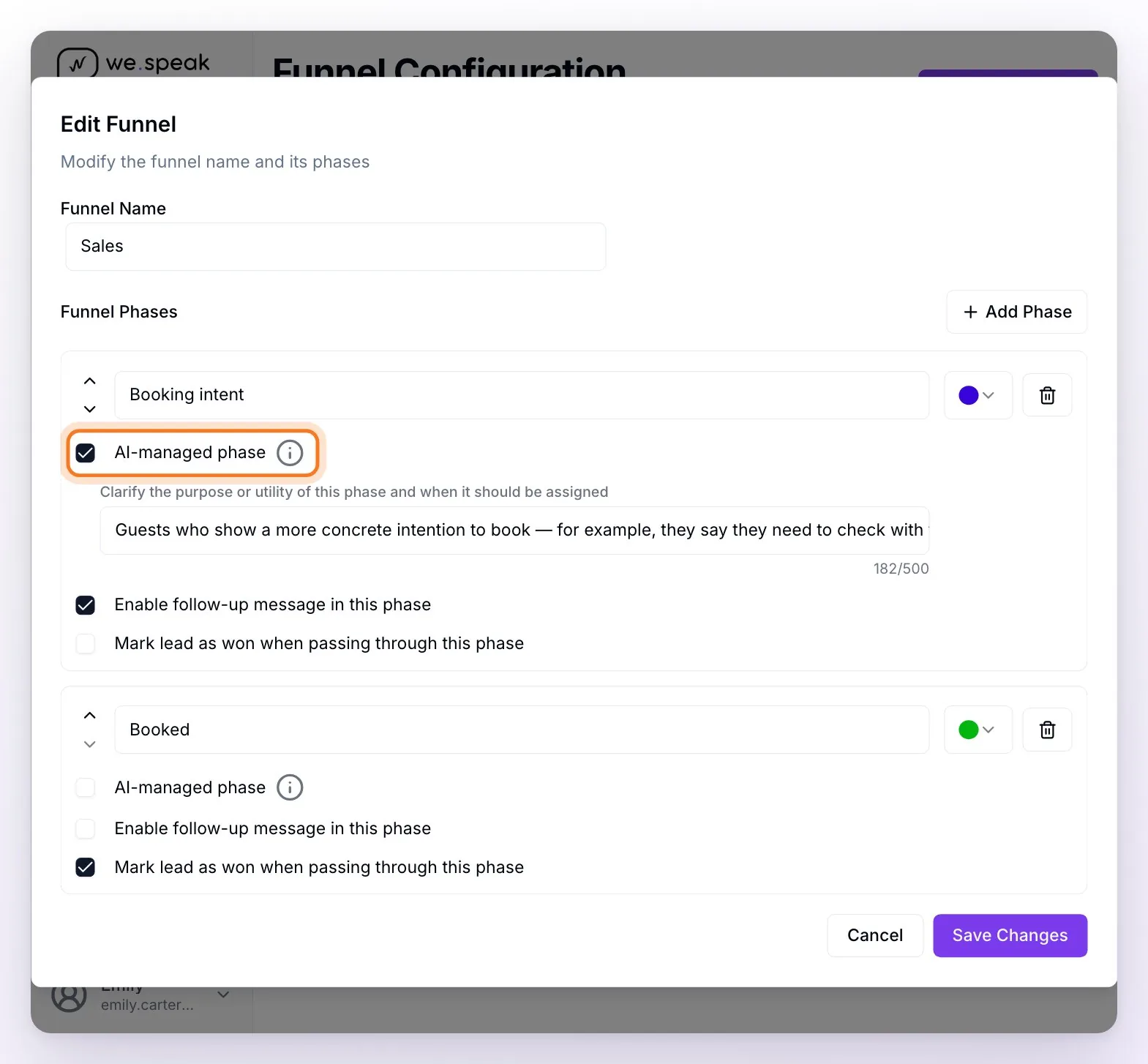
- When you create or edit a funnel you define its Funnel Name and its Funnel Phases: with Add Phase you create new ones, give them a name and color, reorder them with the arrows and delete them with the trash icon. The order is the order of the board's columns, and the first phase of the first funnel is where new conversations enter. Save with Save Changes.
- If a phase name is very long or has characters Excel doesn't accept, below the name you see what its sheet will be called in the download.
- Each phase has three options:
| Option | What it does |
|---|---|
| AI-managed phase | The AI can assign this phase on its own, following the instructions you write in Clarify the purpose or utility of this phase and when it should be assigned. |
| Enable follow-up message in this phase | Contacts in this phase receive the automatic follow-ups (turn it off, for example, in Booked). |
| Mark lead as won when passing through this phase | On entering here, the contact becomes Won automatically. |
⚠️ If you delete a phase or a funnel, its contacts aren't deleted: they stay in Contacts and Conversations, but they no longer show on the board until you assign them another phase (from the State section of their conversation).
💡 In Settings, Platform Configuration card, there's Mandatory form when closing chat (enabled by default in new accounts): when closing a conversation with the Close button in its header, your team has to choose the funnel, the phase and the Result (No status or Lost) before closing it. If the result is Lost, the lost reason is mandatory; and if the chosen phase is marked as won, the result switches to Won on its own. Ideal so the funnel is never out of date.
Frequently asked questions
My contacts go to "Lost" and disappear from the board, why?
The AI, someone on the team, or the automatic closing due to inactivity marked them as lost — in their conversation, the State section shows Customer status: Lost and the Lost reason. They weren't deleted: by default the board only shows leads with no status and won. To see them, use Filters → Customer status → Lost; to reopen one, change its customer status to No status from the State section of its conversation.
A guest stopped responding days ago and still appears as open.
That's expected: the AI only marks Lost upon an explicit decline, never for silence. If you want to close it sooner, mark it by hand with the reason No response from the guest; otherwise, the automatic closing due to inactivity will do it after 7 days without activity.
A conversation that was open closed on its own.
It was the automatic closing due to inactivity (7 days without activity, or a stay date that already passed), which keeps the board and the reports tidy. If the guest writes again, the conversation reopens, but its lead stays Lost (and the AI doesn't move it): to work it again on the board, change its customer status to No status. With Multi-conversation enabled, instead, a new conversation opens and enters the funnel as a new lead.
Why do many of my lost leads show the reason "Automatically closed due to inactivity"?
They're the losses from the automatic closing: the system can't deduce the real motive, it only knows the contact stopped interacting. To have detailed reasons in the statistics, mark the losses by hand or let the AI detect them from the chat content.
I snoozed a conversation, is the system going to close it anyway?
No. As long as the Snooze is still in effect, the automatic closing due to inactivity respects it.
I want certain inquiries to stay in "Interested" and the system moves them to "Quoted".
The AI chooses the phase using each AI-managed phase's instructions and the order of the phases: if the hotel already sent a price in the chat, it tends to choose the quote phase or a later one. Edit the instructions of those phases (or disable the AI management of the one you don't want the AI to use) in Configure your funnels.
Can I make a lead count as won when it passes through a phase?
Yes — enable Mark lead as won when passing through this phase in the phase that represents the closed sale (in the sales funnel your account starts with, it's already enabled in the booked phase).
I get an error when moving a card.
If you see Failed to move the card. Reloading data..., the change wasn't saved and the board shows the real phase again. Retry in a few seconds; if it persists, tell your advisor the contact's name.