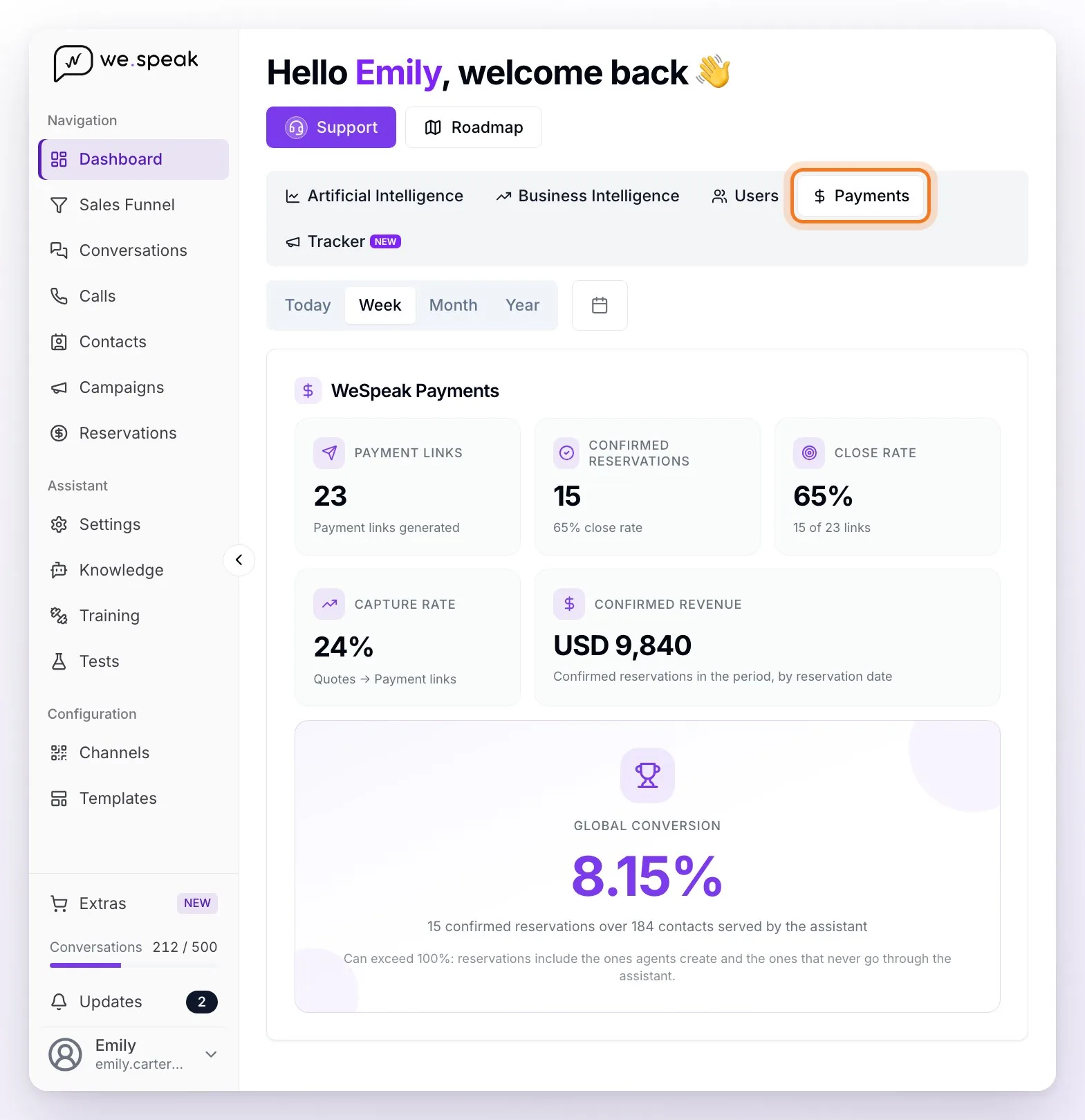
The Payments section of the Dashboard shows the payments funnel: from the payment link to the confirmed booking. It uses the same period filters as the Dashboard and counts each reservation by its creation date.
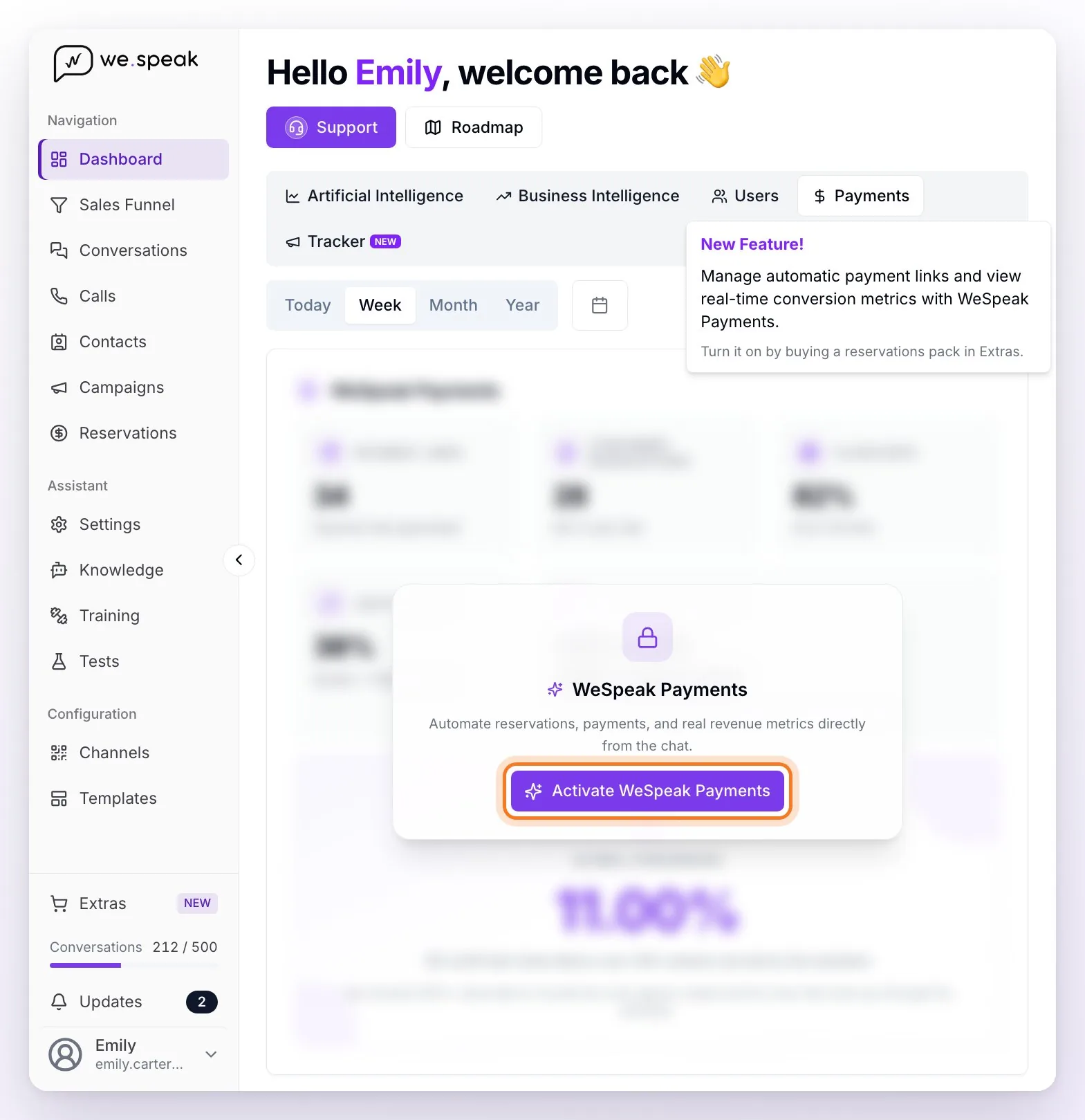
ℹ️ If your account doesn't have WeSpeak Payments yet, you'll see the section with blurred example data and the Activate WeSpeak Payments button, which opens a summary of the feature with a direct link to WeSpeak support on WhatsApp. When you hover over the Payments tab, the panel reminds you how to turn it on: "Turn it on by buying a reservations pack in Extras." With Payments, the assistant generates payment links with the booking data preloaded: the guest pays in a secure environment without leaving the conversation, availability is blocked in your PMS or Channel Manager automatically, and confirmations are sent to the guest and the hotel. WeSpeak doesn't act as a financial intermediary: the money travels directly to your payment method.
The cards
| Card | What it measures |
|---|---|
| Payment Links | How many reservations were started in the period: every payment link the assistant or your team generated, plus the reservations your team enters by hand from Reservations, with any payment method and however they ended. |
| Confirmed Reservations | Of those, the ones that ended up confirmed, by any payment method (further down, what "confirmed" means in each case). Below the number you see the close rate. |
| Close Rate | Percentage of payment links that ended in a confirmed reservation. The card shows the detail "X of Y links". |
| Capture Rate | The Quotes → Payment links step: the period's payment links over the conversations in which the assistant quoted. It can exceed 100% if your team generates links or enters reservations without the assistant having quoted. |
| Confirmed Revenue | The sum of the total price of the period's confirmed reservations, one line per currency: each reservation adds up in the currency the guest was charged in, and currencies aren't mixed into a single total. |
| Global Conversion ⭐ | Confirmed reservations over the contacts served by the assistant in the period (the same ones as Conversations attended in the Artificial Intelligence view), with two decimals — the summary metric. The card details it: "X confirmed reservations over Y contacts served by the assistant", and notes that it can exceed 100%, because reservations include the ones your team creates and the ones that never go through the assistant. |
💡 How to read it: a high capture with a low close indicates that links are generated but guests don't end up paying — review your payment policies or the methods offered.
A confirmed booking isn't the same as a credited payment
Each reservation has two statuses, which you see in Reservations: the Reservation Status (for example, Confirmed once it's in your PMS or Channel Manager) and the Payment Status (for example, Waiting for payment or Completed). The Dashboard doesn't read them the same way for every payment method:
- Gateway payments (Mercado Pago, PayPal, PayU, Wompi, or Credit Card): the reservation counts as confirmed when the payment was approved and the reservation reached your PMS or Channel Manager (Payment Status Completed). If your card payments are set to Save card data for manual charge (the card as a guarantee), it counts when the card was authorized, even if nothing has been charged yet.
- Bank Transfer, Pay at hotel, or Payment Link: it counts as confirmed as soon as the reservation reaches your PMS or Channel Manager (Reservation Status Confirmed), even if the payment is still Waiting for payment.
The typical case is the bank transfer: the reservation is confirmed instantly, but the payment stays pending until your team records it in the reservation's details, with Add Payment or Mark as paid, when the money arrives. That's why, in the same period, Confirmed Reservations — and their Confirmed Revenue — can be more than the payments already credited.
ℹ️ The detail of each transaction lives in the Reservations section of the main menu, with filters by Guest Name, Payment Status, and Reservation Status, among others.
Frequently asked questions
Why doesn't Confirmed Revenue match what came into my account?
For two possible reasons: revenue is counted when the reservation is confirmed — and with transfers, payments at the hotel, or cards saved as a guarantee, that can happen before the money arrives (see above) — and it's shown by currency: each reservation adds up in the currency the guest was charged in. If the assistant quoted in another currency, the payment link charges in that currency and the reservation adds up in that line, not in your main currency's.
Do bookings by transfer or "pay at hotel" count?
Yes — Confirmed Reservations includes any payment method, and these count from the moment the reservation reaches your PMS or Channel Manager. Keep in mind that your team records a transfer's payment by hand in the reservation's details.
Do these cards measure the same as "Confirmed Reservations" in the Artificial Intelligence view?
No. In the Artificial Intelligence view, Confirmed Reservations counts only the reservations the assistant created for contacts who clicked its booking link, and its close rate is calculated over those clicks. Here, all the period's confirmed reservations count — including the ones your team creates or enters — and the Close Rate is calculated over payment links. That's why the numbers can differ.