With the Instagram channel, your account's direct messages arrive in WeSpeak: the assistant replies to them, your team takes them, and they stay in the funnel and the history, alongside the rest of your channels.
In this article
- Before you start
- How to connect it, step by step
- After connecting
- What it supports and what it doesn't
- Limits set by Instagram
- If the channel disconnects
- If something goes wrong
- Multiple accounts (Multichannel)
- FAQ
🖼️ The screenshots show WeSpeak and Instagram in Spanish. Every step gives the English name of each button, and the screens are laid out the same way in every language.
Before you start
What you'll need:
- A professional Instagram account (Business). If the hotel's account is still personal, switch it from the app: Settings → Account type and tools → Switch to professional account. It doesn't need to be linked to a Facebook page.
- The username and password of that account.
- The verification code: depending on how the account is set up, Instagram may ask for it by SMS, by email, or as a confirmation on another device where you're logged in.
- Your WeSpeak user with permission to open Settings → Channels.
💡 Do it from a computer. If your browser (Chrome, Safari…) has several Instagram accounts open, check which one is active before you start: in Step 4 you'll be able to switch it.
How to connect it, step by step
Five steps, a couple of minutes.
Step 1 · Go to Channels
In the WeSpeak dashboard, open Settings → Channels in the side menu. There you see the channels already Connected and those Available to connect.
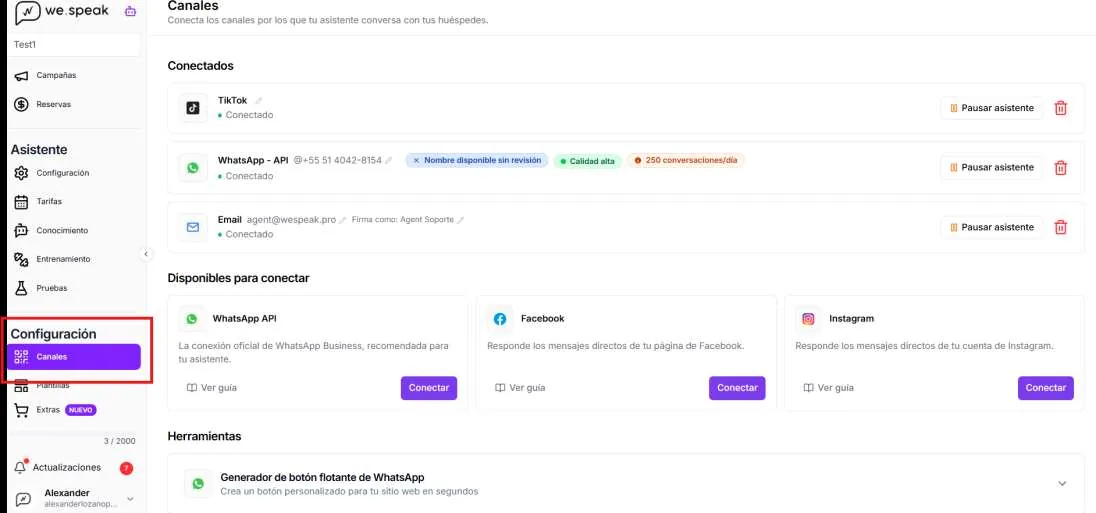
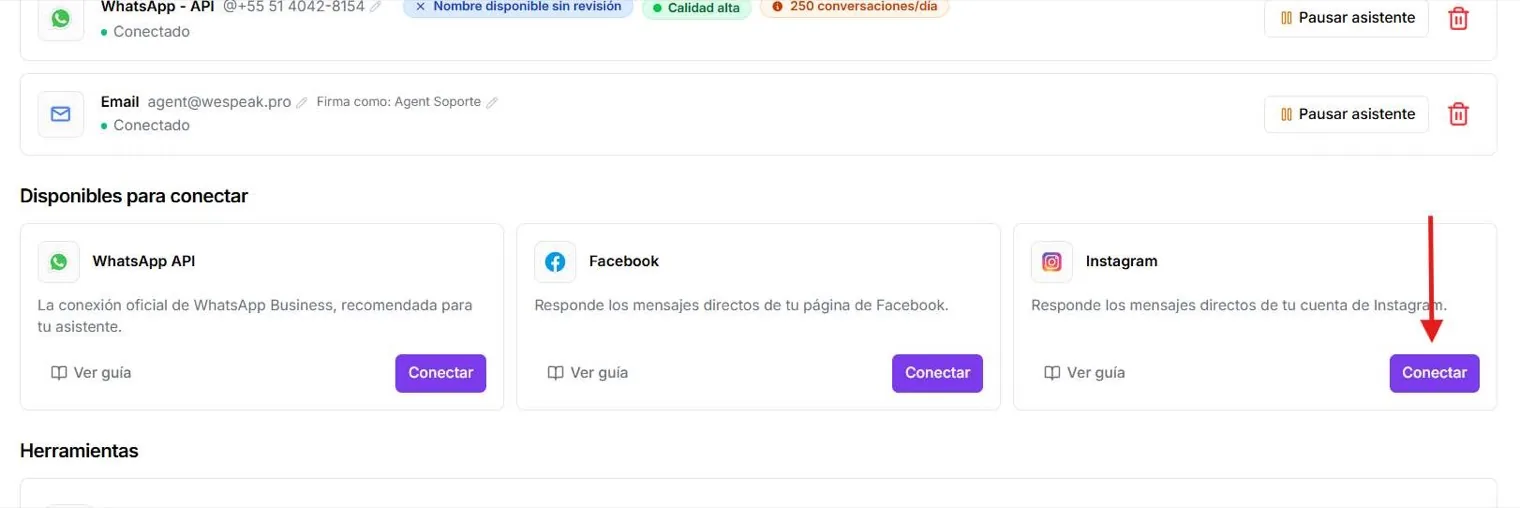
Step 2 · Click Connect on the Instagram card
Under Available to connect, find the Instagram card and click Connect. An Instagram window opens. (The card's View guide button opens this article.)
Step 3 · Log in to Instagram
Enter the hotel account's username and password and click Log in. It's the Instagram login, not Facebook's.
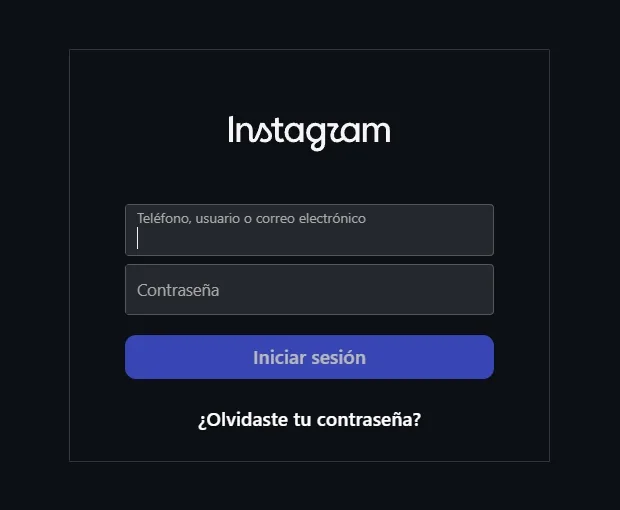
ℹ️ It may ask for a code. Depending on the account's settings, the verification code arrives by SMS, by email, or as a confirmation on another device where Instagram is open (your phone, for example).
Step 4 · Check it's the right account and click Allow
Instagram asks whether you want to share your account's information with WeSpeak-IG. Before accepting, read the username shown in the question: it has to be the hotel's account.
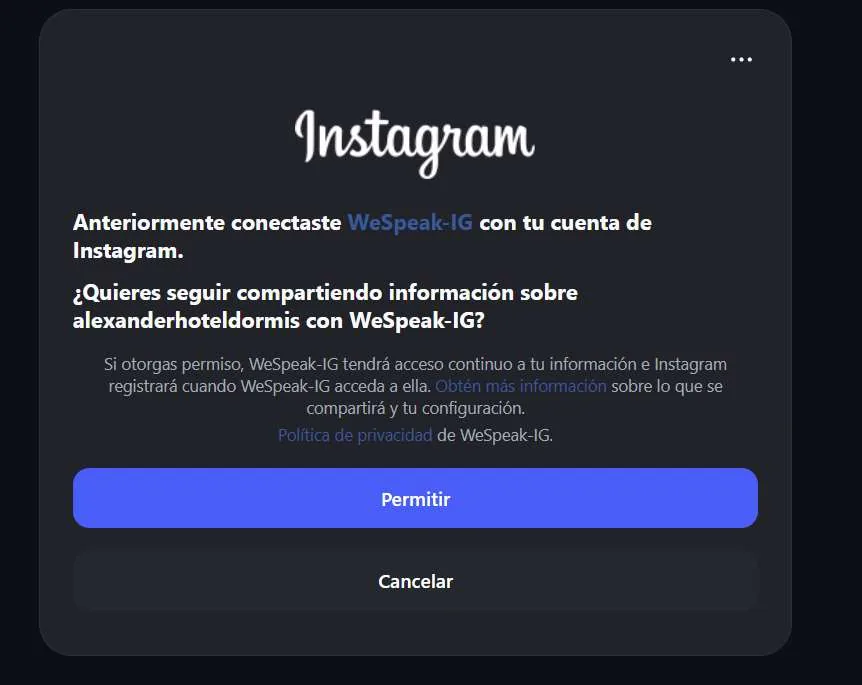
- If it's the right account, click Allow so the assistant can read and reply to your direct messages.
- If it isn't (on that computer you have access to more than one account and the active session isn't the hotel's), click the three dots at the top right and choose Switch accounts. Log in with the right one and come back to this screen.
- If you click Cancel, the connection isn't saved: you have to start again from Step 2.
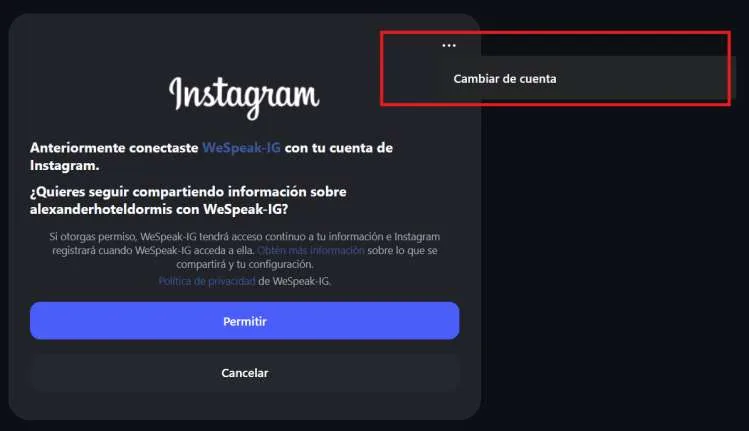
ℹ️ If that account was connected before, the screen says "You previously connected WeSpeak-IG… Do you want to keep sharing information…?". It's the same authorization: click Allow.
Step 5 · Confirm it's connected
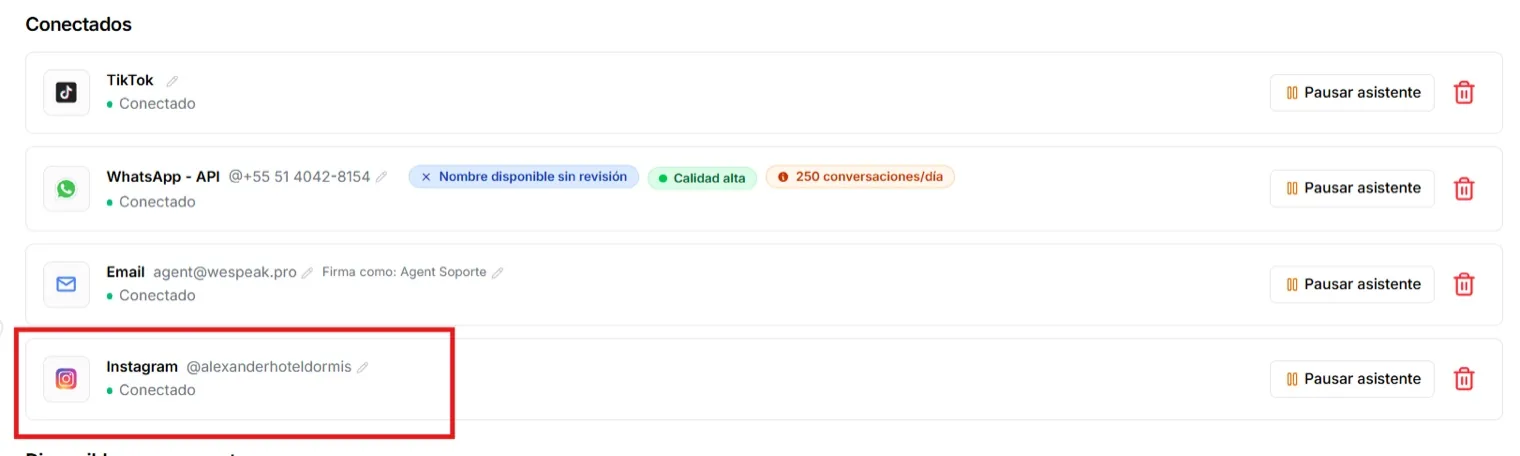
Go back to Channels: Instagram now appears under Connected, with the account's @username next to it. Check it's the hotel's. From that card you can name the channel (the pencil), pause the assistant on Instagram only, or delete the connection (🗑️).
After connecting
- Earlier messages: the assistant starts working with the messages that arrive after the connection. Previous conversations aren't imported.
- If you change the Instagram password: you'll probably have to repeat the connection to refresh the permissions you gave WeSpeak.
- More than one account: you can connect several Instagram accounts. Activation is requested from support first — see Multiple accounts (Multichannel) below.
What it supports and what it doesn't
| Feature | |
|---|---|
| Text, emojis, attachments, voice notes | ✅ |
| Reusable text templates (with /) | ✅ |
| Reply to stories and mentions that reach you by DM | ✅ |
| Quote / reply to a specific message | ❌ Instagram doesn't allow it — the button doesn't appear |
| Reply after 7 days since the customer's last message | ❌ |
| Delete messages | ❌ |
Limits set by Instagram
- 7-day window: you can only reply within the 7 days after the user's last message. Once that time is up, the writing box locks and warns you — it's not an error, it's an Instagram rule.
- You can't start a conversation: you reply to whoever writes to you (or reacts to your content); there are no cold sends.
If the channel disconnects
The authorization you give WeSpeak over your account has an expiration managed by Meta. If the link expires, you change the password or you revoke the permission:
- WeSpeak detects it automatically: the card switches to Needs reconnection and you get a notification: "Your channel has been disconnected. Go to Channels to reconnect."
- Messages that arrive while the channel is disconnected don't reach WeSpeak, so it's best to reconnect as soon as possible.
- To reconnect, repeat the Connect flow in Channels (the same five steps) — the history of already-recorded conversations is preserved.
If something goes wrong
The verification code doesn't arrive.
Check your SMS and the email's spam folder. If Instagram is open on your phone, the confirmation may show up there as a notification.
The Instagram window doesn't open.
It's usually the browser's pop-up blocker. Allow pop-ups for the WeSpeak site and click Connect again.
The wrong account got connected.
Delete the connection from Channels (🗑️ on the card), log out of Instagram in the browser and repeat the process with the right account. In Step 4, use Switch accounts to make sure before clicking Allow.
The channel shows as connected but the assistant doesn't reply.
Check three things: that the channel card doesn't say Assistant paused (if the button says Resume assistant, click it); that the customer's last message isn't older than 7 days; and if the message came in from an ad, see the last FAQ. To test, write to the hotel's account from another Instagram account. If it still doesn't reply, write to soporte@wespeak.pro or to the support WhatsApp (+54 9 3446 64-5873) with the @username and the time of the message.
Multiple accounts (Multichannel)
With Multichannel you can connect several Instagram accounts in the same WeSpeak account:
- Each account is connected by repeating the Connect flow (connecting the same account twice is blocked).
- You can give each channel a name with the pencil (Edit channel name); if you don't name it, the Instagram username is shown.
- In the conversation filter (in Chats and in the Funnel) each account appears as its own option.
- Inside the chat, below the contact's name, it indicates which account the conversation belongs to (only when more than one is connected).
- Each account generates its own conversations: the assistant and your team always reply through the account the customer wrote to.
FAQ
It won't let me reply to a customer from last week.
More than 7 days have passed since their last message: Instagram no longer allows replying. If they write again, the conversation is reactivated.
Why don't I see the button to quote a message?
Instagram doesn't support quoted replies for platforms like WeSpeak — it's hidden on purpose.
Can I connect several Instagram accounts?
Yes, with multichannel: each account with its name and its separate conversations. Check with support to enable it on your account.
I got the notification that the channel disconnected, what do I do?
Go to Channels and reconnect the account (same flow as the first time). While it's disconnected, new messages don't reach WeSpeak.
Do I have to log in with Facebook to connect Instagram?
No. The connection is authorized with the hotel account's Instagram username and password, and it doesn't need to be linked to a Facebook page. The only thing Instagram requires is that it's a professional account.
Can I do the connection from my phone?
Better from a computer: the authorization window and the account switch are easier to follow, and the verification code will reach your phone anyway.
The assistant doesn't reply to some messages that come in from ads.
Messages that come into Instagram from an ad sometimes arrive with a special Meta format that can affect the automatic reply. If you spot a case, report it with the contact and the time — it's a known behavior the team is reviewing.