The payment link takes the guest to your reservations page with everything ready to pay. Here's how it's generated and what the guest sees from opening it to the confirmation.
ℹ️ This guide is part of WeSpeak Payments, which has the list of what has to be ready before you start.
In this article
- How a payment link is generated
- What the guest sees
- Frequently asked questions
How a payment link is generated
The payment link takes the guest to a secure page with their reservation already put together —room, rate, dates and price—, where they fill in their details, choose how to pay and confirm. The assistant can generate it in the conversation, or your team with the chat's $ button. In both cases availability and price are checked again at that moment, and the reservation appears in Reservations as Pending until the guest completes it (see Reservation and payment statuses).
The assistant sends it
With the WeSpeak Payments booking mode (see Last step), when the guest wants to book what it quoted:
The assistant asks them, in a single message, for their first and last name, email, phone with country code and document number.
It checks availability and price again. If something changed, it tells them and offers alternatives.
It sends the link —shortened, like
https://wspk.link/…— and invites them to let it know in the chat when they're done. The details they gave already appear filled in on the page.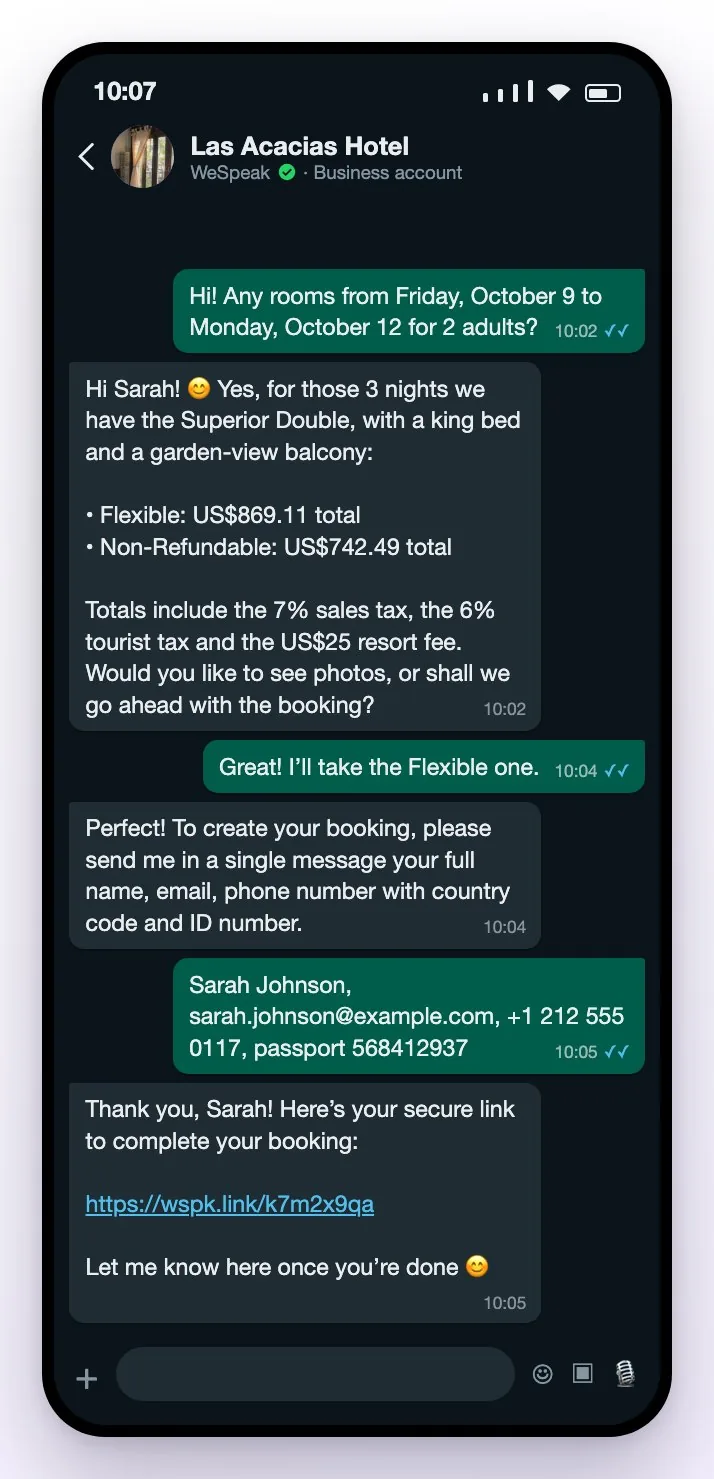
If several rooms have the same currency and, with WeSpeak Rates, the same payment and cancellation policies, the assistant can include them in a single link; if not, it creates one reservation per group.
ℹ️ If the guest prefers not to pay online, the assistant explains that the link is the safest way and, if they insist, hands the conversation over to your team. If your reservations balance ran out, instead of sending the link it pauses the conversation (see Reservation packs and balance).
On a call, the voice assistant can also close the reservation and send the link by WhatsApp or email: see WeSpeak Voice.
Your team generates it from the chat ($ button)
In Conversations, open the conversation and click $ (Generate a quote for the customer), in the message box. Generate quote opens, in three steps:
Dates and occupancy. Choose the Stay dates (days before today can't be selected), Rooms and guests (up to 5 rooms; in each one, 1 to 10 adults and up to 10 children, with each child's age, from 1 to 17), the Currency (it starts in your property's) and, if you have several properties, the Hotel. With WeSpeak Rates you can turn on Include rates with promo codes to also see the rates sold with a code; without Rates, that option doesn't change anything. Click Get quote.
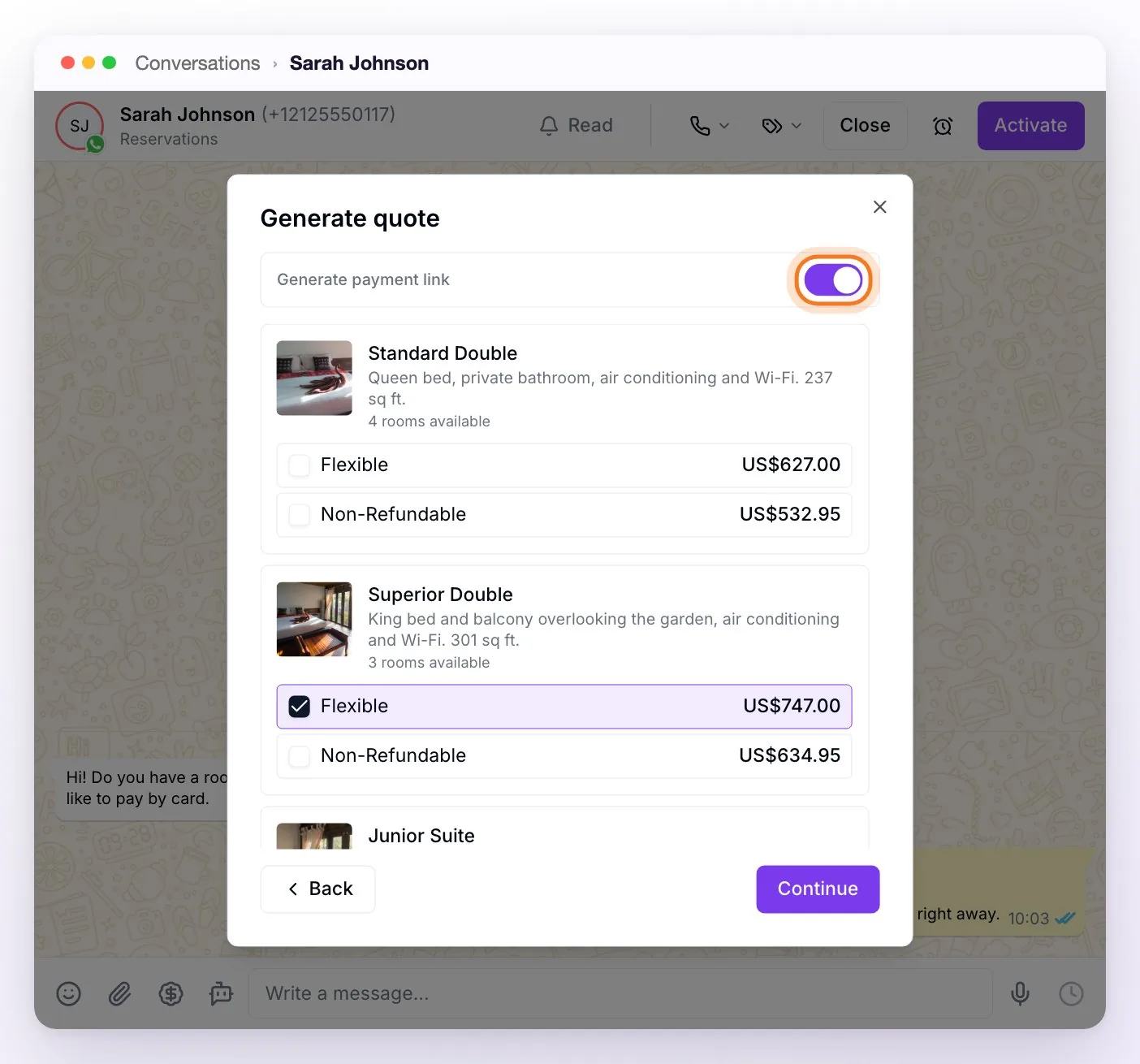
Room and rate. Turn on Generate payment link and choose one room with one rate: each link is one reservation. The prices you see are the total for the stay. Click Continue.
Preview. You see the quote messages and can edit the text right on each bubble. With the link turned on, the button is Copy payment link: it creates the reservation, copies the link and you'll see Payment link copied. Paste it in the chat and send it with whatever message you like: in this mode only the link is sent, not the quote.
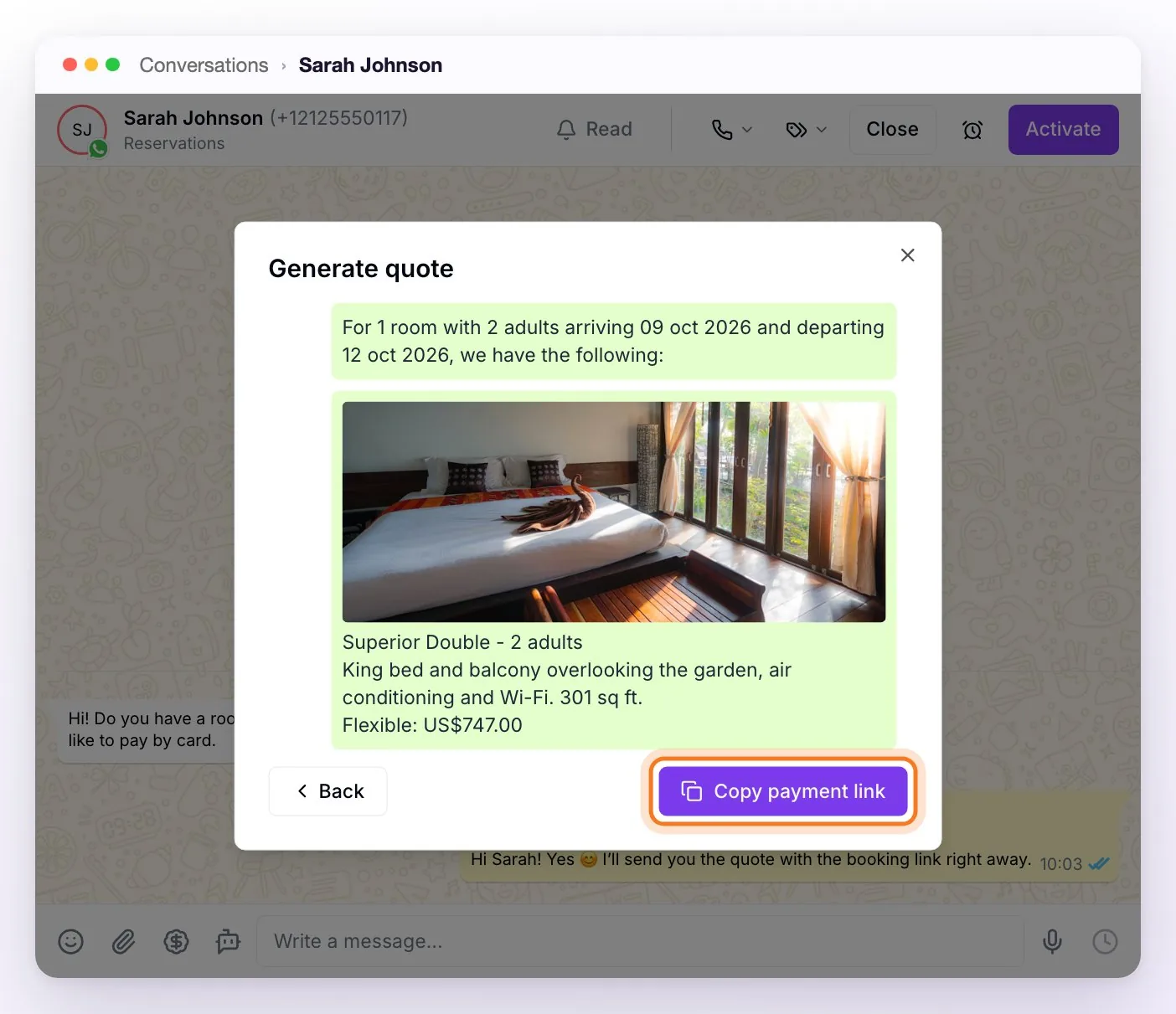
💡 If you want the guest to also get the quote with its photos, send it first without Generate payment link and then generate the link.
ℹ️ Without Generate payment link, the button is Send message and it sends the quote (text and photos) as you left it, with no link. In an email conversation, the button is Load into email: the quote —and, with the switch on, the link with the Pay the reservation button— goes into the draft so you can finish writing.
ℹ️ On your website's Chat Web, the payment link is always generated by your team with the $ button: the assistant doesn't generate it on the website. Send it while the visitor has the chat open; if they disconnect, the quote tool won't let you confirm until they're back.
⚠️ Each link you generate creates a reservation. If the link couldn't be copied, the quoter leaves it written in the message box or shows it to you so you can copy it by hand: don't generate it again.
ℹ️ If you don't see Generate payment link in the rooms step, WeSpeak Payments isn't active on your account or your reservations balance ran out (see Activate WeSpeak Payments).
What the guest sees
The link opens a secure page (app.wespeak.pro) with the reservation already put together. The guest doesn't need to create an account.
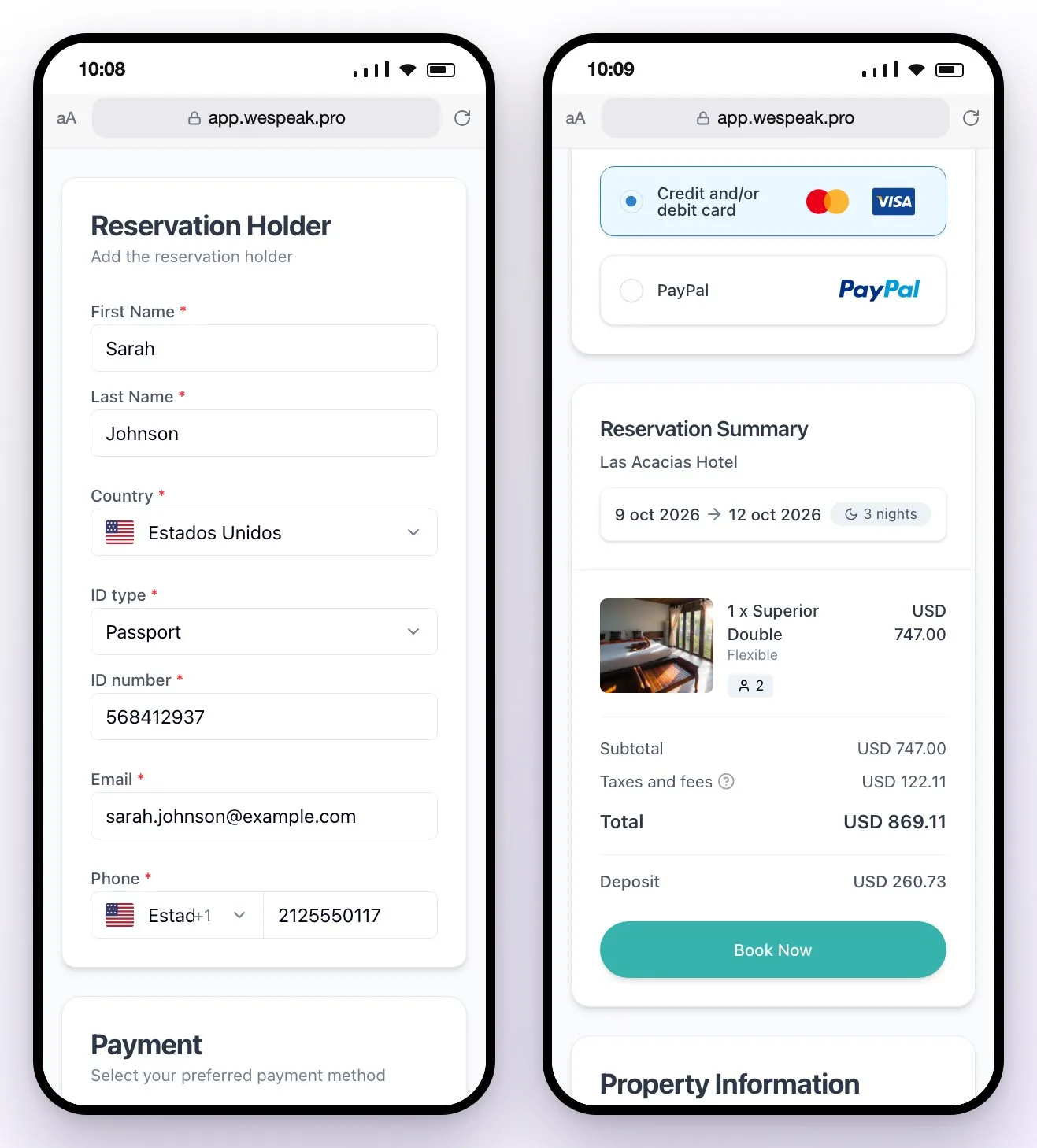
Their details. In Reservation Holder they fill in —or review, if they already gave them to the assistant— First Name, Last Name, Country, ID type, ID number, Email and Phone. They're all required, and the document types offered depend on the country.
How they pay. In Payment they choose among the methods you have turned on; if there's only one, it comes selected.
The summary. In Reservation Summary they see the hotel, the dates and nights, the room with its rate, the tax breakdown (see Taxes), the Total and, if applicable, the Deposit, which is what they pay at booking.
Without WeSpeak Rates, the taxes, deposit, methods and cancellation policy come from your reservations page setup. With Rates, from the booked rate: its taxes, its cancellation policy and its payment policy, with the deposit and methods you defined (see Payment policies).
They confirm. Tapping Book Now opens the Terms and Conditions, with your arrival and departure times, your cancellation policy and, with Rates, the rate's payment policy. The guest checks I have read and accept the Terms and Conditions and taps Confirm and complete reservation.
At that moment WeSpeak checks availability and price in your system again. If something changed, it shows them Availability error: the reservation isn't loaded into your system and stays with the Failed status in Reservations. Send them a new link.
They pay or leave the reservation done, depending on the method:
| Method | When they confirm | Afterwards |
|---|---|---|
| Credit and/or debit card, Mercado Pago, PayPal, PayU, Wompi | They go to the gateway's secure page to pay the deposit (or the total, if you don't charge a deposit). They have 12 minutes to complete the payment. | They come back to the confirmation. The reservation is confirmed when the gateway approves the payment. |
| Card guarantee | They go to a secure form to register the card, with no charge. They also have 12 minutes. | On the confirmation they see Card authorization processed, with the last 4 digits and the notice that nothing has been charged yet. |
| Bank transfer, external payment link, Pay at hotel | The reservation is created at that moment, with no online charge. | On the confirmation they see your payment instructions. |
ℹ️ The link doesn't expire. The 12 minutes run from the moment the guest confirms: if they ran out, or they went back from the gateway, they can open the same link and try again. Once the reservation is confirmed, the link leads to the confirmation.
Finally, the confirmation shows Thank you for your reservation!, the reservation number (your PMS's or Channel Manager's; with WeSpeak Engine, WeSpeak's), the guest's email, the dates, the room and the summary with Amount paid and Amount due.
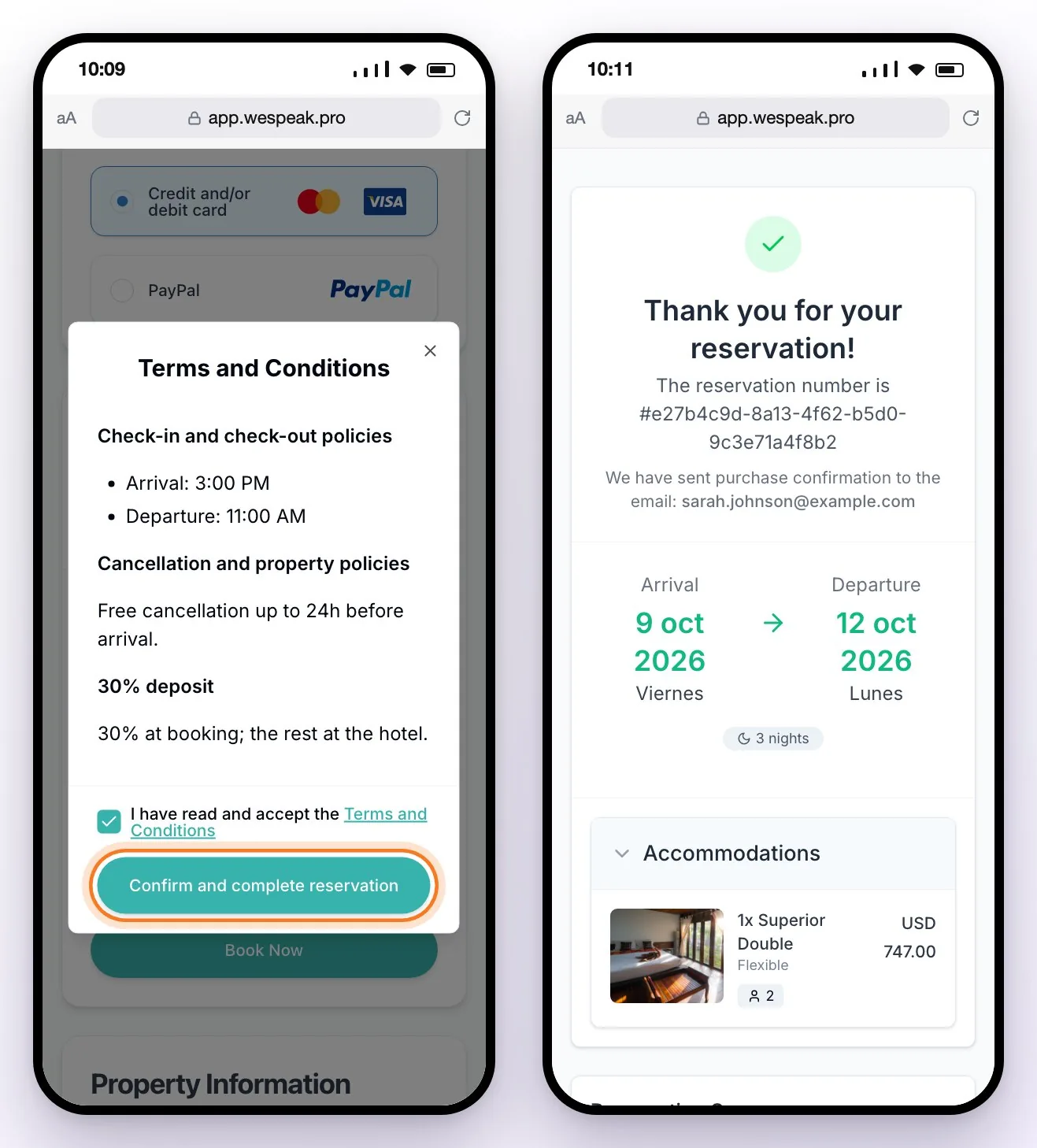
When the reservation is confirmed, it shows as Confirmed in Reservations and in your PMS or Channel Manager, if you have one (see Sync with your PMS); a WeSpeak Payments note appears in the conversation and the conversation is marked as won in the funnel. The confirmation email reaches the guest only if you turned it on in Notifications, where you can also send them a WhatsApp template (see Notifications).
Frequently asked questions
How long does the guest have to pay?
The link doesn't expire: they can open it whenever they want, and when they confirm, price and availability are checked again. What has a limit is the payment on the gateway's secure page: 12 minutes from the moment they confirm. If time runs out, they can open the same link again and retry.
The guest can't pay with their card (e.g., American Express) or the link won't open.
The cards accepted depend on your account with the gateway (which cards your Stripe or Mercado Pago account accepts). If they took more than 12 minutes to complete the payment, the attempt expired: they can open the same link again and retry (no need to generate another one: each new link creates another pending reservation). Also check that the card is set to Charge with… and not to Save card data for manual charge. If the problem persists, report it with the contact's number.
The Book Now button on the payment page is grayed out.
There's no payment method available for that reservation: check that the Payment methods tab has methods turned on and connected and, with WeSpeak Rates, that the rate's payment policy, if it has its own setup, has them too.
The guest tells me they got an "Availability error" when confirming.
Between the moment you sent the link and the moment they confirmed, the price changed or the room sold out, and the reservation ended up with the Failed status. Quote again and send them a new link.
I generated a link and the guest never paid. What happens to that reservation?
It stays Pending in Reservations. It doesn't deduct from your balance or block availability in your system.
Can I send a single link for several rooms?
From the $ button, no: each link is one room with one rate (generate one per room). The assistant can include several rooms in the same link when they have the same currency and, with WeSpeak Rates, the same payment and cancellation policies.
Why wasn't the quote sent with "Generate payment link" turned on?
Because in that mode the Copy payment link button only creates the reservation and copies the link: you paste it in the chat with whatever message you like. If you also want to send the quote, send it first without the switch.