Reduced response mode makes your assistant sell the same using fewer messages. It doesn't reply shorter or leave information out: it merges into one message what used to go out as five or six.
You turn it on with a switch in Knowledge → Assistant configuration, and it only changes what goes out over WhatsApp connected via API. Instagram, Facebook, TikTok, your website chat and WhatsApp over QR keep working exactly as you configured them.
In this article
- Why this mode exists
- What changes exactly
- How many messages it saves you
- It only changes WhatsApp
- How to turn it on
- Why you might not see it
- What happens to your other settings
- What does not change
- Frequently asked questions
Why this mode exists
Until now your assistant's replies were free, so it didn't matter how many messages it sent. From October 1, 2026 Meta charges for every message that leaves your number, with 1,000 free per number per month (all the details are in WhatsApp costs (Meta)).
That's when something that used to be harmless becomes visible: a single quote could go out as sixteen messages. The text with the prices, then a "Deluxe Suite 👇", then four photos of the suite, then "Double Room 👇", another four photos. And before that, the assistant often took three turns to reach the price: it answered, asked, waited, asked again.
The mode fixes both: fewer messages per reply and fewer turns until the price.
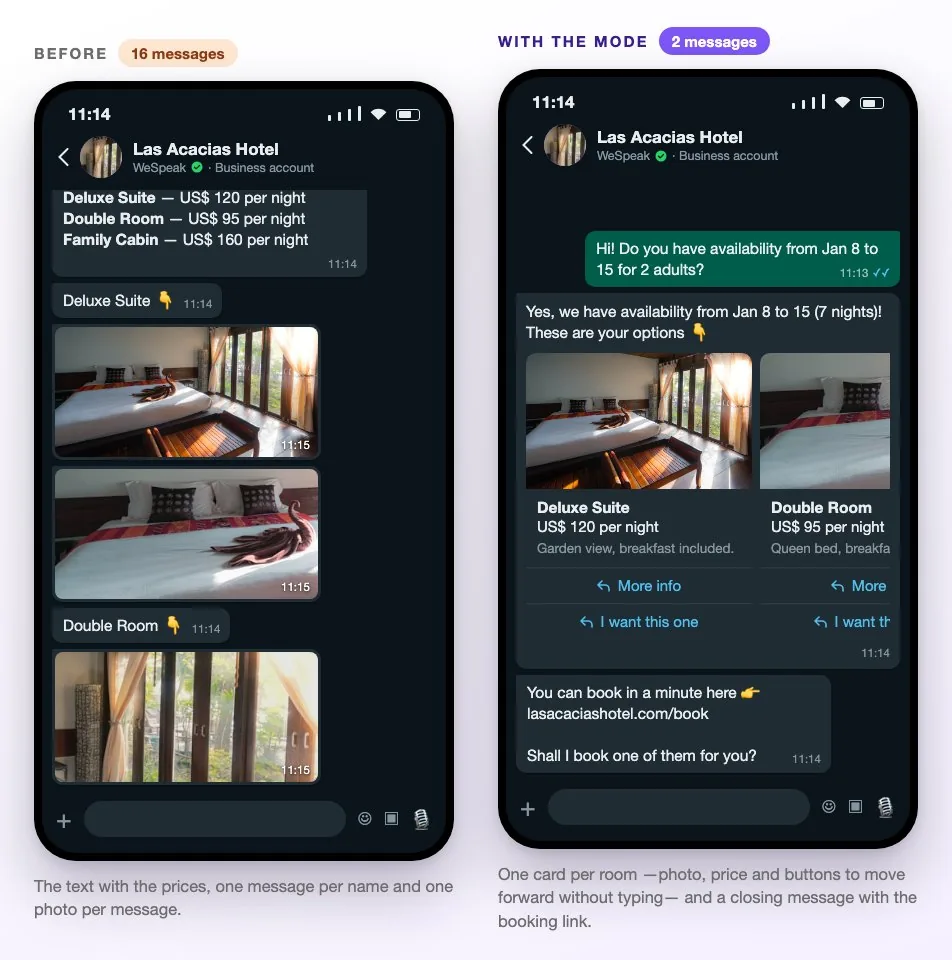
💡 It isn't a "savings" mode that serves guests worse. The guest gets the same information, better presented: instead of a long text and a burst of photos, they get cards with a photo, a price and buttons to move forward.
What changes exactly
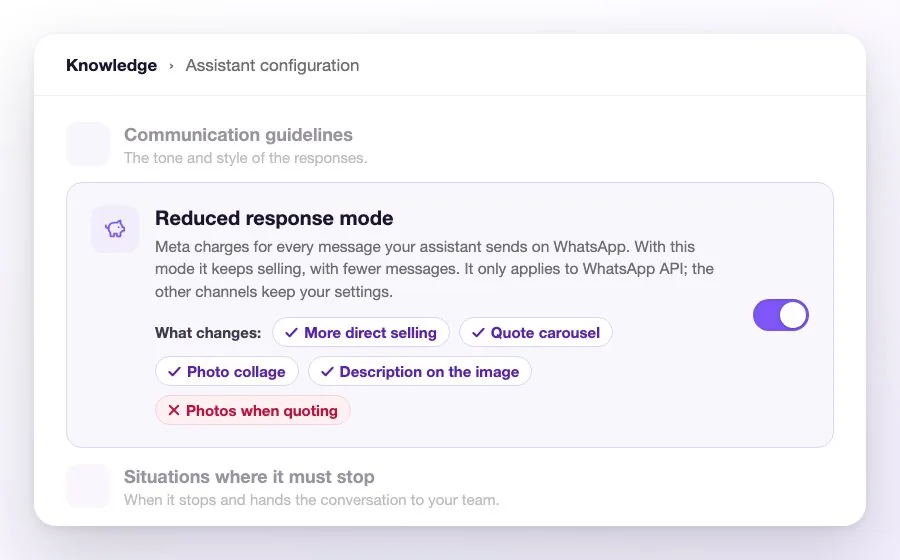
Turning it on applies five changes together on WhatsApp. You don't pick them one by one: it's all or nothing. On your panel's card you see them as chips: four the mode turns on and one it turns off.
| Change | What it does |
|---|---|
| ✅ More direct selling | The assistant goes straight to the price and the booking link. If it already knows the dates and how many people, it quotes in that same reply instead of asking permission or asking again. And if the guest is vague ("sometime in October"), it proposes an option with a real price and says which dates it assumed, so they can correct them. |
| ✅ Quote as cards | The quote goes out as a carousel of cards: one per room, with its photo, its price and buttons to move forward, all in one message. |
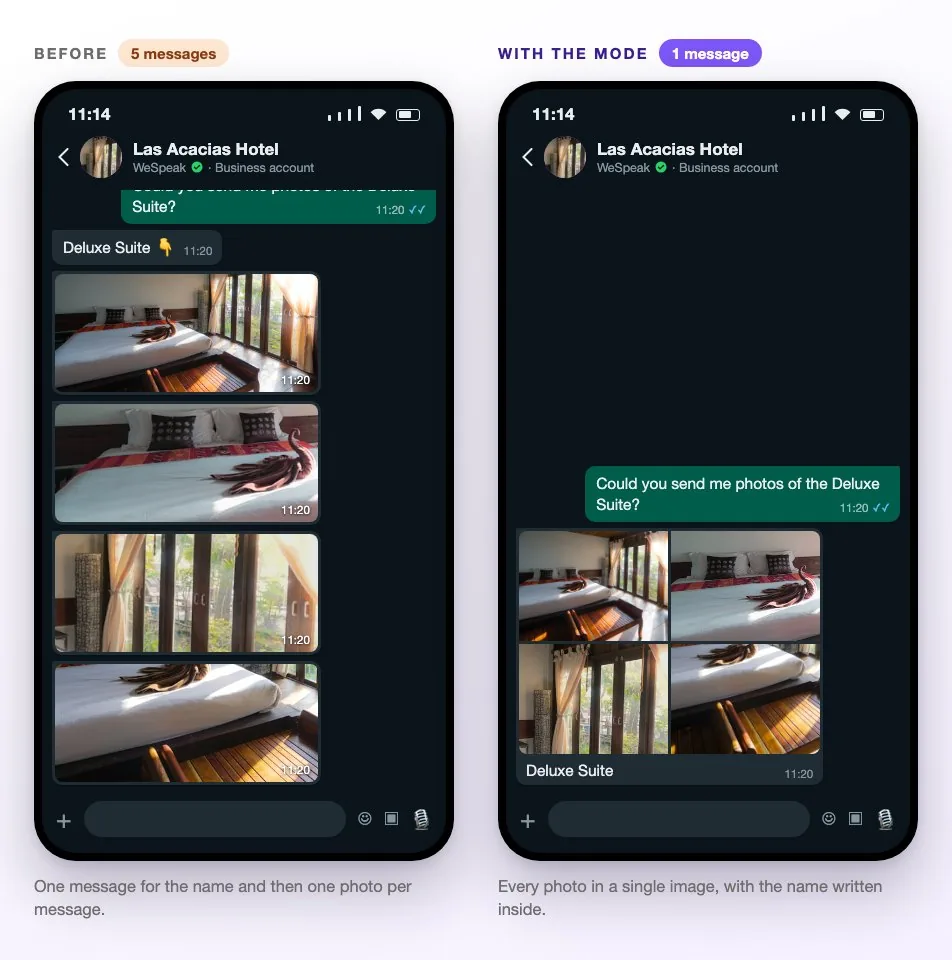
| ✅ Photos in a single image | When it sends the photos of a room or a common area, it merges them into one image instead of sending them one by one. |
| ✅ The name inside the photo | The name of what's shown is written inside the image. The "Deluxe Suite 👇" that came before each photo disappears: two messages become one. |
| ❌ Photos when quoting | Turned off. The photos already travel in the cards, so the gallery is not sent again after quoting. |
How many messages it saves you
A quote for three rooms with four photos each, as the guest receives it:
| How it's configured | Messages |
|---|---|
| Without the mode | 16 — the quote text plus, per room, a "Name 👇" and its four photos. |
| With the photos in a single image only | 7 — the text plus, per room, a "Name 👇" and one image. |
| With reduced response mode | 2 — the three cards with their photos and a closing message with the booking link (plus whatever doesn't fit in a card, like another rate or a condition). |
And when the guest only asks for photos, without a quote, each room goes from five messages to one (the assistant's reply goes separately, as always):
It only changes WhatsApp
The mode acts only on messages leaving through WhatsApp connected via API (the official connection with Meta). That's the channel Meta charges for, and the only one where the cards exist.
In your hotel, at the same time:
- WhatsApp connected via API → replies with the mode on.
- Instagram, Facebook, TikTok, website chat and WhatsApp over QR → your usual configuration.
Nothing needs to be configured twice: it's the same assistant, with the same information and the same rules. The only thing that changes is how it delivers replies on the channel that gets billed.
How to turn it on
- Go to Knowledge → Assistant configuration.
- Find the Reduced response mode card (it sits between the communication guidelines and the situations where the assistant must stop).
- Hover each chip if you want to see what it does before deciding.
- Flip the switch. That's it: from the next conversation on, the assistant replies with the mode on.
Turning it off is just as immediate and leaves everything as it was: the mode never changes your settings, it only overrides them while it's on.
💡 The first time you turn it on, WeSpeak builds the merged images with your room photos. It may take a few minutes and happens on its own; until then, those photos go out as usual.
Why you might not see it
If you can't find the card in Knowledge, one of these is missing:
- Having WhatsApp connected via API. That's the channel the mode improves. With WhatsApp over QR the card doesn't appear — your account manager can help you move your number to the API. See WhatsApp.
- WeSpeak enabling it for you. We're turning it on gradually, account by account. If you're interested, ask your account manager.
- Having the new Knowledge. The card lives only there; if your panel still has the previous version, your account manager will update it.
- Your assistant quoting. If prices and availability are off, there are no cards or direct selling to offer.
- Your assistant's quoting setup being up to date. Some assistants still have an older quote format; your account manager reviews it and updates it.
What happens to your other settings
The mode doesn't touch any switch of yours. It coexists with them, and on Price and Availability you'll see a note clarifying which one rules on each channel:
| Your setting | What happens while the mode is on |
|---|---|
| Send photos when sending availability (on) | On WhatsApp the gallery isn't sent after the quote, because the photos already travel in the cards. On every other channel it still applies. |
| Send photos as a collage (off) | On WhatsApp the photos go out merged into one image anyway. Turn it on if you want the same on the other channels. |
Turn the mode off and both rule everywhere again, exactly as you left them.
What does not change
- The information. The assistant still gives full prices, conditions, taxes and policies. It doesn't summarize or leave anything out to save messages.
- Tone and language. Your communication guidelines, the assistant's name and the guest's language stay the same.
- The pricing rules. It still quotes only with real, current data. If the guest doesn't say how many people, it quotes for 2 and says so in the same message so they can correct it; if they give neither dates nor people, it asks for both together. It never presents a date the guest didn't give as if they had: when it assumes something in order to show a price, it says so in the same message.
- When it hands the conversation to your team. The situations where the assistant stops work the same.
- Automatic follow-ups and the rest of the platform's features.
- The cards' safety net. If the cards can't say exactly what the quote says (with more than ten rooms, say), the quote goes out as text, complete and never trimmed. Sometimes one image per room arrives as well. The cases are in Quote carousel.
Frequently asked questions
Can I turn on just some of the five changes?
No: it's a package, one switch. The four it turns on and the one it turns off hold each other up — the gallery after the quote is turned off precisely because the photos already travel in the cards. What you can turn on separately is Send photos as a collage, from Price and Availability, which applies to every channel.
Will the assistant reply in a short, dry way?
No. The idea isn't to shorten the reply but to stop stretching the sale: fewer turns until the price, with the same warmth. It can be just as friendly — while giving the quote instead of promising it for the next message.
Does it affect Instagram or my website chat?
No. It only acts on WhatsApp connected via API. On every other channel the assistant replies exactly as you configured it.
I turned it on and the quote didn't come out as cards.
For cards to go out, the rooms need their photo uploaded and names that can't be confused with each other. If the quote has a single room, it goes out as a single card. If a room has no photo, it gets no card: it appears in the closing message, with its price, and the rest go out as cards. When the cards can't say exactly what the quote says, it goes out as text, complete and never trimmed. The cases are in Quote carousel.
How much will I save?
It depends on how many conversations you have and where your guests are from, because Meta charges by country. What is fixed is the count: a quote that took sixteen messages now takes two, and on each photo request every room goes from five messages to one. The assistant's reply goes separately, as always.
Can I see it working before turning it on?
The panel's test chat doesn't show the mode, because it only acts on WhatsApp. To see it with your assistant, turn it on and message your number over WhatsApp from another phone: if you don't like it, turn it off and everything goes back to how it was.
If I turn it off, what happens to what I had configured?
Everything comes back, immediately. The mode never overwrites your switches: while it's on it overrides them, and when you turn it off your configuration is exactly as it was.