Normally, each contact has a single conversation that reopens every time they write — which means inquiries from months ago get mixed in with today's. With multi-conversation, when the contact writes again and their previous conversation is already closed, a new, separate conversation opens.
The problem it solves, with an example
Imagine a guest who wrote to you 3 times in the year, each time arriving from a different Meta ad:
Without multi-conversation (a single endless thread):
- Counts as just 1 lead, even though they visited 3 times.
- It's attributed to a single ad, even though they came from three different ones.
- It can only be marked as won once, even if they booked 3 times.
- It gets a single follow-up cycle, because there was never any separation between visits.
With multi-conversation:
- They're 3 conversations, each its own lead.
- Each visit is attributed to its source ad.
- Each visit can be won (or lost) separately, with its own funnel stage.
- Each visit has its own follow-up.
What changes for you
- For your team: each visit is a separate case, tidier — the assistant and agents start clean, without carrying over old context.
- For your metrics: acquisition, conversion, ad attribution, and follow-ups reflect the reality per visit.
- In Conversations, each conversation is a row: with the All filter, the same contact can show up more than once (the current conversation and the previous closed ones). Their history isn't lost.
- It also enables Snooze for conversations and the Snoozed filter: you hide them until a date and they come back on their own (the options are in How to use live chats).
How it looks in Conversations
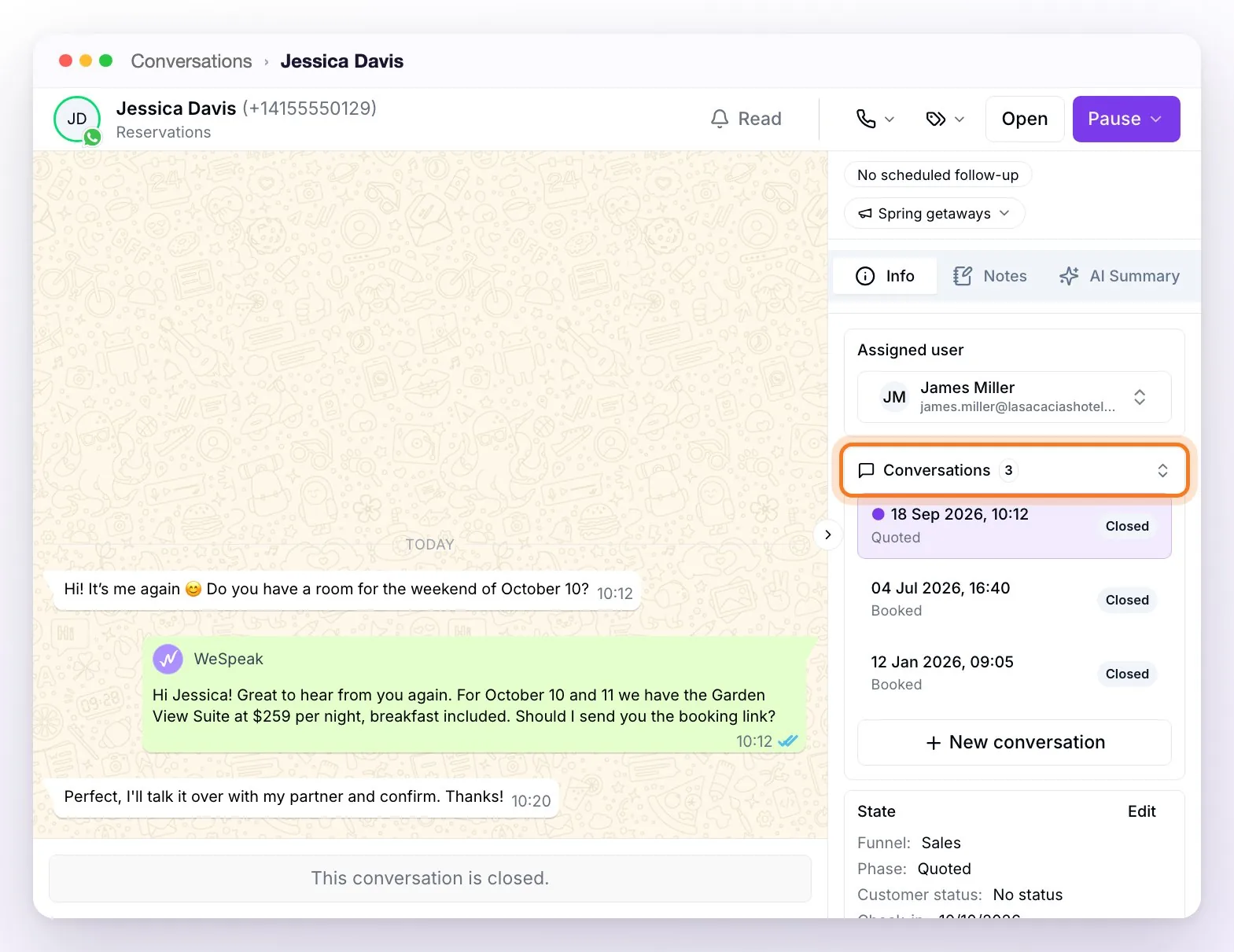
- Conversations section: inside the chat, in the right-hand panel (Info tab), the Conversations section shows how many conversations you've had with that contact; click it to expand the list. Each row shows when that conversation started, which funnel stage it ended up in, and whether it's Open or Closed: the one you're viewing is highlighted, and you reach the others with a click. The section appears when the contact has more than one conversation.
- New conversation button: when the contact has no open conversation, it appears in that same section so you can start a new one manually, without waiting for them to write — useful for proactively kicking off a case. If one is already open, the system takes you to it (they're never duplicated). It isn't available in email or calls conversations.
When it's a good fit
It's ideal for businesses with recurring customers — hotels with guests who come back each season, inquiries spaced out by months — and for those who invest in advertising and want each visit attributed to its campaign.
How to turn it on
Multi-conversation is enabled for your whole account, and you can manage it yourself, without going through support:
Go to Settings (in the side menu, Assistant group) and scroll down to the Platform Configuration card, near the bottom of the page.
Turn on the Multi-conversation toggle (it's next to the other platform options, such as Auto-assignment of users or Mandatory form when closing chat).
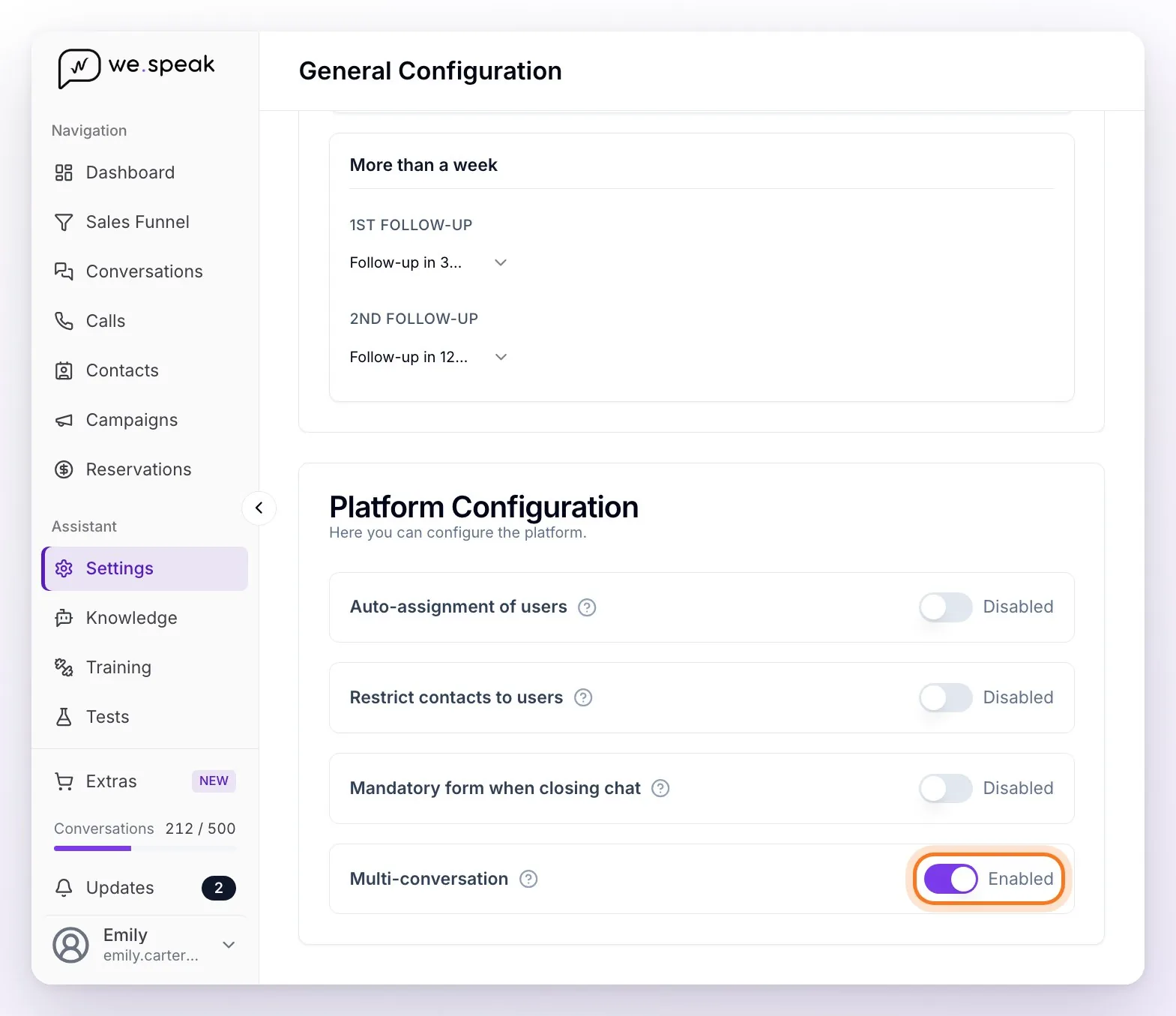
The change is immediate: there's no separate save button. If something fails when saving, the toggle reverts to its previous state on its own and lets you know so you can retry.
Turning it on also makes Snooze and the Snoozed filter available. Turning it off returns to the classic behavior (the last closed conversation is reopened).
ℹ️ The account's administrators and supervisors can change the toggle. Users with the User role don't have access to Settings: it's a configuration decision, not a day-to-day one.
The operating rule is simple: when a message arrives with all of the contact's conversations closed, a new one is created instead of reopening the last one.
⚠️ Important: if the previous conversation is still open, the message goes there — open conversations aren't duplicated. That's why closing conversations when you finish each case is key to getting the most out of this feature.
Frequently asked questions
Do I lose the contact's old history?
No — previous conversations stay closed and viewable under the Info tab → Conversations; they just stop getting mixed in with the new one.
Does the contact notice anything?
No, for the guest it's transparent: they keep writing to the same number as always.
What happens if we never close conversations?
New conversations are never created: the feature depends on the previous one being closed. That's a good reason to make closing part of your team's process.
Why does the same number show up as two contacts?
Because they wrote to two different lines of the hotel (for example, two WhatsApp numbers). Each line keeps its own conversation history, on purpose, so they don't get mixed.
What if I want to go back to single-conversation mode?
Turn off the Multi-conversation toggle in Settings → Platform Configuration. Conversations that were already split stay as they are; from then on, when a contact writes again, their last conversation is reopened.