If you manage more than one property or business, you don't need a user for each one: with multi-account, the same user accesses several organizations (WeSpeak accounts) and switches between them from the panel, without logging out.
In this article
- How to switch accounts
- How to give someone access to several accounts
- What each account shares (and what it doesn't)
How to switch accounts
In the left sidebar, at the top, below the logo, is the organization switcher: a button with a building icon and the name of the account you're working in (if the name is long, it's cut off with "…").
Click it: the list of your accounts opens, in alphabetical order and with the current one highlighted. Search by name ("Search organization...") or pick one from the list.
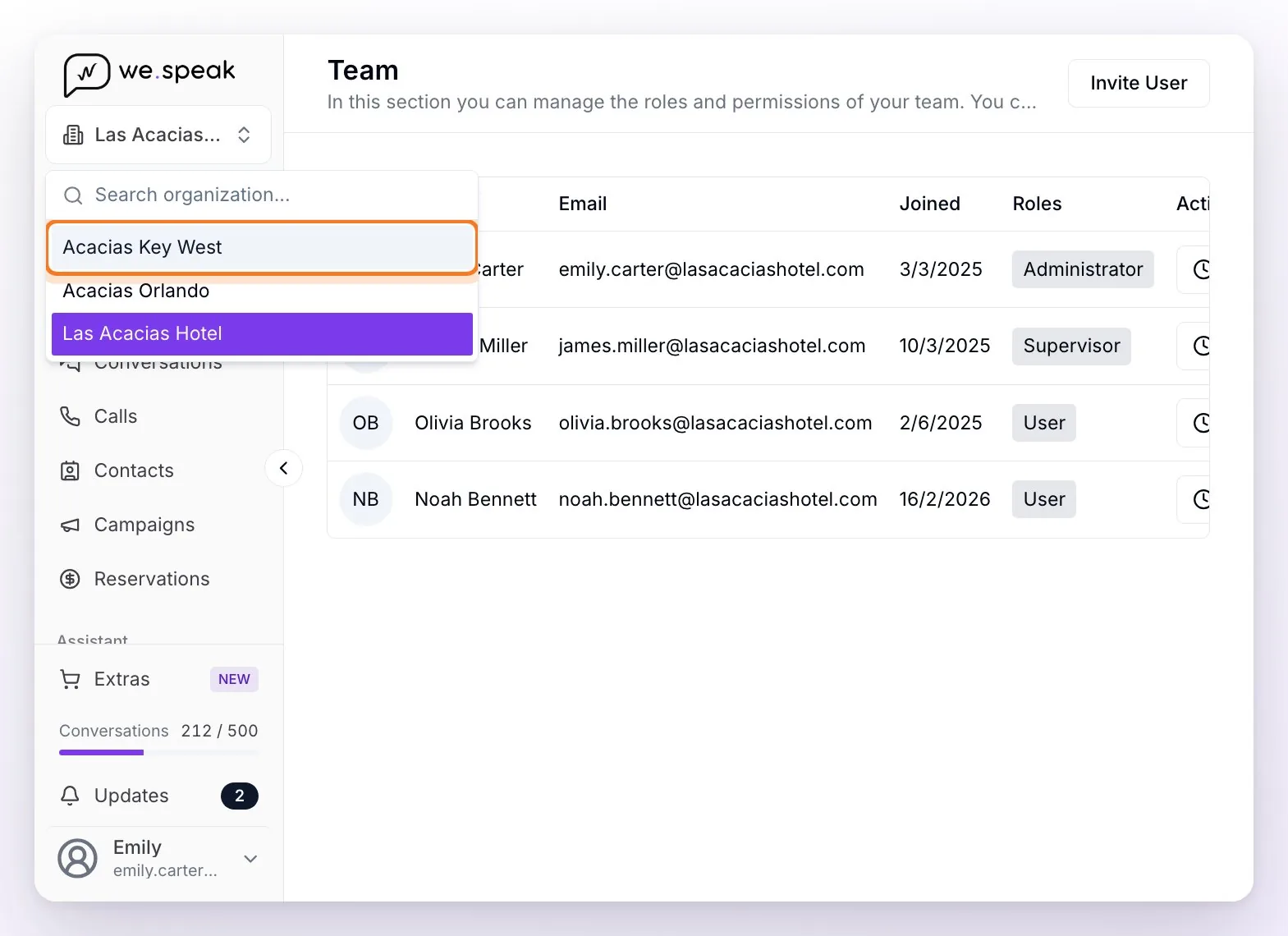
When you pick another account, the panel reloads already inside it and keeps you in the same section you were in: chats, funnel, channels, statistics — everything becomes that organization's, and the switcher shows its name. If your role in that account doesn't have access to that section, you land in Conversations.
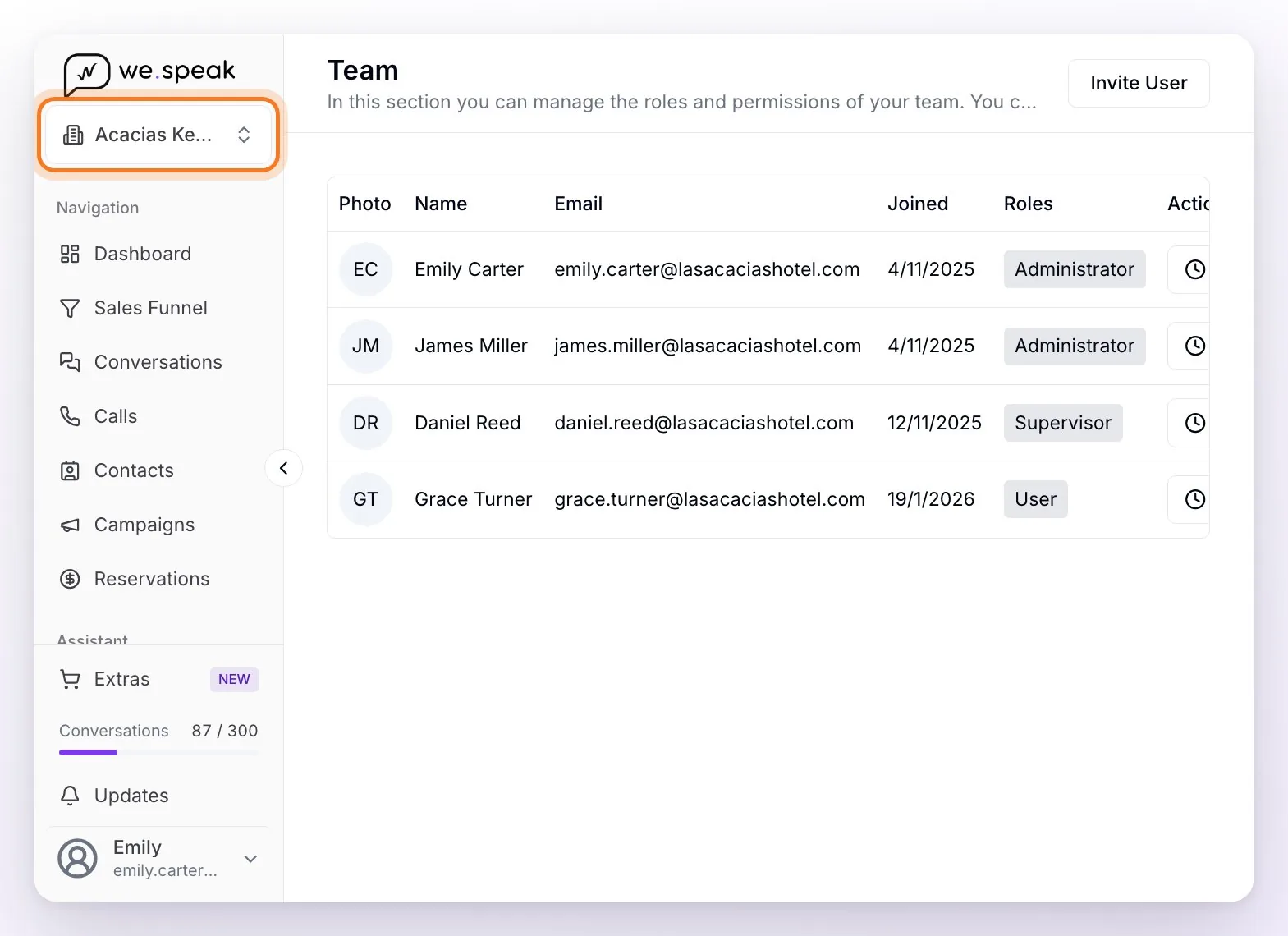
ℹ️ The switcher only appears if your user has access to two or more organizations. If you manage just one, you won't see it. If you just got access to a new account and it doesn't show up in the list yet, log out and log in again.
How to give someone access to several accounts
Access is given account by account, always with the same email. An Administrator of each account does it from Team (in their user menu, at the bottom left) —or your WeSpeak advisor, if you ask them—:
- Go into the account where you want to give access (with the switcher) and open Team.
- Click Invite User, choose the role (Administrator, Supervisor or User) and type their email: the same one they already use to log in to the other accounts.
- Send Invitation — the person gets access to that account and receives the invitation email. If they already had a WeSpeak user, they don't create another one: they keep logging in as usual.
- Repeat the same in each organization they need to access. Once they have access to more than one, the switcher appears for them.
The step by step with images is in Permissions and Roles.
💡 The role is independent in each account: the same person can be Administrator in one property and User in another. In the image above, James Miller is Administrator in Acacias Key West, while in Las Acacias Hotel he's Supervisor.
⚠️ Always use the same email —and the same sign-in method— in every account: with another email, WeSpeak treats them as a different user and the switcher doesn't appear. And if you remove someone from Team in one account, they lose access only to that one: they keep the others.
What each account shares (and what it doesn't)
What's shared across organizations is your user: the same email and the same sign-in method for all of them, and your name and photo from Profile. Everything else is independent per account:
- Role and permissions — assigned separately in each one.
- Conversations and contacts — each organization has its own.
- Connected channels — WhatsApp, Instagram, Facebook, etc. are connected per account.
- Assistant and knowledge — each account trains its own.
- Funnel, campaigns and statistics — data kept separate per account.
- Usage and Extras — each account has its own conversation counter (the one in the sidebar) and its own Extras.
- Subscription and billing — in Subscriptions you see the one of the account you're in; depending on how you signed up, it can belong to that account alone or be a single one that groups several accounts of your group.
- Working hours, availability and time zone (for WeSpeak Voice) — set up in each account.
- Team — managed separately in each one.
⚠️ One exception with Facebook: channels are independent in WeSpeak, but the authorization Facebook gives is a single one per Facebook user, shared across all your accounts. If the same user manages pages connected in two WeSpeak accounts, the page selection in the Facebook window must always include all of them — if you uncheck one, that channel stops receiving messages in the other account, with no warning. The details are in Facebook Messenger.
ℹ️ In hotel chains (multi-property), each property is set up separately. If you need to add a new organization, check with your WeSpeak advisor.