If your property has no PMS and no Channel Manager, WeSpeak can be your system: you load everything here — rooms, rate plans, prices and inventory — and the assistant quotes and sells over chat with that information.
It's the third of the three Rates connection types, alongside PMS and Channel Manager. And it's the only one where you can edit inventory from WeSpeak: in the other two, availability comes from your system.
In this article
- How to know if this is your connection
- What makes it different
- How to set it up
- Inventory, day to day
- How the sale works
- Things to keep in mind
- Frequently asked questions
How to know if this is your connection
Go to Rates → Integration. If this is your connection, you'll see:
- Integration Channel: WeSpeak (rsv)
- Integration Type: WeSpeak Rates
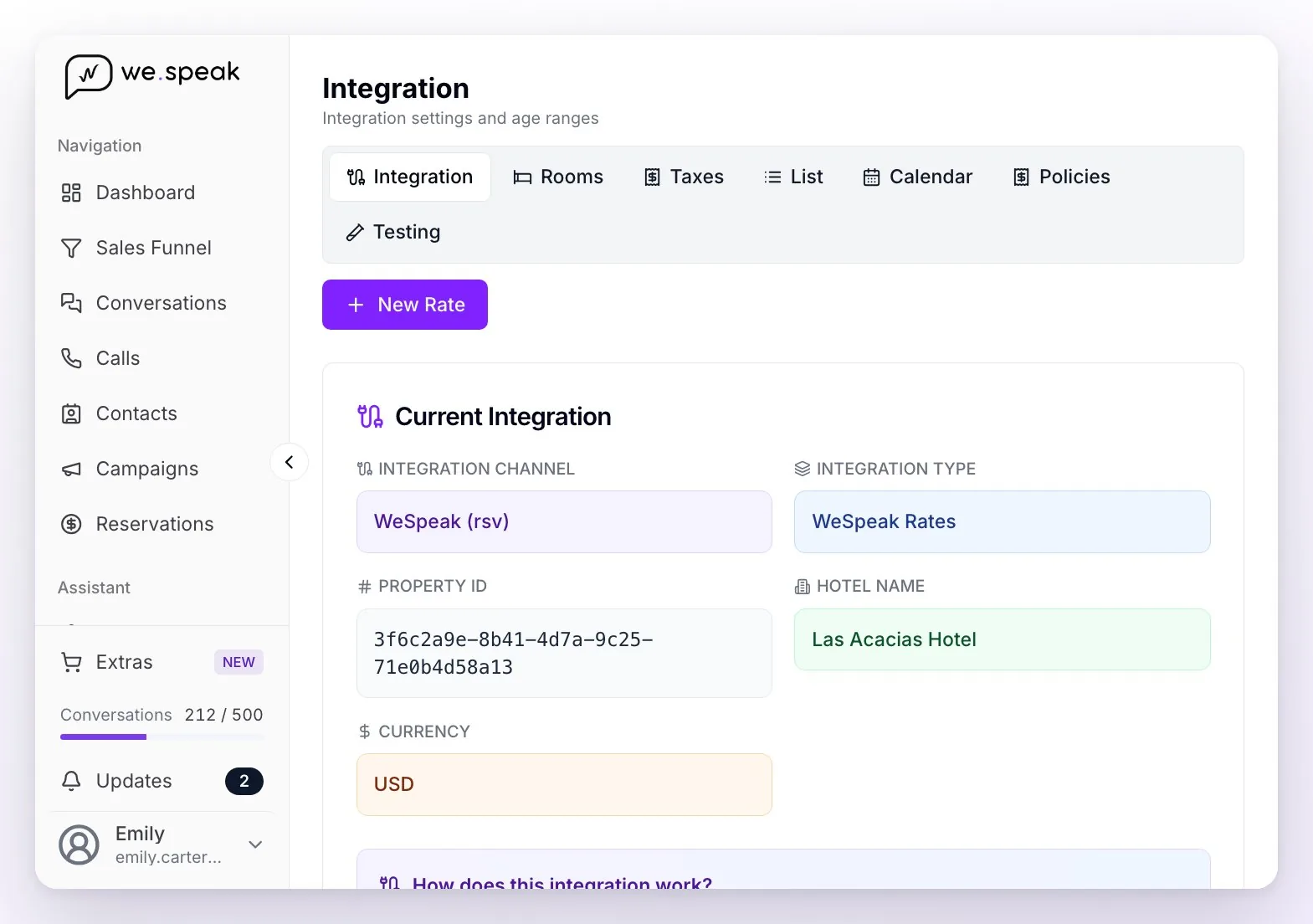
If it says something else — your PMS's name, your Channel Manager's, or Booking Engine — yours is a different connection: check the table in Get to know WeSpeak Rates.
What makes it different
| This connection | PMS or Channel Manager | |
|---|---|---|
| Where prices come from | From WeSpeak | From your system |
| Where availability comes from | From WeSpeak | From your system |
| Do you edit inventory here? | ✅ Yes — the only one that allows it | No |
| Where the chat booking ends up | In WeSpeak (Reservations) | Also in your PMS or Channel Manager |
| Does it sync with other sales channels? | No | Yes, through your system |
How to set it up
- Create your rooms in Rates → Rooms (the New room button), with their maximum capacity of adults, children and people, the description and the photos.
- Set the ages in Integration: the infant and child ranges, and whether a baby takes a spot.
- Create your rate plans with New Rate and load the prices — the same as in any connection, with their policies, taxes and restrictions. The step by step is in Get to know WeSpeak Rates.
- Load the inventory: how many units of each room you put on sale per date, from the Calendar.
- Turn on WeSpeak Payments: that's what lets the assistant close the booking over chat. Without a payment path the assistant quotes, but can't confirm.
Inventory, day to day
In the Calendar, under each room, there's a row with each day's availability. On this connection those numbers can be edited: you click a day and Edit Availability opens.
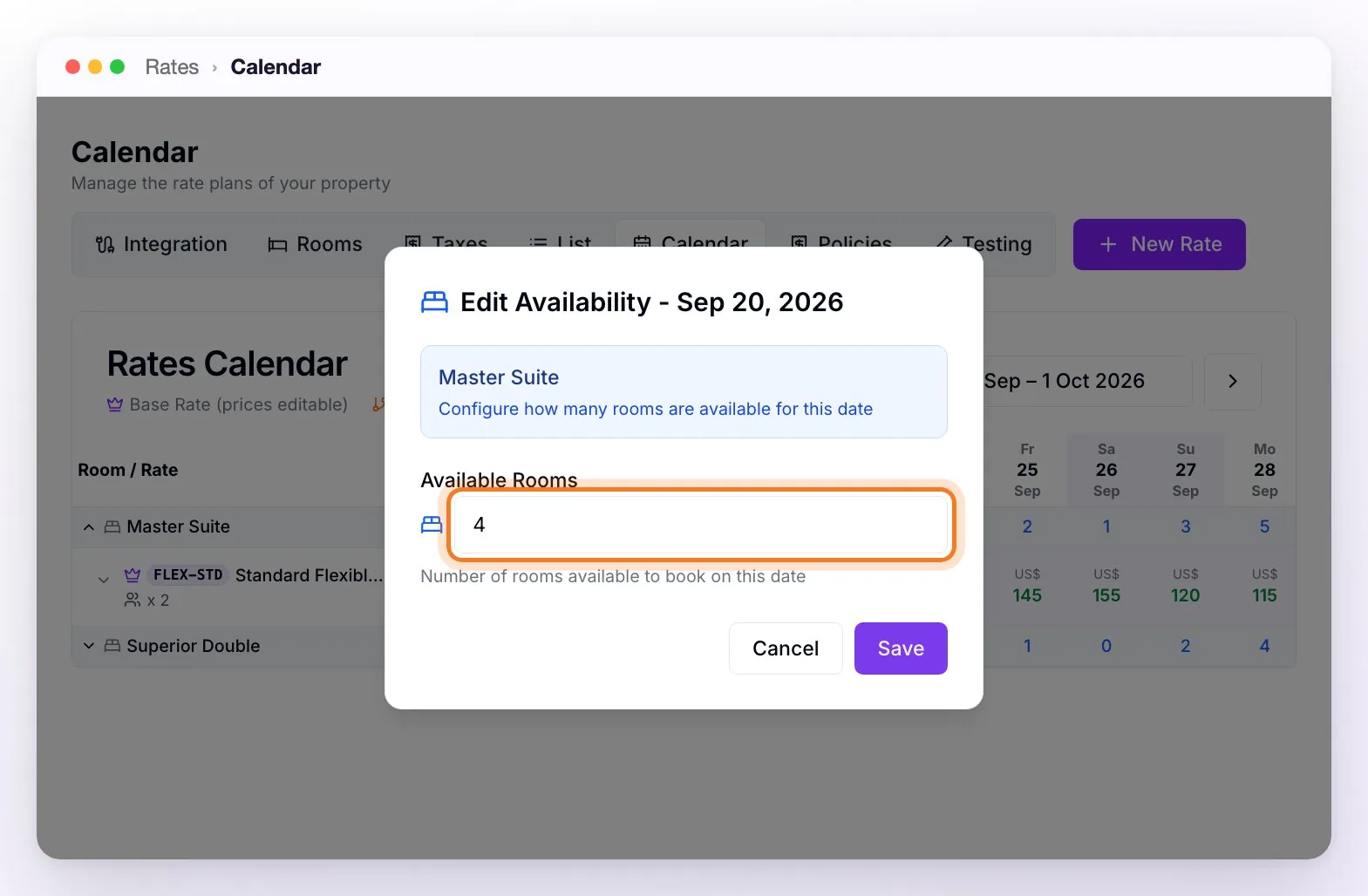
- Day by day: click the day's number, type how many rooms are still on sale and hit Save.
- By range, with the Bulk Editor: the Bulk Editor button in the Calendar applies changes to many dates at once. It has three tabs — Availability, Rates or Both — and lets you adjust, per room type, the number of Available Rooms, the Stop Sell, Closed to arrival (CTA) and Closed to departure (CTD), the minimum and maximum nights, and the prices. Anything you leave blank isn't changed.
- Past dates can't be edited: only today onwards.
- It decrements on its own: when a booking is confirmed over chat, WeSpeak subtracts the rooms sold from each night. You don't have to do anything.
💡 The inventory is what you put on sale over chat, not necessarily your whole hotel. If you also sell through other channels, load here the number you want to keep for WhatsApp.
How the sale works
- The guest asks over chat and the assistant quotes with your prices and your inventory.
- The guest pays with the WeSpeak Payments payment link.
- The booking is registered in Reservations and the inventory is decremented automatically, night by night.
Since there's no external system, the booking isn't sent anywhere: it's born and lives in WeSpeak. That's why the "unsynced bookings" notice you get with a PMS doesn't exist here.
⚠️ If the inventory for one of the nights ran out between the quote and the payment, the booking isn't confirmed: WeSpeak says there isn't enough availability for that date instead of leaving the calendar negative.
Things to keep in mind
- Inventory doesn't sync with other channels. If you also sell on Booking or on your website, those sales don't decrement here: you decide how many units you put on sale over chat and adjust them when needed.
- No inventory loaded, no sale. A date with no availability saved (the "-" in the Calendar) isn't offered.
- It's the typical starting mode for a hotel with no previous system: you start here and, if you later get a PMS or a Channel Manager, the connection type is changed.
Frequently asked questions
Does it work for a chain with several properties?
Yes: each property loads its rooms, prices and inventory, and sets up its own payment methods in Payments.
Where do I see the bookings?
In Reservations, with the payment and booking status.
How do I block dates (holidays, maintenance, end of season)?
From the Calendar's Bulk Editor: pick the range and apply Stop Sell, or set the inventory to 0. You can also close only arrivals or only departures with CTA and CTD.
What happens when a date's inventory runs out?
The assistant stops offering that room for those dates, without you doing anything.
I sold through another channel — how do I decrement it?
By hand, from the Calendar: click the day and lower the number. Or by range, with the Bulk Editor.
Can I move to a PMS or a Channel Manager later?
Yes. Your account manager changes the connection type and, from then on, prices and availability come from your system — the availability row stops being editable here.