If your central system is a PMS with an API connection (like Cloudbeds or Mini Hotel), WeSpeak connects through its official interface: every time a guest asks, the assistant checks with your PMS at that moment for availability, and the chat booking is loaded directly into your PMS.
ℹ️ Oracle Opera Cloud connects differently: Opera sends WeSpeak its rates, prices, availability and restrictions in real time, and the assistant quotes with that data, just like with a Channel Manager (see WeSpeak Rates for Channel Managers). Chat bookings are still loaded directly into Opera.
How it works
- It's a hybrid setup: availability comes from your PMS (checked live), and you control prices from WeSpeak, or directly from your PMS using external rates.
- When the guest completes the booking, WeSpeak loads it into your PMS with the rate and the price the guest was quoted.
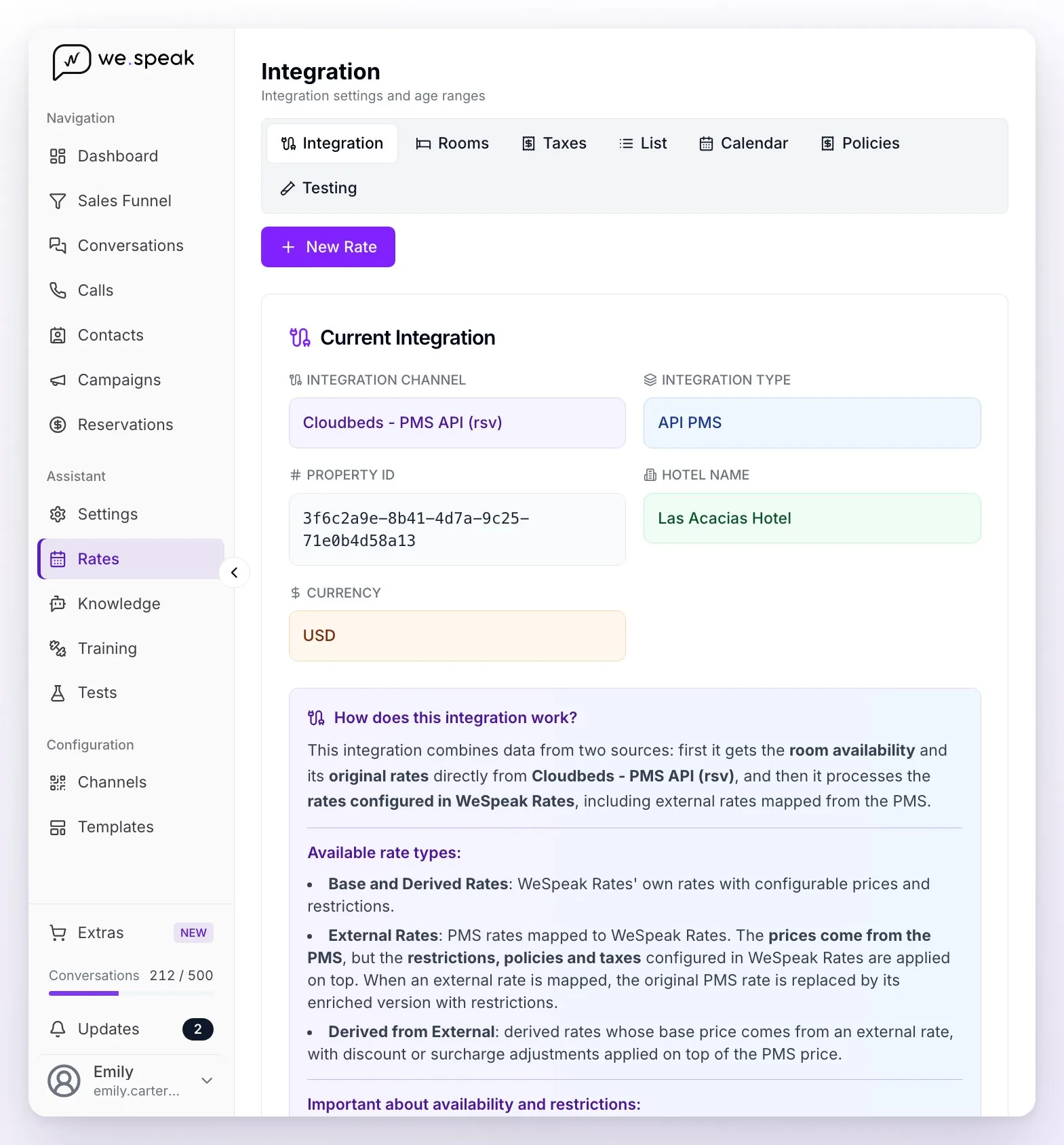
Under Rates → Integration you can see how your property is connected: the Integration Channel (your PMS), the Integration Type (API PMS) and the explanation How does this integration work?.
What you need to connect
- You connect your PMS. Depending on the system, you authorize the connection from your own account (Cloudbeds connects from Channels → Integrations, with the Connect button) or your provider gives you the access keys to its API and, in some systems, the codes of the rates you want to sell.
- The WeSpeak team sets up the integration and loads the rooms from your PMS: you'll see them under Rates → Rooms (you can add descriptions and photos there; the rooms themselves come from the PMS).
- Only then do you create your rates in WeSpeak. Base Rates and External Rates are linked to a rate code from your PMS, which you pick from the list WeSpeak brings from your system; Derived Rates are calculated on top of one of them. Until the integration is ready, the New Rate button is disabled and you'll see the notice "Your integration isn't compatible with WeSpeak Rates."
The three rate types (External is PMS-only)
| Type | What it does | Edited in WeSpeak? |
|---|---|---|
| External Rate (recommended) | Uses the prices already loaded in your PMS | ❌ The price is edited in the PMS (restrictions and policies, in WeSpeak) |
| Base Rate | You define the prices in WeSpeak | ✅ |
| Derived Rate | Calculated on top of a Base or External rate (% or amount) | ✅ |
💡 Recommendation: the External Rate keeps a single source of truth (your PMS) and avoids price differences between channels.
How to create an External Rate (step by step)
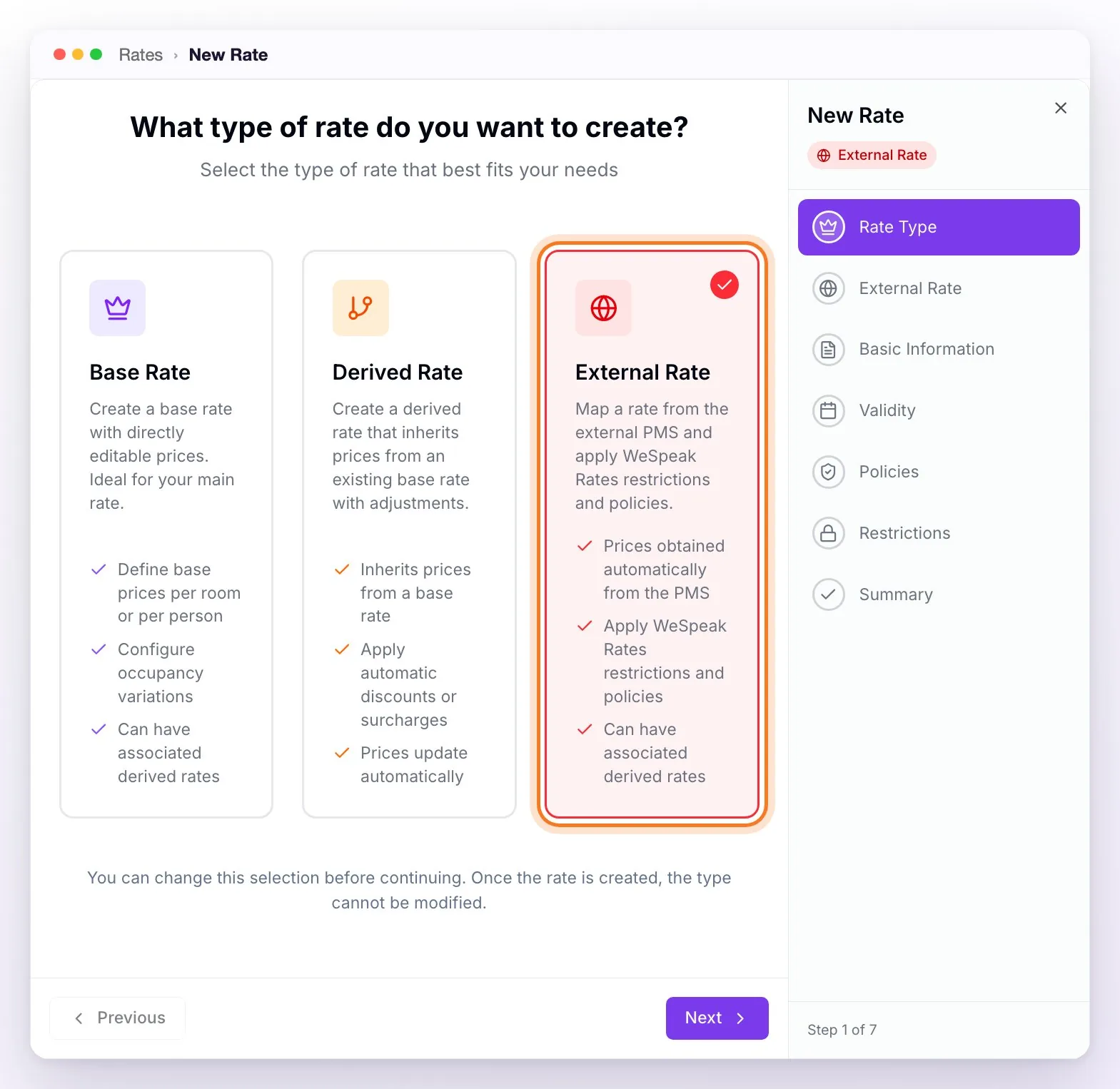
In Rates, click New Rate and choose External Rate: "Map a rate from the external PMS and apply WeSpeak Rates restrictions and policies." The option only appears if your integration is API PMS and WeSpeak was able to fetch the list of rates from your PMS.
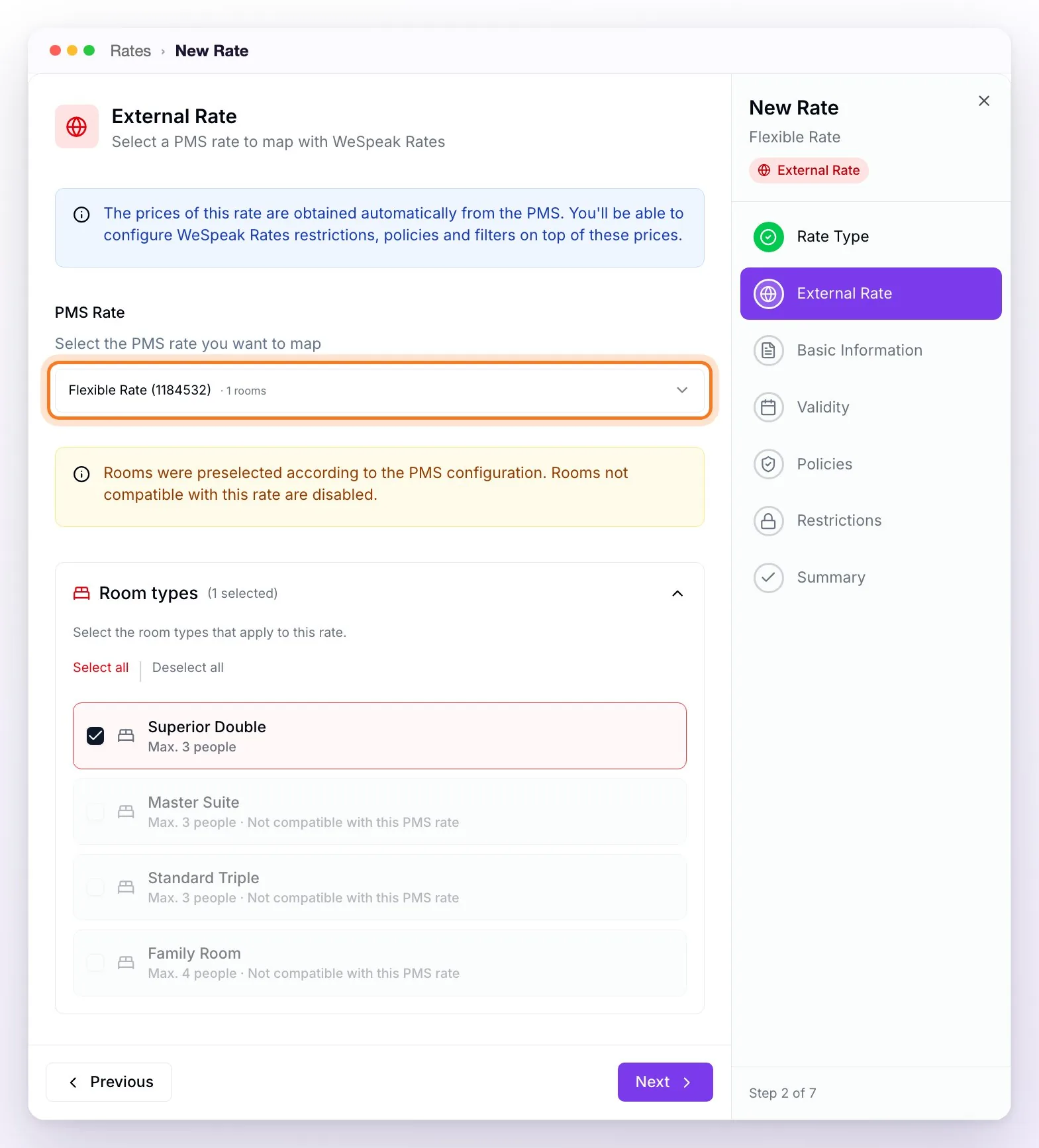
In the PMS Rate selector, choose the rate to map: each option shows its name, its code and how many rooms it applies to, and hovering over it shows those rooms by name. PMS rates already used by another WeSpeak rate don't appear in the list.
When you choose it, the name is filled in automatically and the compatible rooms are preselected; the incompatible ones appear disabled with the text "Not compatible with this PMS rate."
Complete the remaining steps as with any rate: Basic Information (the code comes fixed from the PMS), Validity, Policies, Restrictions and Summary, and click Create Rate. No base price or currency is configured: that data comes from the PMS on each query.
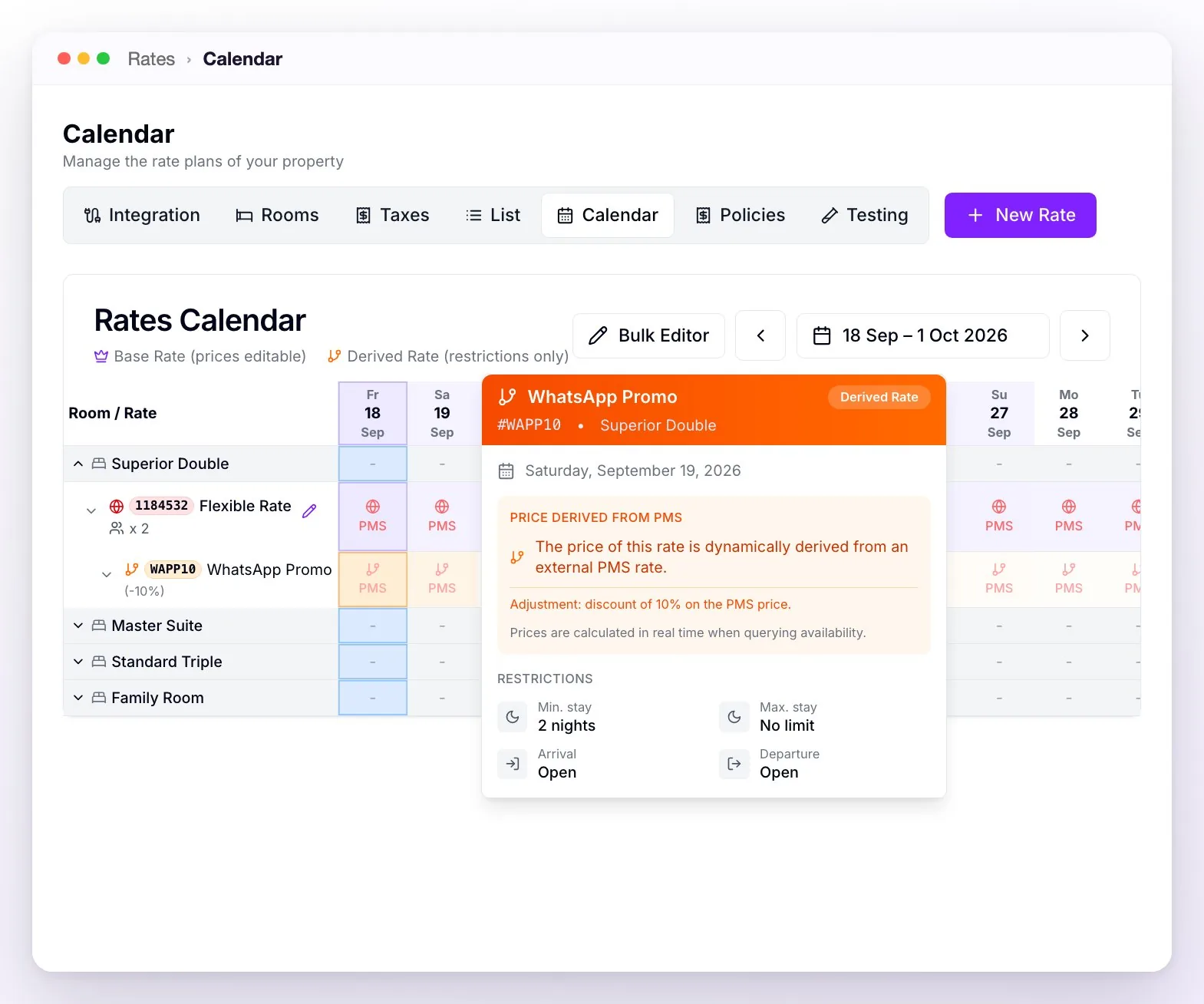
In the List, external rates carry the External Rate label in red (the legend at the top describes them as "PMS prices with WeSpeak Rates restrictions"). In the Calendar they're also marked in red and, instead of a price, each day shows PMS: the prices aren't stored in WeSpeak, they're checked live. On top of an external rate you can create derived rates with a discount or surcharge (in the List, ⋯ → Create derived rate menu): when you hover over a day, the calendar shows them as "Price derived from PMS," calculated in real time.
Which rates the guest sees
- If you have at least one active rate in WeSpeak Rates, the assistant offers only your WeSpeak Rates rates (base, derived and external). The PMS rates that are not mapped as external are not shown: this way you control exactly what's sold over chat.
- If there are no active rates in WeSpeak Rates, the original PMS rates are shown as they come.
- Only rates in Active status are offered: those in Hidden, Draft or Finished aren't sold.
- WeSpeak Rates restrictions (minimum stay, closed to arrival, etc.) apply to all the rates you offer.
- Availability always rules: if there's no room in your PMS, there's no availability even if rates exist in WeSpeak Rates.
To see exactly what the assistant would offer, use Rates → Testing: pick dates and guests and click Query Availability and Prices (with the Include rates in draft status option you can test a rate before activating it).
If a booking didn't reach your PMS
WeSpeak loads every booking into your PMS as soon as the guest completes the checkout. If your PMS doesn't accept it (for example, because of a connection outage or because the rate no longer exists), WeSpeak lets you know by email, with the subject "⚠️ Reservation not registered in…" and all the guest and booking details, so you can load it by hand.
In Reservations, the details of each booking (ⓘ icon, View reservation details) show the PMS / CHANNEL RESERVATION ID field with its status:
- Synchronized: it already has a reservation number in your PMS.
- Unsynchronized: it's completed in WeSpeak, but it has no number in your PMS. While there are any, you'll see the notice "You have X unsynchronized reservations" above the list (with the View reservations button), and those rows are highlighted in orange.
- Pending: the booking isn't completed yet (for example, it's waiting for payment).
To fix an unsynchronized booking:
Load it by hand into your PMS (the details are in the notice email and in the booking details).
In Reservations, click the orange icon on its row ("Reservation completed! Sync with PMS") or, in the details, the pencil next to PMS / CHANNEL RESERVATION ID.
In Sync with PMS, type the booking number in your PMS (or the link to the booking) in PMS Reservation ID or URL and click Sync. The booking becomes Synchronized and no longer counts in the notice.
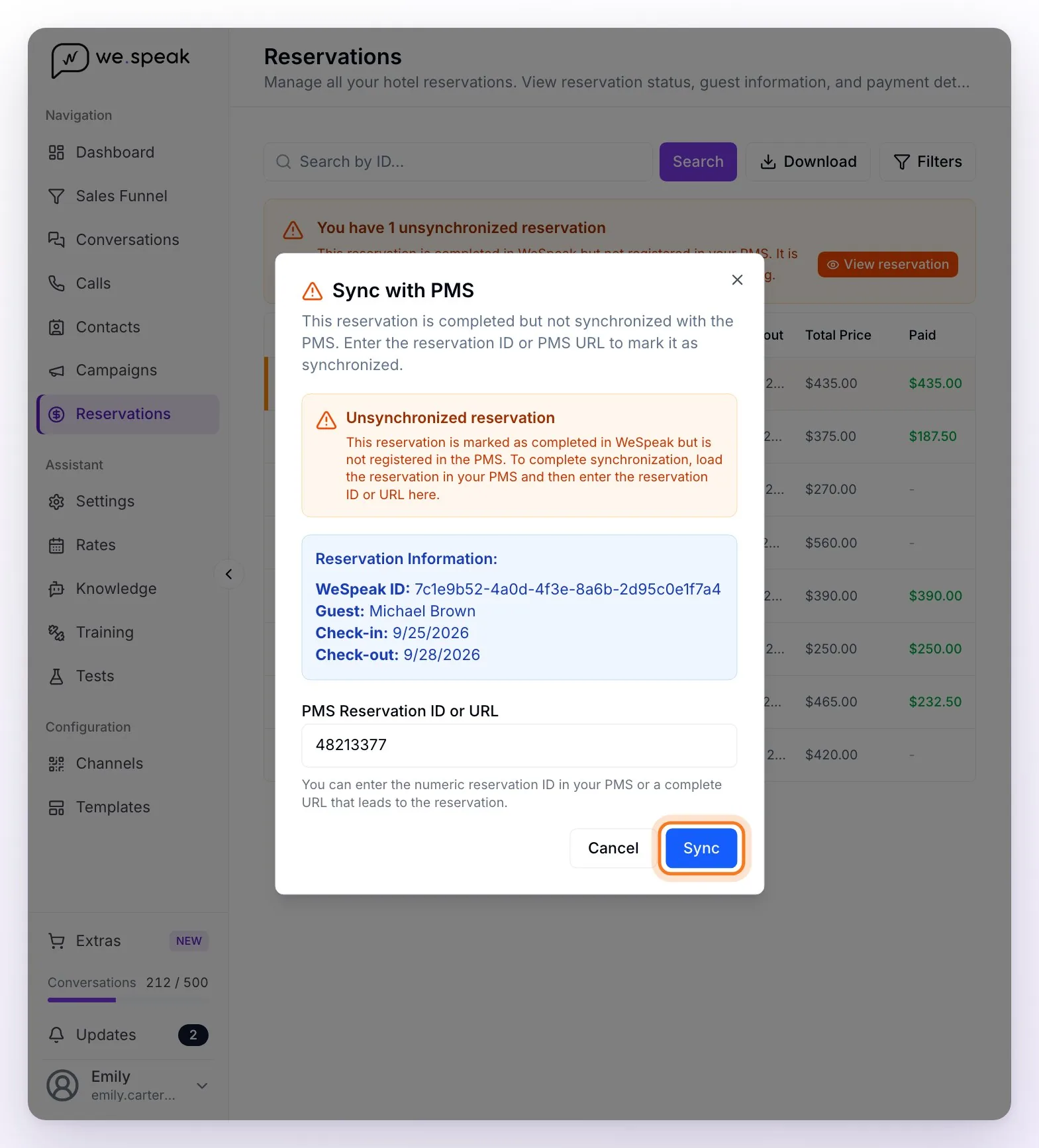
ℹ️ Sync with PMS doesn't resend the booking: it only records in WeSpeak the number the booking already has in your PMS. That's why you load it there first. If a linked booking has the wrong number, fix it with Edit PMS reservation ID.
Things to keep in mind
- If you delete a rate in your PMS, the WeSpeak rate linked to that code stops working: let your advisor know before restructuring rates.
- Availability isn't edited from WeSpeak: it's managed in your PMS.
- Cloudbeds: it doesn't accept a price different from the one it has loaded: it records each booking with its own price (the amount WeSpeak charged goes in the booking note). That's why, with Cloudbeds, it's best to work with External Rates. More details in Cloudbeds Integration.
Frequently asked questions
Is the availability the assistant quotes up to date?
Yes: it's checked with your PMS at the moment of each quote. Unlike a Channel Manager, your PMS doesn't send changes to WeSpeak: each query brings the values in real time.
I want to offer only some of my PMS rates over chat.
Map as an External Rate only the ones you want to sell: the rest of the PMS rates aren't shown to the guest (as long as you have at least one active rate in WeSpeak Rates).
Where do I see the booking that came in through the chat?
In your PMS, like any other booking, with the matching rate (in most systems, with a note from WeSpeak that includes the payment details). You also see it under Reservations in WeSpeak: in its details, PMS / CHANNEL RESERVATION ID shows the number your PMS gave it (with Cloudbeds, it's a link that opens the booking in Cloudbeds).
Can I have promotions that don't exist in my PMS?
Yes: create a Derived Rate on top of an external one (for example, 10% off for guests who book through WhatsApp) or a Base Rate with WeSpeak's own prices, linked to a code from your PMS. The assistant quotes it with the price WeSpeak calculates and the booking enters your PMS with that amount, except in Cloudbeds, which records it with its own price.
I'm migrating to Cloudbeds, what do I need to do?
WeSpeak is a Cloudbeds partner and the connection is direct: your advisor enables the integration and under Channels → Integrations you'll see the Cloudbeds card with the Connect button; you authorize with your account and you're done. If you have several properties, connect each one with a Cloudbeds user that has access only to that hotel, and make sure the hotel name in Cloudbeds matches exactly the property name in WeSpeak. The room mapping is done by the technical team (Cloudbeds doesn't configure anything on its side; it's normal for them to tell you that). The step by step is in Cloudbeds Integration.
I use Mini Hotel or another system, what will they ask me for?
Typically: the access keys to your system's API and, in some cases (like Mini Hotel), the codes of the rates you want to sell. Your advisor gives you the exact list for your system. Keep in mind that WeSpeak Rates only works with systems that can receive the booking: if your system only connects by reading your booking engine, under Rates you'll see the notice "Your integration isn't compatible with WeSpeak Rates" and you won't be able to create rates.
I migrated another property to the same system, do we repeat the process?
Yes: each property connects and maps just like the first; having done it once, the second goes much faster.