If you manage your rates and availability from a Channel Manager (such as Channex, RoomCloud, or Amadeus), this is the ideal scenario: your Channel Manager automatically notifies WeSpeak every time a price or availability changes, and the assistant always quotes with up-to-date data.
How it works
- Your Channel Manager remains your central system: that's where you edit prices and inventory, as always.
- WeSpeak receives the changes on its own, automatically: prices, availability and each day's restrictions (minimum stay, closed to arrival or departure, stop sell). The assistant quotes with day-by-day, room-by-room availability.
- When a guest books through the chat, WeSpeak sends the booking to your Channel Manager, which deducts the inventory across all your channels.
What you need to connect
Order matters: with a Channel Manager, you first create the entire structure in WeSpeak and then connect (the opposite of a PMS). Before you start, your WeSpeak advisor sets up your Channel Manager as the property's integration: you'll see it under Rates → Integration, with Channel Manager as the Integration Type (until then, the New Rate button is disabled). The recommended order:
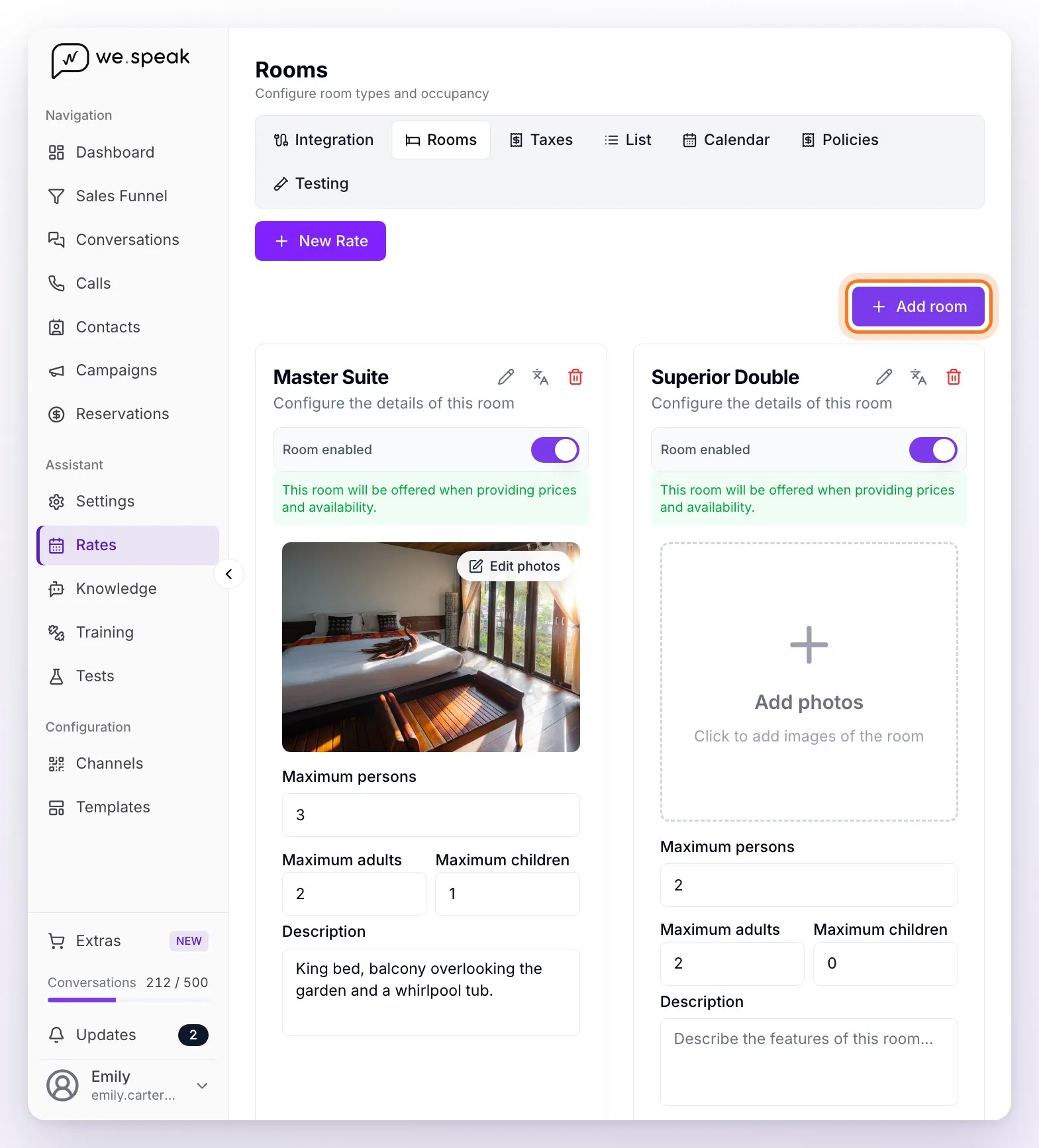
Create your rooms under Rates → Rooms, with the Add room button, entering their capacities: Maximum persons, Maximum adults and Maximum children. The maximum number of adults is the occupancy WeSpeak reports to your Channel Manager for each room.
Configure the ages under Rates → Integration: the Infant, Child, Teenager and Adult ranges, and whether the infant occupies a bed.
Create your policies and taxes: cancellation and payment policies under Rates → Policies, and taxes and fees under Rates → Taxes. You then pick them in the Policies step of each rate.
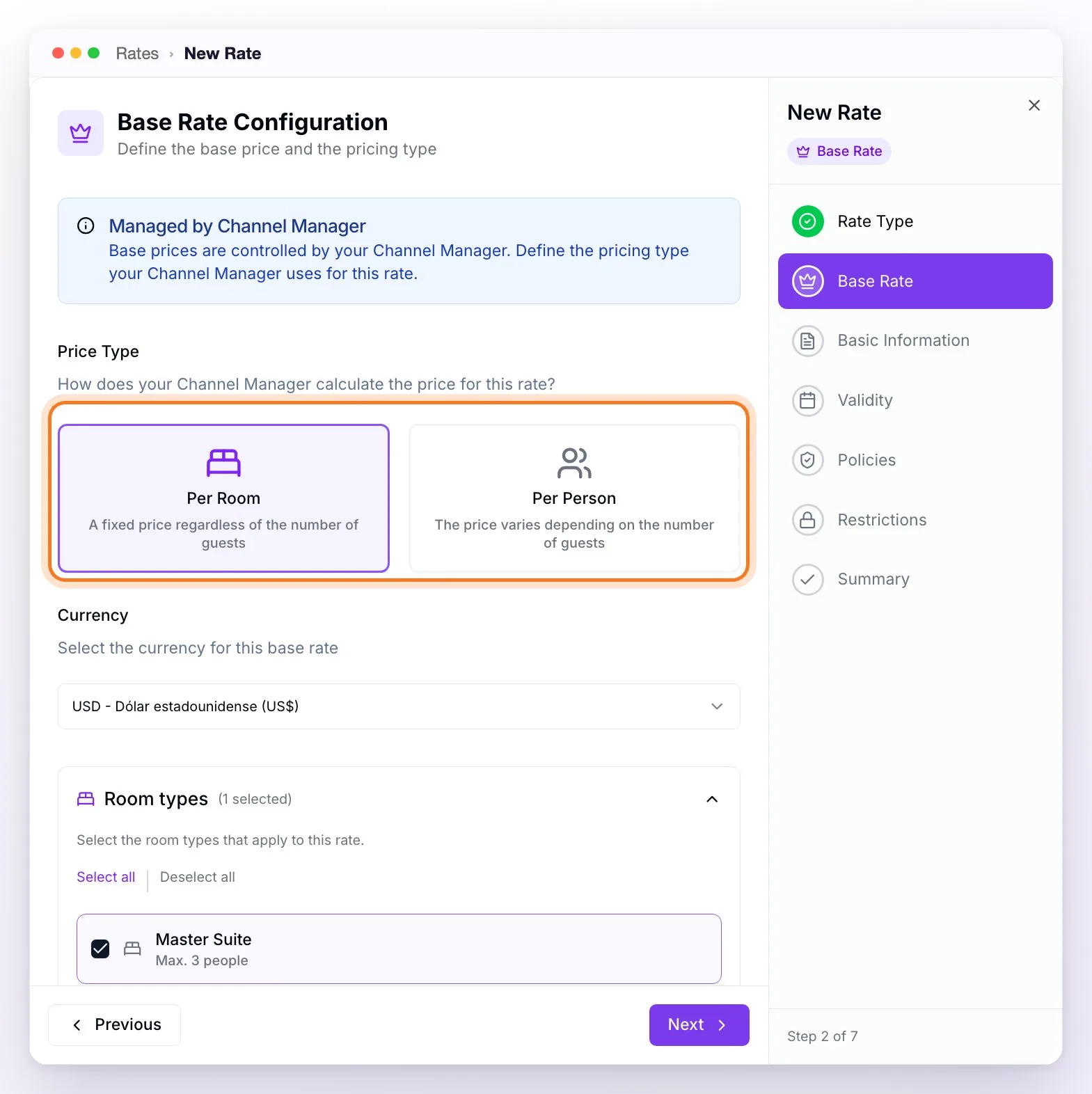
Create your base rates without prices: New Rate → Base Rate. With a Channel Manager, the step shows the Managed by Channel Manager notice and doesn't ask for a price (your Channel Manager keeps sending the prices). Choose the Price Type, Per Room or Per Person, the same as in your Channel Manager (it affects compatibility when connecting), the Currency and the rooms; then complete Basic Information (name and code), Validity, Policies, Restrictions and Summary.
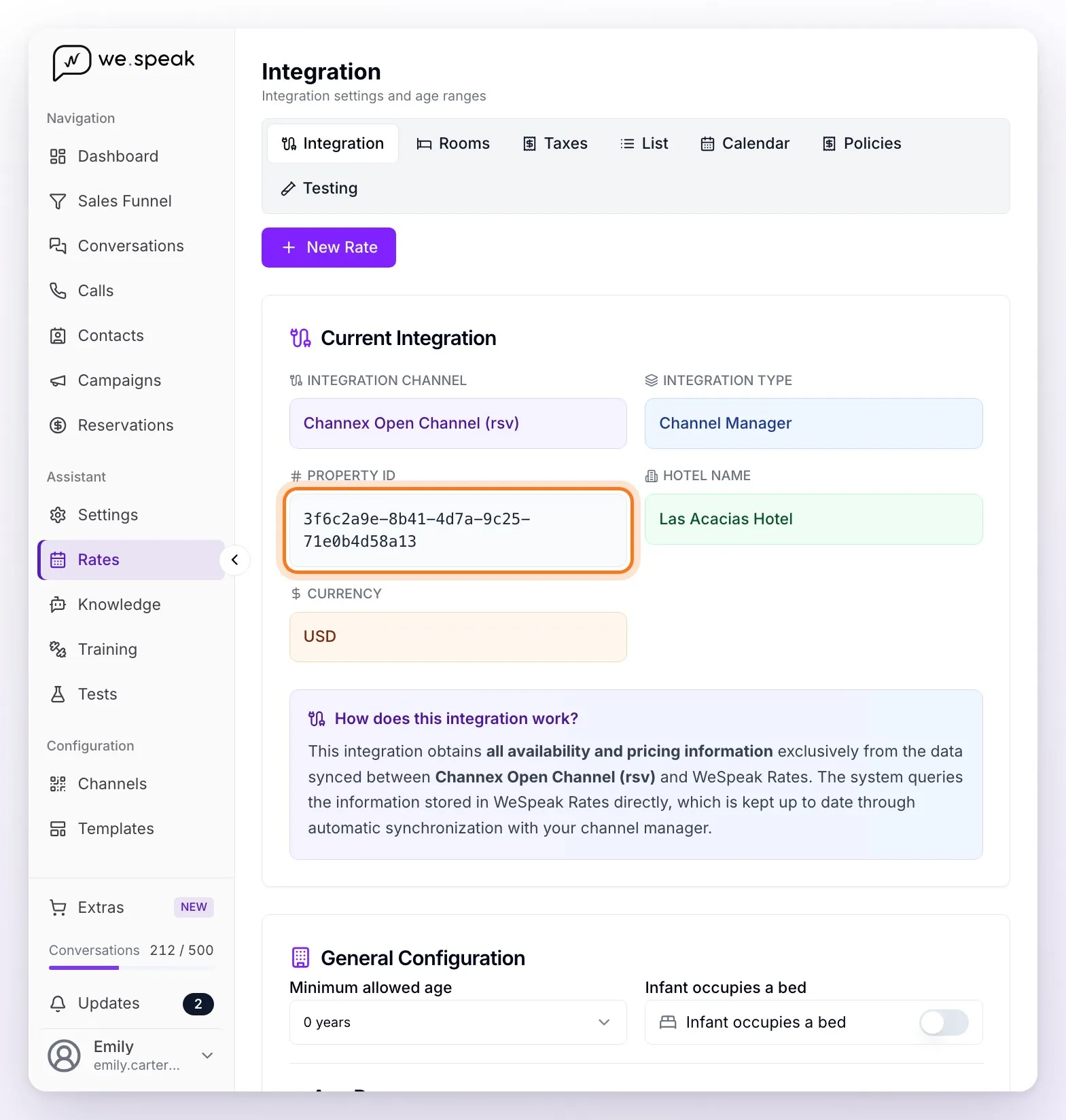
Hand the Property ID shown under Rates → Integration to your Channel Manager's support team: it's the code that identifies your property in WeSpeak. The 1-to-1 mapping between their rates and rooms and WeSpeak's is done within the Channel Manager. Map only your base rates: derived rates are calculated in WeSpeak.
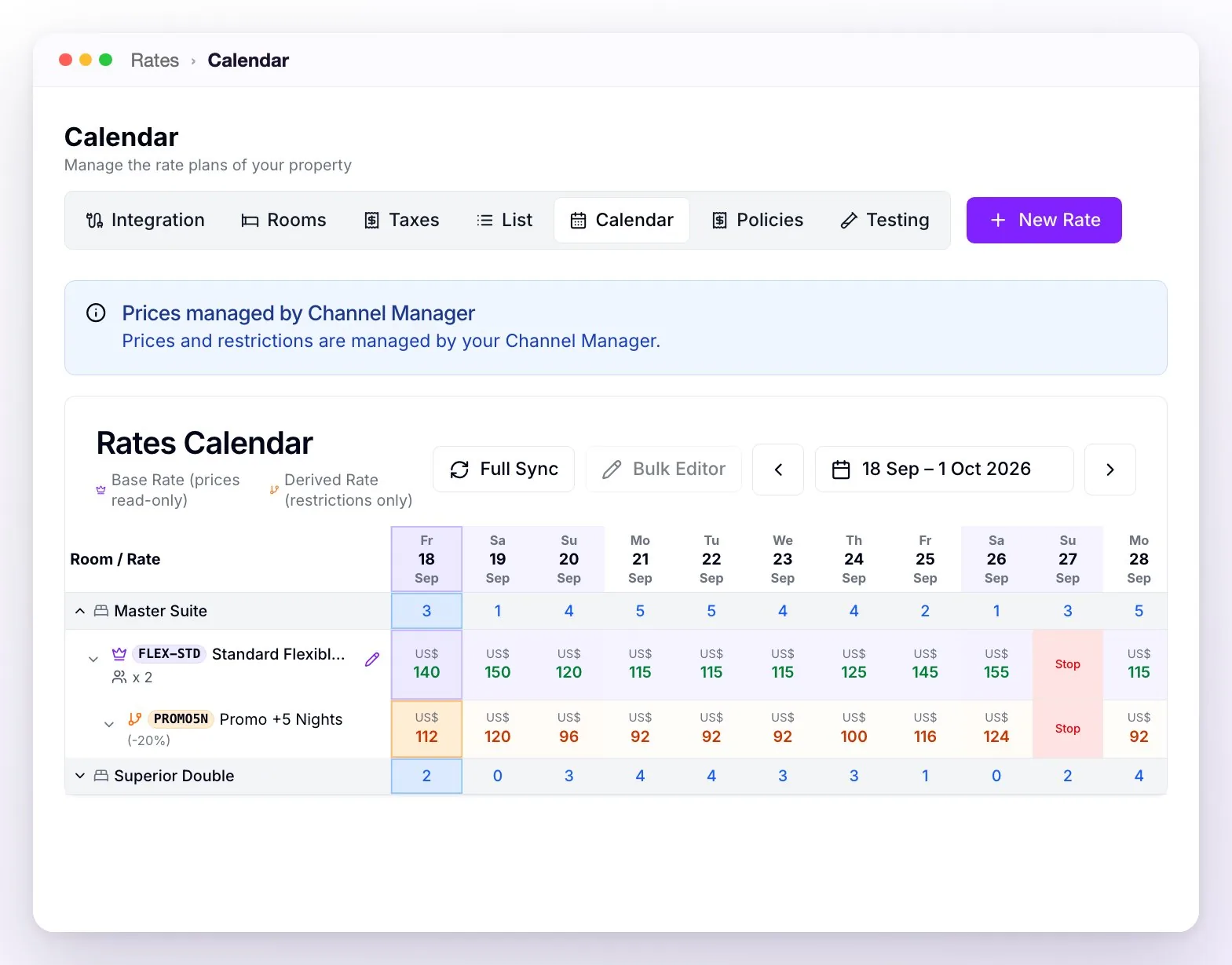
ℹ️ Per-person prices: if your Channel Manager handles the rate per person, it sends a price for each number of adults and WeSpeak quotes with the one that matches each request: there's no base occupancy to configure. In the Calendar you see the price for the room's maximum adult occupancy; hovering over a day shows the breakdown by occupancy. With RoomCloud, each per-person rate also appears as "… - 1 Pax", "… - 2 Pax", and so on (one for each occupancy below the room's): map each one to your matching rate.
ℹ️ It's recommended to map your Standard / Flexible rate (the highest in your structure) as the parent rate: if its price changes in the Channel Manager, the change carries over to WeSpeak and all the derived rates recalculate in cascade.
What you can and can't do from WeSpeak
| Action | From WeSpeak? |
|---|---|
| Edit prices (including the calendar's Bulk Editor) | ❌ Edited in your Channel Manager |
| Edit availability / inventory | ❌ Edited in your Channel Manager |
| Each day's restrictions (minimum stay, closed to arrival or departure, stop sell) | ❌ Sent by your Channel Manager |
| Rate restrictions (minimum and maximum nights, advance booking, days without arrivals or departures, countries, promo code) | ✅ Added on top of your Channel Manager's (the most restrictive one always applies) |
| Create derived rates (Last Minute, Early Booking…) | ✅ WeSpeak calculates the final price on top of the parent rate |
| Payment and cancellation policies per rate | ✅ |
| View the day-by-day, room-by-room availability in the Calendar | ✅ (read-only: the Channel Manager syncs it) |
In the Calendar, the notice "Prices managed by Channel Manager" reminds you that prices and each day's restrictions come from your central system: the cells can't be edited and the Bulk Editor is disabled.
How the booking travels to your Channel Manager
When the guest books a derived rate created in WeSpeak (e.g., Last Minute), your Channel Manager receives the booking with the code of the mapped parent rate but with the final price of the derived rate. This is normal: the derived rate exists only in WeSpeak, so it's reported under the rate your central system does know, with the correct amount.
If a booking didn't reach your Channel Manager
If your Channel Manager doesn't accept a booking (for example, because of a connection outage), WeSpeak lets you know by email, with the subject "⚠️ Reservation not registered in…" and all the details so you can load it by hand. Then, under Reservations, link it to its number: in the booking details, the PMS / CHANNEL RESERVATION ID field shows whether it's already Synchronized, and with Sync with PMS you record the number your central system gave it. The step by step is in WeSpeak Rates with PMS.
Complete example: base + Long Stay promo
- In Integration, you set the ages: Infant up to 2 years and Child from 3 to 12.
- You create the Master Suite room (maximum 2 adults + 1 child).
- New Rate → Base Rate: "Standard Flexible Rate," USD currency, price type Per Room, linked to the Suite, with a flexible cancellation policy. The price isn't entered: the Channel Manager sends it.
- New Rate → Derived Rate: "Promo +5 Nights," base rate = Standard Flexible Rate, adjustment Cheaper, 20% (Percentage), a 5 minimum nights restriction and a payment policy with a 50% deposit (with WeSpeak Payments).
- In your Channel Manager, you map the "Standard Flexible Rate" to your standard rate, using the Property ID.
Result: if tomorrow you raise the price of the Flexible rate in your Channel Manager, the promo adjusts by itself to 20% below it, and it's only offered to those who ask for 5 nights or more.
Frequently asked questions
I changed a price in my Channel Manager, how long until it shows?
Changes arrive automatically; generally within minutes.
Can I fix a price from WeSpeak if my Channel Manager is down?
No: prices live in your Channel Manager. If the connection is interrupted, there's no manual price or inventory management from WeSpeak.
Do chat bookings deduct availability on Booking/Expedia?
Yes: the booking travels to your Channel Manager, and it updates all your channels just like any other sale.
The calendar data looks outdated, can I force the sync?
If you use Channex, under Rates → Calendar you have the Full Sync button: it asks Channex for a complete synchronization and the data updates shortly. If it still doesn't match after that, report it to your advisor.
Which rate does my Channel Manager see when someone books a promo created in WeSpeak?
The booking arrives linked to the code of your mapped parent rate, with the final price of the promo. Derived rates don't need to exist in your Channel Manager.
I want to sell only the promo over chat, not the parent rate. Can I?
Yes: under Rates → List, set the parent rate to Hidden. The assistant stops offering it, but it stays connected to your Channel Manager and its derived rates keep being calculated from its prices. Don't move it to Draft or Finished: with those statuses, Channex and RoomCloud stop receiving it for the mapping.
I renamed or restructured rates in my Channel Manager, does anything break?
The mapping is 1-to-1: if you delete or replace the mapped rate or room in your Channel Manager (or in WeSpeak), that connection becomes unlinked. Let your advisor know before restructuring so the mapping can be redone.