When the assistant quotes rooms over WhatsApp, the reply can go out as a carousel of cards: one card per room, each with its photo, its name, its price and tappable buttons. The guest swipes, compares and picks with a tap — without typing.
In this article
- What it is and why it helps
- What the guest sees
- The buttons and what each one does
- Group quotes
- When the classic format is used (and why that's fine)
- What you need to turn it on
- How it looks in your panel
- Current limits
- Frequently asked questions
What it is and why it helps
Until now a multi-room quote arrived as a long text with names, rates and conditions, followed by a burst of loose photos. The guest had to mentally match each photo with its price and, to move forward, had to type ("I want the double", "more info on the suite"). Every point of friction loses guests.
The carousel puts everything in a single message: photo + name + price + action on the same card. And the buttons remove the typing: when the guest taps I want this one, the assistant already knows exactly which room, for which dates and for how many people — it doesn't ask again.
ℹ️ The carousel only works on WhatsApp connected via API (the official connection with Meta). See What you need to turn it on.
What the guest sees
A short intro line ("These are the options available for your dates 👇") and below it up to 10 swipeable cards in a single message. Each card carries:
- The main photo of that room (the first one you uploaded in Knowledge).
- The name of the room.
- The price, exactly the same one the quote's text says.
- The buttons to move forward.
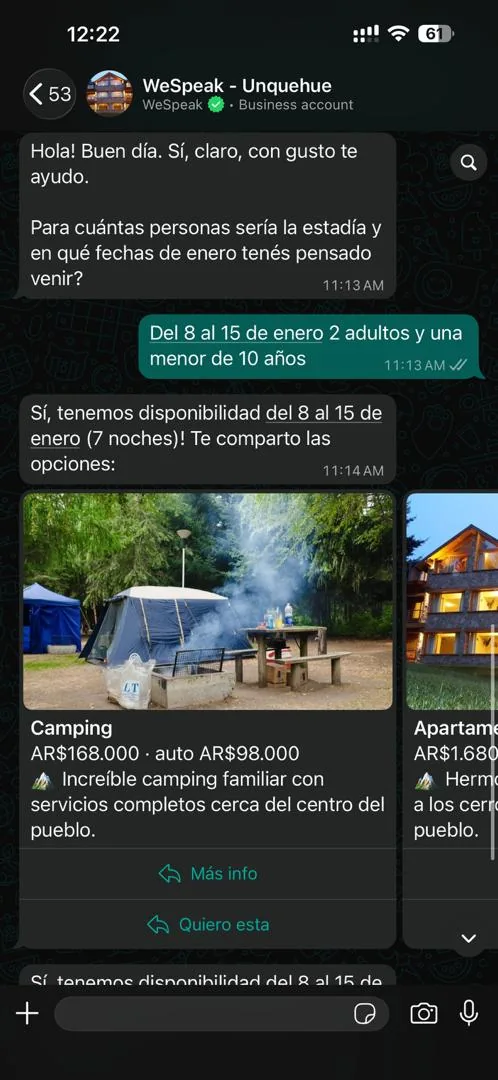
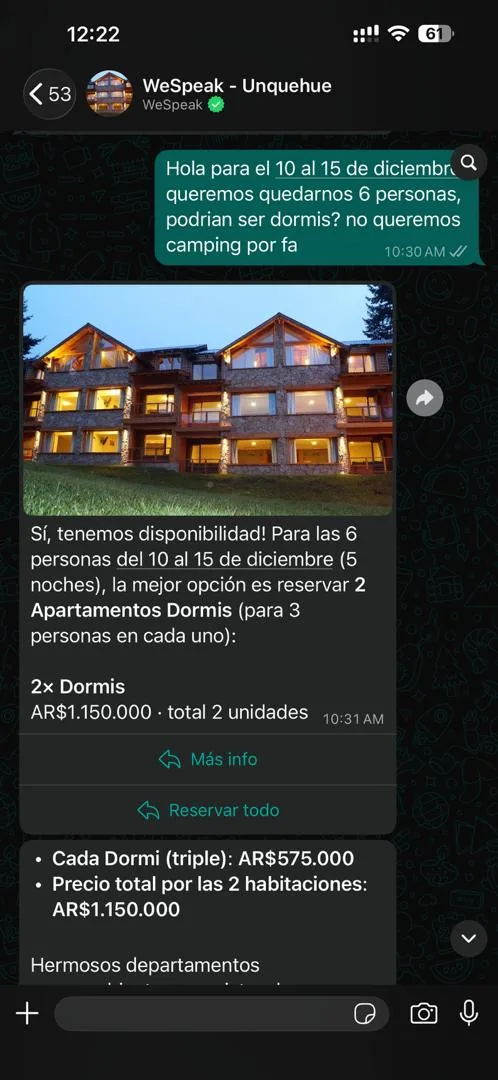
When there's only one option — or a combination that resolves into a single room type ("2× Dorms") — instead of a carousel you get a single card, more compact, with the same photo, price and buttons. For combinations, the card shows the quantity ("2× Dorms") and the total price, with the per-unit note when the text includes it.
The buttons and what each one does
| Button | What happens when the guest taps it |
|---|---|
| More info | The assistant replies with the full description of that room, all its available rates and its photos. |
| I want this one | Starts the booking for that room, with the dates and occupancy from the quote. |
| Book everything | Group quotes only: starts the booking for the complete package (for example "2 dorms + 1 camping spot"). |
Each button carries the room, the property, the dates and the occupancy of that quote encoded in it. That's why the assistant replies specifically and doesn't ask again which room it was.
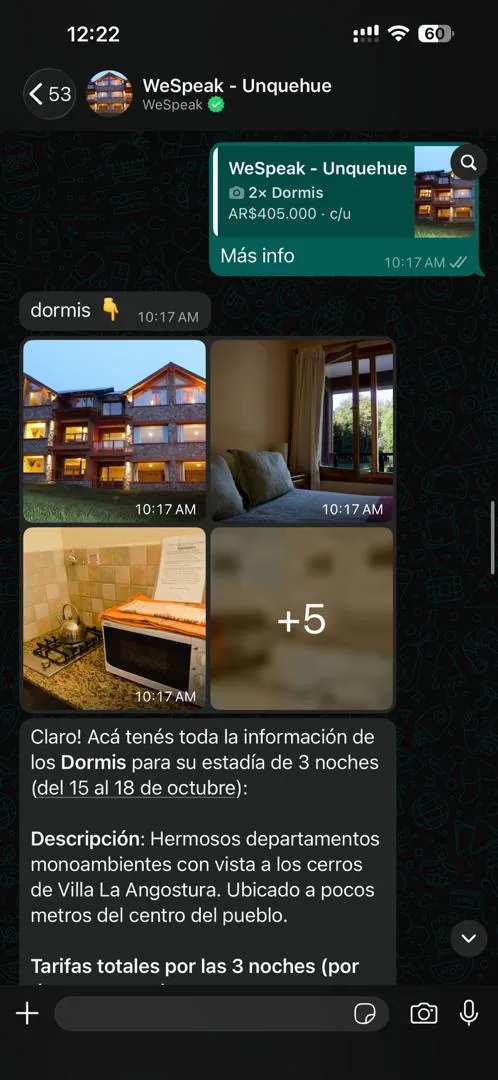
ℹ️ WhatsApp requires every card to have the same number of buttons. If one option can't offer booking, the whole set goes out with More info only — which still works fully (the guest can book through the link in the text).
Group quotes
When the group doesn't fit in a single room, the assistant builds a combination (for example "2 dorms + 1 camping spot"). Those cards share a single booking button: Book everything, which requests the complete package — never a loose room from a package that isn't sold separately.
If the quote offers several alternative combinations and the system can't determine with certainty which one matches each card, the cards go out with More info only, and booking is still available through the link in the text.
When the classic format is used (and why that's fine)
The rule is simple: when in doubt, classic format. If the system can't guarantee the cards are 100% faithful to the quote, it sends the usual format (text + photo gallery). The guest never loses information.
Cases where the carousel deliberately doesn't go out:
- The quote has more than 10 rooms (a WhatsApp limit; trimming cards would drop options).
- A photo can't be matched with certainty to its room (for example, two rooms with the same name).
- Sending the cards would lose photos the assistant decided to send.
- The system can't guarantee the cards cover the whole text: in that case only the text goes out, complete.
ℹ️ Sometimes getting the carousel and sometimes the usual format is not an error: it's the design. The classic format always delivers 100% of the information.
What you need to turn it on
- WhatsApp connected via API. Interactive cards are exclusive to the official connection with Meta. With WhatsApp connected via QR they don't appear (it's a WhatsApp limitation, not a WeSpeak one). See WhatsApp.
- Ask your WeSpeak advisor to enable it. It's enabled per account and starts off. From the next quote onwards, replies with prices go out as cards. Reduced response mode also turns it on: if you enable that mode, the carousel comes with it.
- Photos uploaded per room in Knowledge. The card uses the main photo (the first one). A room without a photo gets no card: it appears in the closing message, with its price, and the rest go out as cards.
- Distinguishable room names. Two rooms with exactly the same name create ambiguity, and the system prefers the classic format over risking mixing up photo and price.
- A booking path, so the I want this one and Book everything buttons appear: WeSpeak Payments active or a booking link loaded in Knowledge (if you have several properties, in all of them). Without a booking path, the cards go out with More info only.
💡 None of this is new configuration: it's the same data that already improves your regular quotes. The better your rooms' photos and names are loaded, the more often the cards will go out.
How it looks in your panel
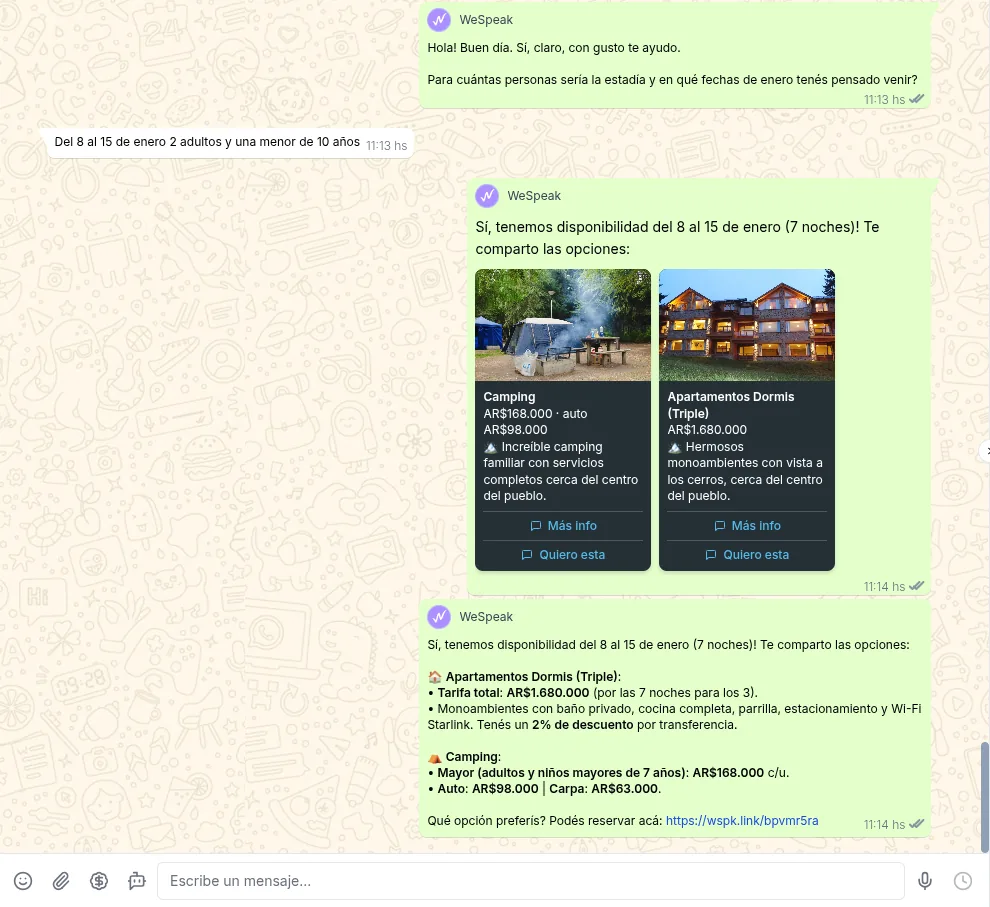
In Chats you see the carousel rendered as cards inside the conversation, with its photos and buttons — the same way the guest sees it. When the guest taps a button, it appears as an incoming message quoting the quote, with the name of the button they tapped.
Current limits
- WhatsApp connected via API only. It doesn't work with WhatsApp over QR, or on Instagram, Facebook or TikTok: on those channels the classic format keeps going out. Your website's Chat Web has its own quote cards, always on: they don't depend on this setting.
- Maximum 10 cards per message (a WhatsApp limit). Quotes with 11 rooms or more go out in full in the classic format.
- Every room needs a photo to get a card. Without one, that room goes in the closing message.
- The booking buttons need a booking path (Payments or a booking link in all your properties).
- Duplicate text may go out alongside the carousel when the system can't guarantee the cards cover everything: it's deliberate — redundancy over loss.
- The buttons don't expire: a guest can tap a button from an old quote. That's not risky, because every tap re-checks availability and price.
Frequently asked questions
Can I have the cards with my WhatsApp connected via QR?
No. Interactive cards are a capability exclusive to the official WhatsApp API — they don't exist on WhatsApp Web/QR, due to a WhatsApp limitation. If you're interested, your advisor can help you migrate your number to the API; in the meantime your quotes keep going out with the usual text + photos format.
Can I choose which photo goes on each card?
Yes: the card uses the main photo of each room (the first one in its photo section in Knowledge). Reorder them and the card updates on the next quote.
Can the card's price be different from the one in the text?
No. The card shows exactly the price the quote says: the system never recalculates or rounds. If it can't guarantee that fidelity, it simply doesn't send a card.
The carousel went out and the full text was repeated too — is that an error?
No: the system couldn't guarantee the cards covered the whole text, so it sent both. It's redundant on purpose, so the guest doesn't lose anything. If it happens every time, let your advisor know so we can review it.
A room the assistant quoted has no card — why?
Because it has no photo uploaded in Knowledge. Upload at least one photo for that room. It still appears in the closing message, with its price.
The "I want this one" button doesn't appear — what's missing?
The booking path: load the booking link in Knowledge (if you have several properties, in all of them) or activate WeSpeak Payments. It can also happen when the option is ambiguous and the system prefers not to risk it.
A group quote didn't show "Book everything" — why?
Because the quote offered several alternatives and the system couldn't determine with certainty which one matched each card. In that case the cards go out with More info only and booking is still available through the link in the text.
What happens if a guest taps a button from an old quote?
Nothing risky: the assistant re-checks availability and price at that moment. If the room is no longer available or the price changed, it says so — it never books blindly with stale data.
Does this replace the photos the assistant already sent?
When the carousel goes out, the photos travel as the cover of each card (and the guest can ask for the rest with More info). When the classic format goes out, the usual gallery stays intact.