Complete booking measurement in WeSpeak combines four pieces: the funnel records every sale, the Conversion Pixel or WeSpeak Payments detect bookings with their amount, WeSpeak Tracker tells you where each customer came from, and the Dashboard together with WeSpeak MCP build the reports. No piece is enough on its own: each one covers what the others can't see.
With all four working you can answer:
- How many bookings and how much revenue did WeSpeak generate in the period?
- What percentage of inquiries ends in a booking, and at which stage does the sale stall?
- Do bookings come from Meta ads, from your own posts, or from customers who find you on their own?
- What do the conversations that close have in common, and what goes wrong in the ones that don't?
The path, in order:
- Record every sale and every loss in the funnel.
- Measure bookings with the Pixel (if the guest books on your engine) or with Payments (if they book inside the chat).
- Attribute the source with Tracker, connected to your Meta Ads account.
- Analyze in the Dashboard and, for finer questions, with WeSpeak MCP from Claude.
In this article
- How the pieces fit together
- Step 1: the funnel, the foundation of everything
- Step 2: measure bookings with the Pixel or with Payments
- Step 3: where bookings come from, with WeSpeak Tracker
- Step 4: the reports, in the Dashboard and with WeSpeak MCP
- How to read the numbers together
- Setup checklist
- Frequently asked questions
How the pieces fit together
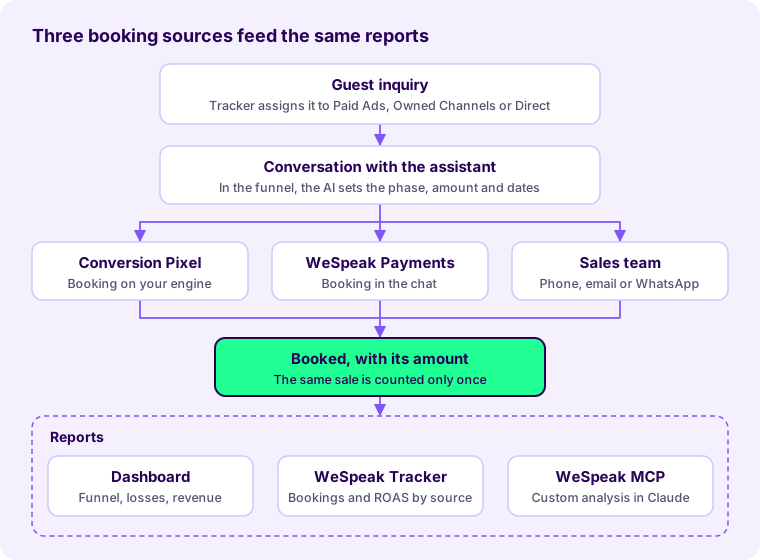
Any of the three sources leaves the conversation in Booked with its amount; from there, the Dashboard, Tracker and WeSpeak MCP read it.
Step 1: the funnel, the foundation of everything
The funnel is where every measurement ends up: the Pixel and Payments move the bookings they detect to Booked on their own, but the ones your team closes by phone, email or WhatsApp with an advisor only exist if someone records them. An up-to-date funnel is what makes the conversion rate, the revenue and the loss reasons reliable.
How each conversation moves today:
- The AI assigns the phase on its own after each assistant reply, in the phases marked as AI-managed phase, and fills in the quoted amount and the dates. It only works with the assistant active in that conversation: if it's paused, everything is manual.
- The AI marks a lead Lost only when the guest explicitly declines ("I already booked elsewhere", "it's too expensive"). Silence doesn't count.
- Automatic closing due to inactivity marks a conversation as lost after 7 days without activity, with the reason Automatically closed due to inactivity. It doesn't say why it was lost.
Best practices for your team
- Every clear sale goes to Booked with its amount. The amount is what adds up to revenue and the average ticket and, with Tracker, what gets reported to Meta: a booking marked without an amount isn't shared.
- Every loss goes with its real reason: No availability, High price, Missing services, Prices not loaded or No response from the guest. If everything closes due to inactivity, Lost reason and Lost demand stay empty, because they only value real reasons.
- Turn on Mandatory form when closing chat in Settings > Platform Configuration. Nobody closes a conversation without choosing a phase and a result.
- Assign each conversation to whoever handles it. That way User statistics shows assigned, won and lost conversations per person.
- Snooze the ones still in negotiation. Automatic closing respects a snoozed conversation's deadline.
- Move booked conversations to the Operations funnel (Pre check-in → Check-in → Check-out) with Change funnel, so that Sales only shows what's still in play.
- Review the funnel once a week, for example the Quoted leads with several days without activity, to pick up the ones that can still be closed.
Full guide: Funnels.
Step 2: measure bookings with the Pixel or with Payments
The tool depends on where the booking is completed: if the assistant sends your engine's link and the guest books there, you use the Conversion Pixel; if the booking is charged inside the chat with a payment link, you use WeSpeak Payments. You use one or the other, never both at the same time.
| What changes | Conversion Pixel | WeSpeak Payments |
|---|---|---|
| Where the guest books | On your booking engine, from the assistant's link | On your WeSpeak booking page, from a payment link |
| What it records | Booking number, amount and currency, linked to the conversation | The full booking, the charge and its status, in the Reservations section |
| What it misses | Device changes, rejected cookies, bookings by phone or OTA | What gets closed outside the chat |
| Accuracy | A floor: the verified minimum | End to end, without depending on cookies or the device |
| Activation | Done by the WeSpeak team; the code appears in Channels | From Extras, with a one-time payment that includes the setup and 50 bookings |
| Cost | No additional cost (beta) | Activation + booking packs |
If you use the Pixel
It's a one-line code that's installed only once on your booking engine, not on the hotel's website. Your engine has to meet three conditions:
- Allow inserting the code, in a scripts section or in the Google Tag Manager it already loads.
- Load it on all the pages of the booking process, including the confirmation page.
- Emit the standard purchase notice when a booking is confirmed: booking number, amount and currency.
With Google Tag Manager: Tags > New > Custom HTML, paste the code, trigger on All Pages, save and publish the container. The Pixel is just another tag: it coexists with Google Analytics, Google Ads and the Meta pixel, and it doesn't read or modify those measurements.
⚠️ The installation is validated with a test booking that starts from the link the assistant sends, in the same browser and accepting cookies. Going straight to the engine is the number one cause of "I made the test and it doesn't show up".
Full guide: Conversion Pixel.
If you use Payments
The assistant (or your team, with the chat's $ quoter) asks the guest for their details and sends them a payment link. The guest pays with the method you choose to offer (payment gateway, card as guarantee, bank transfer or payment at the hotel) and the booking is confirmed in Reservations. Whether it loads into your system on its own depends on your integration: with a Channel Manager (Channex, RoomCloud) or a PMS via API it loads on its own; if prices are read from a booking engine, your team loads it into the PMS by hand.
Full guide: WeSpeak Payments.
Step 3: where bookings come from, with WeSpeak Tracker
Tracker assigns each inquiry to a single source and, with the Pixel or Payments active, shows how many bookings and how much revenue each one brought. That closes the full path: campaign → conversation → booking → amount.
| Source | What it is | Example |
|---|---|---|
| Paid Ads | Paid Meta ads (Facebook or Instagram) that open a chat | A seasonal campaign on Meta Ads |
| Owned Channels | Free posts measured with a WeSpeak short link | A story, the bio, a QR code in the lobby, the newsletter |
| Direct | Whoever arrives on their own, with no attributable link or ad | Someone who already had your number |
Meta advertising. You connect your Meta Ads account by logging in with the account that manages the ads, with read-only permission: WeSpeak can't modify campaigns or spend budget. You see spend, real inquiries, bookings, revenue, ROAS and ROI, broken down by campaign, ad set and ad. It requires WhatsApp connected through the official API: the data about which ad started the chat only arrives that way.
Owned Channels. You create a campaign and an ad per piece; each one gives you a short link that opens WhatsApp with a pre-filled message. The conversation stays linked to that post, and you see clicks, conversations and results per piece.
Optimization with Meta (Conversions API). With one click, WeSpeak sends back to Meta which contacts actually wrote and which ones booked, with their amount, so Meta learns which profile books and adjusts who it shows the ads to. It doesn't disconnect WhatsApp or share the content of the chats. Meta needs about 50 inquiries per week to use those signals.
The funnel by source shows the current stage of each captured customer and the loss reasons, separately for Paid Ads and Direct. The sales your team marks as won in the funnel show up there as won.
ℹ️ Two limits: Tracker measures Meta and your WeSpeak links, not Google Ads; and it's enabled per account, from Extras.
Full guide: WeSpeak Tracker.
Step 4: the reports, in the Dashboard and with WeSpeak MCP
The Dashboard answers everyday questions; WeSpeak MCP, from your own Claude, answers the ones that require reading and cross-checking conversations.
In the Dashboard
| Where | What it answers | Guide |
|---|---|---|
| Business Intelligence > Funnel | How many conversations are in each phase and the percentage relative to the previous one: where the sale stalls | Business Intelligence |
| Business Intelligence > Lost reason and Stop reason | Why sales are lost and why the assistant stopped (they appear with periods of Month or longer) | Business Intelligence |
| Business Intelligence > Lost demand | How much revenue was left on the table from leads lost for a real reason | Business Intelligence |
| Business Intelligence > Average ticket, ADR, lead time, length of stay, demand calendars | The attributes of what gets quoted and requested | Business Intelligence |
| Business Intelligence > Lead attribution | Where each lead came in from (channel, country, ad) | Business Intelligence |
| Payments | Payment links, confirmed bookings, capture and closing rates, revenue by currency and overall conversion | Booking statistics |
| WeSpeak Tracker | Bookings, revenue, conversion and ROAS by source and by campaign | WeSpeak Tracker |
| User statistics | Assigned, won and lost conversations per team member | User statistics |
If you need the leads in a spreadsheet, the funnel's Download button exports an Excel file with one sheet per phase, respecting the active filters.
With WeSpeak MCP, from Claude
WeSpeak MCP is the official connector that adds your account's tools to your Claude (claude.ai): search and read conversations, check volume and funnel metrics, and list leads by stage or days without activity. Claude chains several queries in one request and gives you the result as a table or a report. It's the tool for questions the panel doesn't answer at a glance:
- "Compare the conversations that moved to Booked in the last 60 days with the ones that stayed in Quoted: lead time, nights, number of guests, room type and what they asked before deciding."
- "At what point do the ones who don't book stop replying: after the price, after the link, or after an unanswered question?"
- "Build the funnel for the last 30 days and list the Quoted leads with more than 5 days without activity, with which ones are worth picking up first."
- "Which questions keep coming up, and in which ones did the assistant hand over to an advisor?"
- "Put together the weekly summary for management, compared with the previous week, in a table to paste into the spreadsheet."
To connect it: your advisor enables the feature; in the panel, Settings > Connect WeSpeak to Claude gives you the URL and the Client ID; in claude.ai, Settings → Connectors → Add custom connector, and you log in with your WeSpeak user. Each person connects their own user: metrics and the funnel require the Supervisor or Administrator role. If you manage several properties, you add one connection per account.
ℹ️ Today WeSpeak MCP's metrics don't include response times.
Full guide: WeSpeak MCP.
How to read the numbers together
The total bookings you see in WeSpeak is a verified minimum, not the hotel's total: it adds up what WeSpeak can verify and what your team records.
- The same sale is counted only once. Tracker doesn't duplicate a booking that the Pixel detected and that is also marked as won.
- The Pixel is a floor. It doesn't capture guests who switch devices between the link and the booking, guests who reject the engine's cookies, or bookings by phone, at the front desk or through OTAs. Those are added by marking them in the funnel.
- Without the Pixel or Payments, the funnel underestimates conversion. If the guest books on your engine and nobody records it, their conversation stays in Quoted or closes due to inactivity, even though they booked.
- The funnel is read "as of today". It shows the current stage of each customer captured in the period: one captured in May who booked in June shows up as won when you look at May.
- Meta always shows more conversations than WeSpeak. Meta counts clicks and estimates; WeSpeak only counts the people who actually wrote, and the return is calculated with them.
- A confirmed booking isn't a received payment. In Payments, a bank transfer or a payment at the hotel count as confirmed before the money arrives.
- Currencies aren't mixed. Revenue, average ticket and lost demand are shown per currency.
- Google Ads is left out. Bookings from those ads are still measured in Google, with its own rules.
Setup checklist
Funnel
- The assistant is active on every channel you want to measure (Channels).
- The sales phases have AI management turned on, with their instruction.
- Mandatory form when closing chat is turned on.
- The team agreed to mark every sale in Booked with its amount and every loss with its reason.
Bookings
- You chose the tool based on where the guest books: Pixel (engine) or Payments (chat).
- Pixel: the code is published on the engine, on every page, and the test booking from the assistant's link shows up in WeSpeak.
- Payments: the activation is complete, a payment method is connected, the test booking synced with your PMS or Channel Manager, and the booking mode is set to WeSpeak Payments.
Source
- WhatsApp is connected through the official API.
- Tracker is active and the Meta Ads ad account is connected.
- Optimization with Meta is turned on.
- Organic posts use Owned Channels links.
Reports
- Whoever analyzes the data has the Supervisor or Administrator role.
- WeSpeak MCP is enabled and connected in each person's Claude.
- A regular review is scheduled: the funnel every week, the Dashboard and Tracker every month.
Frequently asked questions
Does the Pixel replace my Google or Meta pixel?
No. It's just another tag in the same container and it doesn't read or modify the other measurements. Google keeps attributing bookings to its ads; the WeSpeak Pixel marks which ones were born from a conversation.
Can I use the Pixel and Payments at the same time?
There's no need, and they aren't used together. With Payments, the booking and the charge happen on the platform; the Pixel exists for when the booking is completed on your engine.
My funnel shows very few bookings. Is something wrong?
Almost always the booking piece is missing: without the Pixel or Payments, WeSpeak can't see what gets booked on the engine. Also check that the team marks in Booked the sales it closes through other channels.
Why do almost all my losses say "Automatically closed due to inactivity"?
Because nobody recorded the real reason and the AI only marks a lead Lost when the guest explicitly declines. Mark losses by hand with their reason, or turn on Mandatory form when closing chat.
Does Tracker measure Google Ads?
No. It measures Meta advertising and your Owned Channels links.
WeSpeak's bookings don't match my PMS.
That's expected: WeSpeak counts the bookings that were born from a conversation and that it can verify or that your team recorded. The PMS also adds the ones from your website, OTAs, phone and front desk.
Do I have to pay anything to use WeSpeak MCP?
The AI usage runs on your Claude subscription; WeSpeak doesn't charge per query. Check with your advisor whether the feature is included in your plan.