When a guest opens your number's profile in WhatsApp, they see your business's photo, name and details. If the number is connected through WhatsApp API, you can change them from Channels without going into Meta: the changes are saved directly to WhatsApp.
ℹ️ It works with numbers connected through WhatsApp API. Instagram, Facebook and TikTok don't let other platforms change the profile: you change it from each network's app or website.
What you can change
| Detail | When your guests see it |
|---|---|
| Profile photo, about, description, email, websites and address | As soon as you tap Save changes |
| Display name: the name they see at the top of the chat | Once Meta approves it and you apply it with Apply name |
Before you start
- The number must be connected through WhatsApp API and without errors. If the channel card asks you to reconnect, do that first by following Problems with WhatsApp.
- You need the Administrator or Supervisor role. With the User role you see the name and its status on the card, but you can't open the profile (Permissions and Roles).
Change the photo and details
Go to Channels and find the card of your WhatsApp API number.
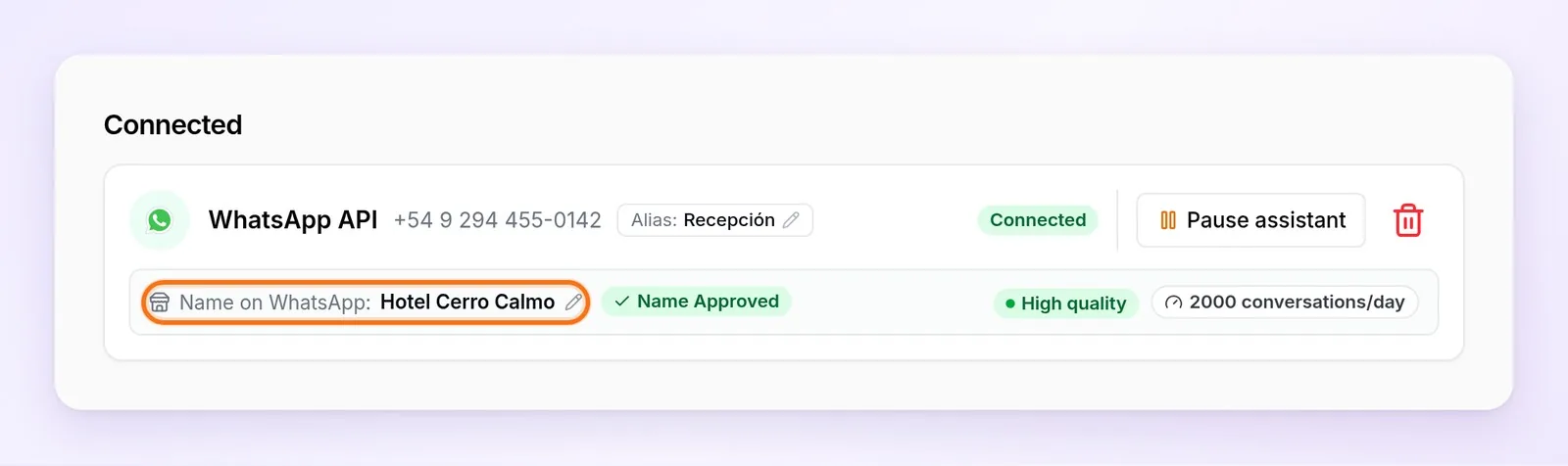
On the card, tap Name on WhatsApp: the line that shows the name your guests see, with a pencil next to it. The WhatsApp profile window opens, with the profile as WhatsApp has it.
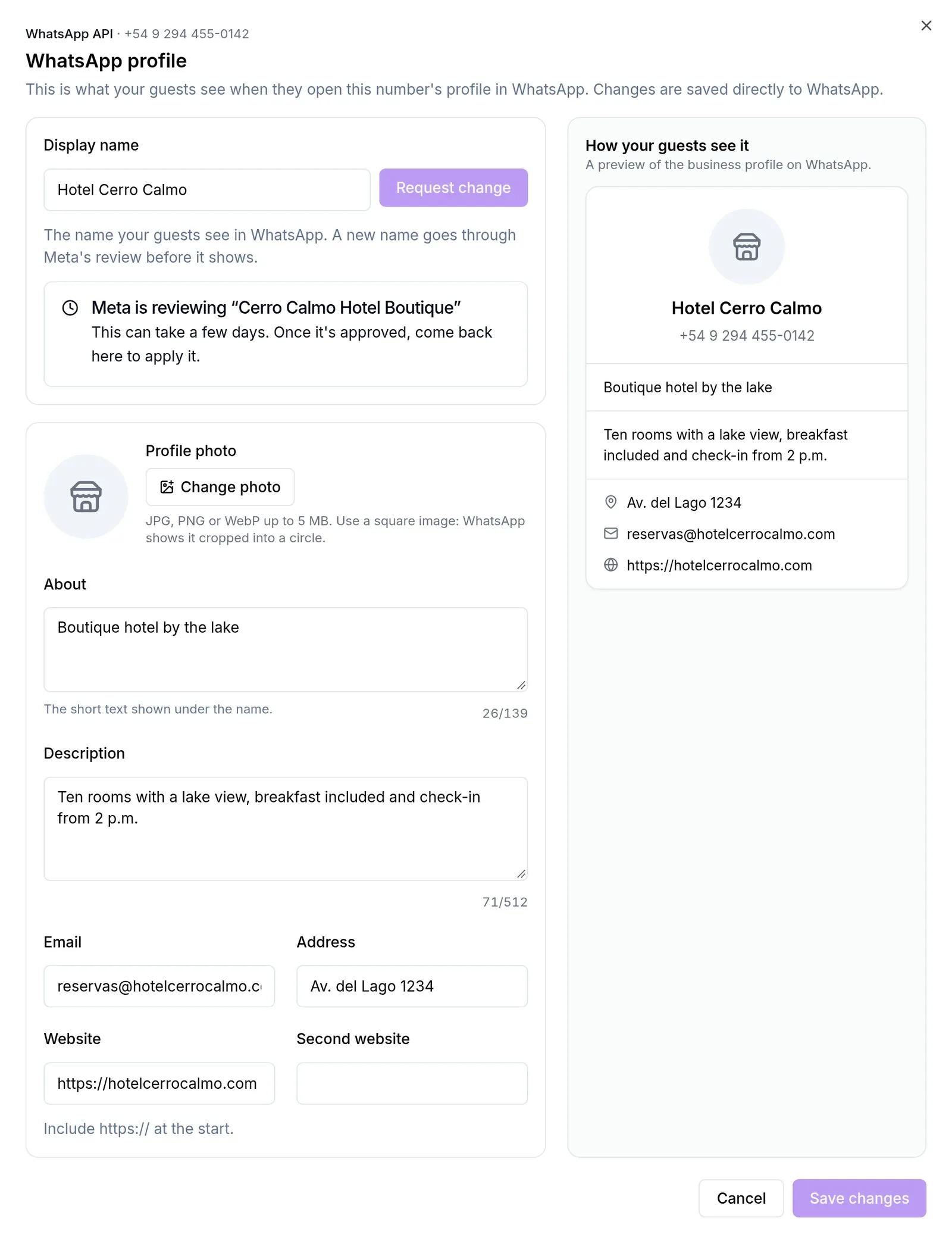
To change the photo, tap Change photo and choose a JPG, PNG or WebP image of up to 5 MB. Use a square image: WhatsApp shows it cropped into a circle.
Change the details you want. On wide screens, on the right you see How your guests see it: a preview of the profile that updates as you type.
Tap Save changes. When Profile updated shows up, the changes are already in WhatsApp.
| Detail | What to keep in mind |
|---|---|
| About | The short text shown under the name, up to 139 characters. Once it has text, WhatsApp doesn't let you leave it empty: you can replace it, but not delete it |
| Description | Up to 512 characters |
| It must be a valid email | |
| Websites | Up to two, always starting with https:// |
| Address | Up to 256 characters |
💡 If WhatsApp rejects any detail, nothing is saved. Check the details (for example, that the website starts with https://) and save again.
Change the display name
The name doesn't change right away: Meta reviews every new name to check that it matches your business, and only once it's approved can you apply it. In the meantime, your guests keep seeing the previous name.
In the WhatsApp profile window, type the new name in the Display name box.
Tap Request change. Meta is reviewing “…” shows up and you can close the window: on the channel card, next to the name, the Name Under Review label stays with the name you requested.
Meta takes from a few hours to a few days. You don't need to open the window to know whether it's been approved: the label on the card tells you.
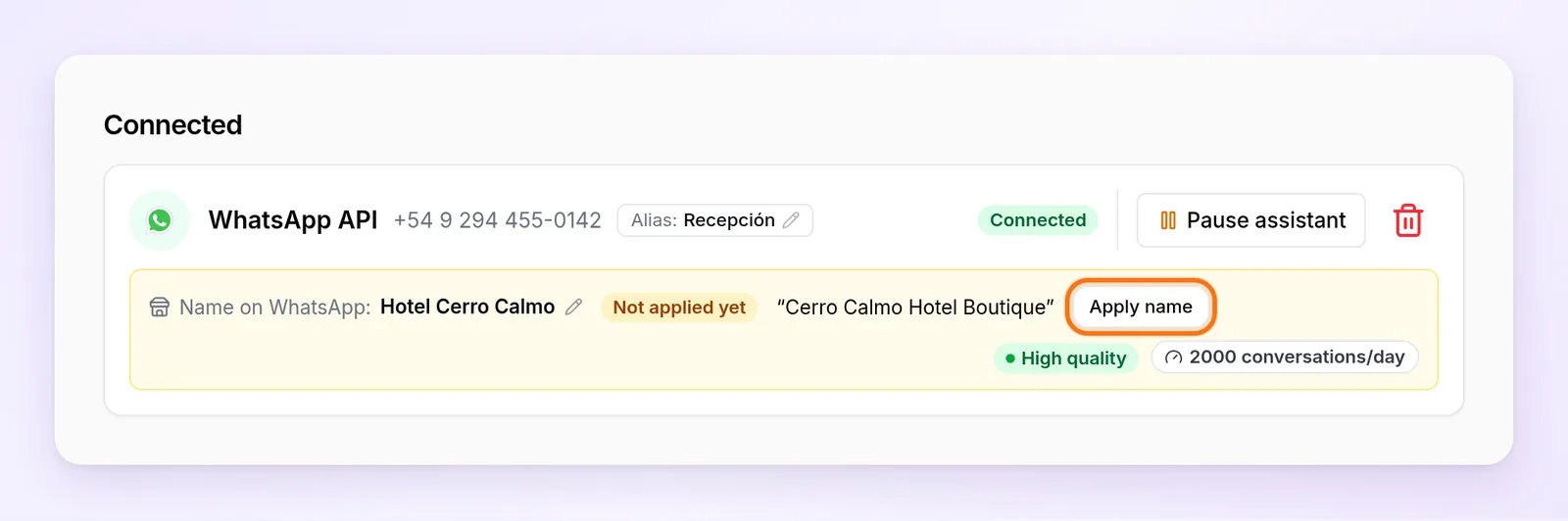
When the label changes to Not applied yet, tap the card's Apply name button.
The window opens with Meta approved “…”: tap Apply name. Name applied shows up and within a few minutes your guests see the new name.
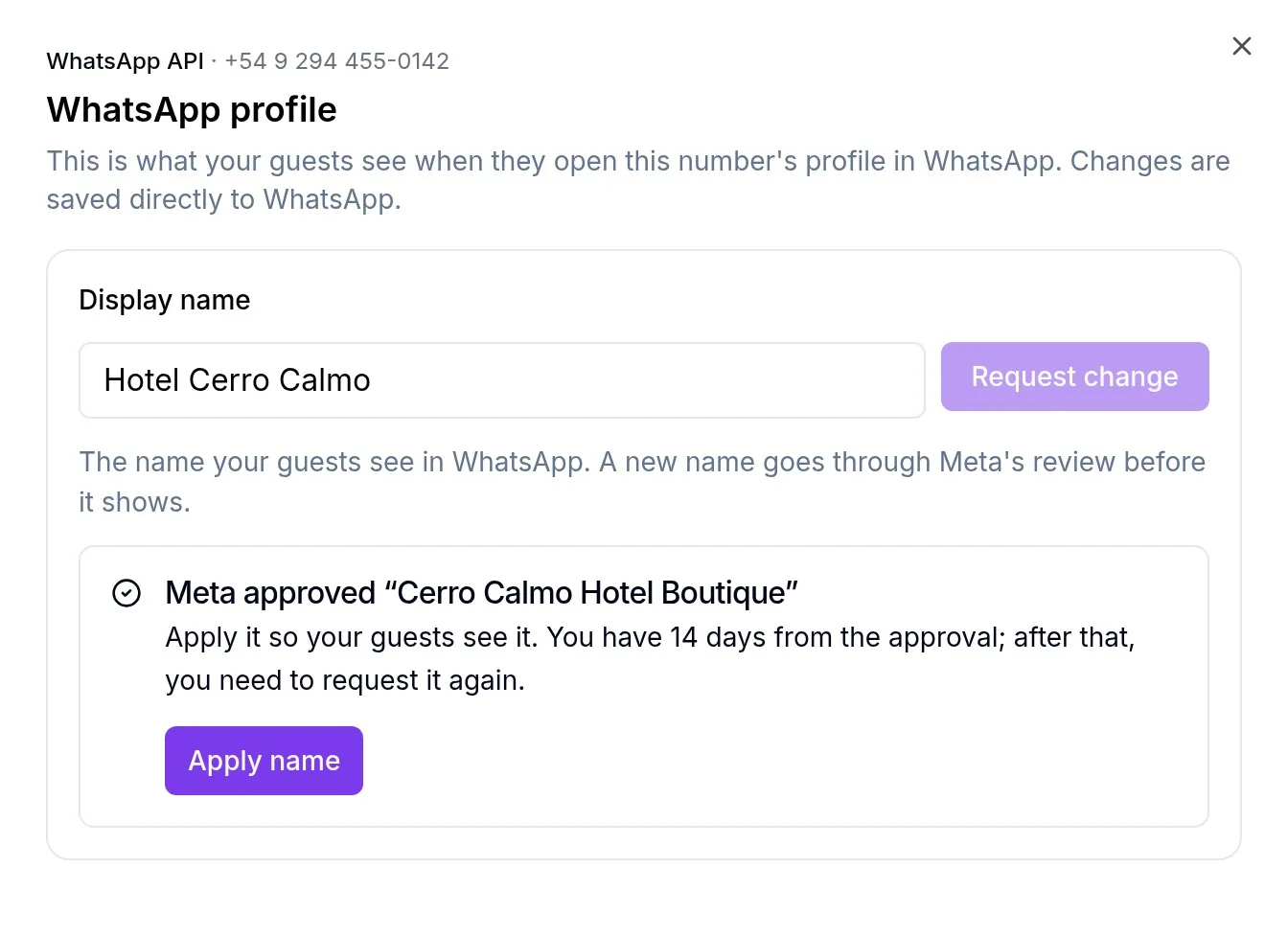
⚠️ You have 14 days to apply it. Until you tap Apply name, your guests keep seeing the previous name. If 14 days go by after the approval without applying it, the approval expires and you have to request the change again.
The name's status on the card
Next to Name on WhatsApp, the channel card shows a label with the name's status. While a change is in progress, the name you requested appears in quotes beside it.
| Label | What it means |
|---|---|
| Name Approved | The name on the card is the one your guests see. Nothing is pending |
| Name Under Review | Meta is reviewing the name you requested. Your guests keep seeing the previous one |
| Not applied yet | Meta approved the name, but it isn't visible yet. Tap Apply name within 14 days |
| Name Declined | Meta declined the name. Tap Request another name and choose one that follows the guidelines below |
| Name Expired | The 14 days went by without applying it. Tap Request it again |
ℹ️ The label is always about the WhatsApp name, the one Meta reviews. The channel's alias (Alias: …) is an internal WeSpeak name: it's saved right away and Meta doesn't review it.
What each notice means
| Notice | What to do |
|---|---|
| Meta is reviewing “…” | Wait. Your guests keep seeing the previous name |
| Meta approved “…” | Tap Apply name within 14 days |
| Name applied: “…” | Nothing else: within a few minutes it shows in WhatsApp |
| Meta declined “…” | Request another name that follows the guidelines below |
| The approval of “…” expired | Request the change again and apply it as soon as Meta approves it |
How to choose a name Meta approves
- It should match your business name, as it appears on your website, your social networks or your sign.
- No generic words on their own, such as “Hotel” or “Reservations”.
- No emojis or special characters. Don't use “&” (write “and”) or company suffixes such as “LLC”: Meta rejects those names automatically.
- Capitalize only the first letter of each word or acronyms: “Cerro Calmo Hotel”, not “CERRO CALMO HOTEL”.
Meta allows up to 10 name changes every 30 days per number.
If something doesn't work
| What happens | What to do |
|---|---|
| I changed the name and my guests still see the previous one | Look at the label next to the name, on the channel card. If it says Not applied yet, tap Apply name. If it says Name Under Review, you have to wait for Meta |
| When applying the name, We couldn't apply the name from here shows up | Contact support and we'll help you apply it. Do it as soon as possible, so the 14 days don't run out. |
| The pencil next to Name on WhatsApp doesn't show up on the channel card and I can't open the profile | Check that the number is connected through WhatsApp API, that the card isn't asking you to reconnect and that your role is Administrator or Supervisor |
| The Display name box doesn't show up | WhatsApp didn't respond when asked for the number's details. Close the window and open it again in a few minutes |
| WhatsApp rejected the change shows up when saving | Check the details (website with https://, valid email, about not deleted) and save again |
Frequently asked questions
Can I change the Instagram, Facebook or TikTok photo or name from WeSpeak?
No. Those networks don't let other platforms change the profile: do it from each one's app or website.
How many times can I change the name?
Meta allows up to 10 name changes every 30 days per number.
My number has the green checkmark of an official account. Can I change the name from here?
No. Meta asks for official accounts' name changes to go through its support. Contact us and we'll help you with the process.
Can WeSpeak do it for me?
Yes. Send support the new photo, details or name and we'll set it up for you. The name still goes through Meta's review.