A promotion (a presale, a 3-for-2, a long-stay discount) can reach the assistant in two different ways, and which one applies to you depends on how your hotel is connected. Before loading anything, check which one is yours: this article explains the path for when prices come from your booking engine.
In this article
- Which path applies to you
- How promotions work with your engine's prices
- Where they're loaded
- How to load a promotion, step by step
- What the guest sees
- Testing, editing, pausing or deleting it
- Frequently asked questions
Which path applies to you
| How your hotel is connected | Where you create the promotion | How it's booked |
|---|---|---|
| With WeSpeak Rates: an integration with a Channel Manager or a PMS via API, or WeSpeak Engine | In Rates, as a derived rate. It's explained in Promotions with WeSpeak Rates. | The assistant quotes it with its price and the guest books directly in the chat. |
| With prices from your booking engine (or from another system the assistant checks): neither a Channel Manager nor a PMS via API | In Knowledge → Promotions, as explained in this article. | If your engine already has the promotion's rate, the assistant quotes it with that price; if it doesn't, an advisor from your team closes the booking. |
💡 If your hotel can use WeSpeak Rates, that's the ideal path. With Rates, WeSpeak creates the promotion's rate: it calculates its price from your base rate, applies its conditions (dates, minimum nights, lead time, code, country) and the guest books it without waiting for anyone. When prices come from your booking engine, WeSpeak can't create new rates: the assistant only shows what your engine returns.
Rates isn't available for every connection: it needs a compatible integration, that is, a Channel Manager or a PMS via API that can receive the bookings, or WeSpeak Engine (WeSpeak's own engine). If your integration only reads your booking engine, Rates shows the notice Your integration isn't compatible with WeSpeak Rates.
Which integration applies to you, or which one you could use, depends on your system and on the integrations WeSpeak has at any given time. If you're unsure, ask your advisor: they'll tell you which one is yours and, if there's an integration compatible with Rates for your system, your hotel's connection can be changed. The connection types are explained in Get to Know WeSpeak Rates.
How promotions work with your engine's prices
▶️ Prefer to watch it? Watch the video: setting up promotions in Knowledge. It's also embedded further down, in the step by step.
- The assistant presents each promotion along with the quote, only for the dates and number of people it applies to. When the promotion expires, it stops mentioning it on its own.
- The source of truth is your booking engine (or the system where the assistant checks availability). That's why the assistant never calculates discounts: it shows the prices your engine returns.
- Everything depends on one question: does your engine already have the promotion's rate?
| Your engine has the rate | Your engine doesn't have the rate | |
|---|---|---|
| What the assistant does | Highlights the promotion's rate, with its price, and offers to book with it. | Presents the promotion without calculating amounts and says that an advisor applies it. |
| How it's booked | Like any other rate from your engine. | Only through an advisor: if the guest wants to go ahead with it, the assistant hands the conversation to your team. |
| Label in the list | Assistant's rate | Applied by an advisor |
Where they're loaded
In Knowledge, open Establishment Information, switch to Advanced mode and expand Promotions, the section below Extra information.
If you have several hotels, go into each one from the hotel directory: each hotel has its own promotions.
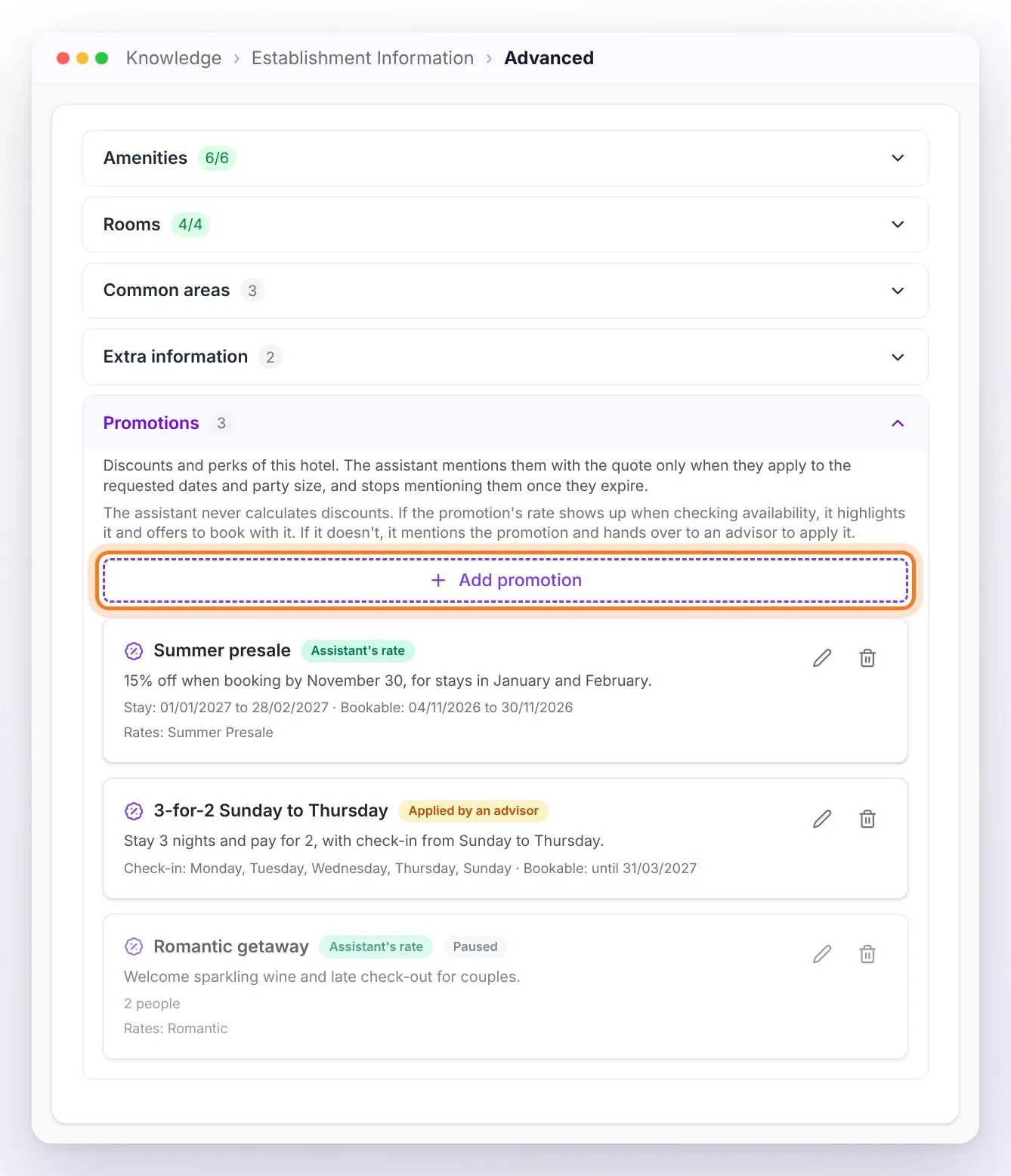
Each promotion in the list shows its label (Assistant's rate or Applied by an advisor, plus Paused if you turned it off), its description and, below, its conditions: stay dates, check-in days, until when it can be booked, number of people and the selected rates.
How to load a promotion, step by step
On video: the tutorial goes through both cases, a promotion your engine already has and one it doesn't, and how to test them in the test chat.
Watch the video: setting up promotions in Knowledge
Tap Add promotion.
Fill in the Promotion name and the Promotion description: that's what the assistant tells the guest, so write it the way you'd explain it to the guest (what it includes, for which dates, what conditions it has).
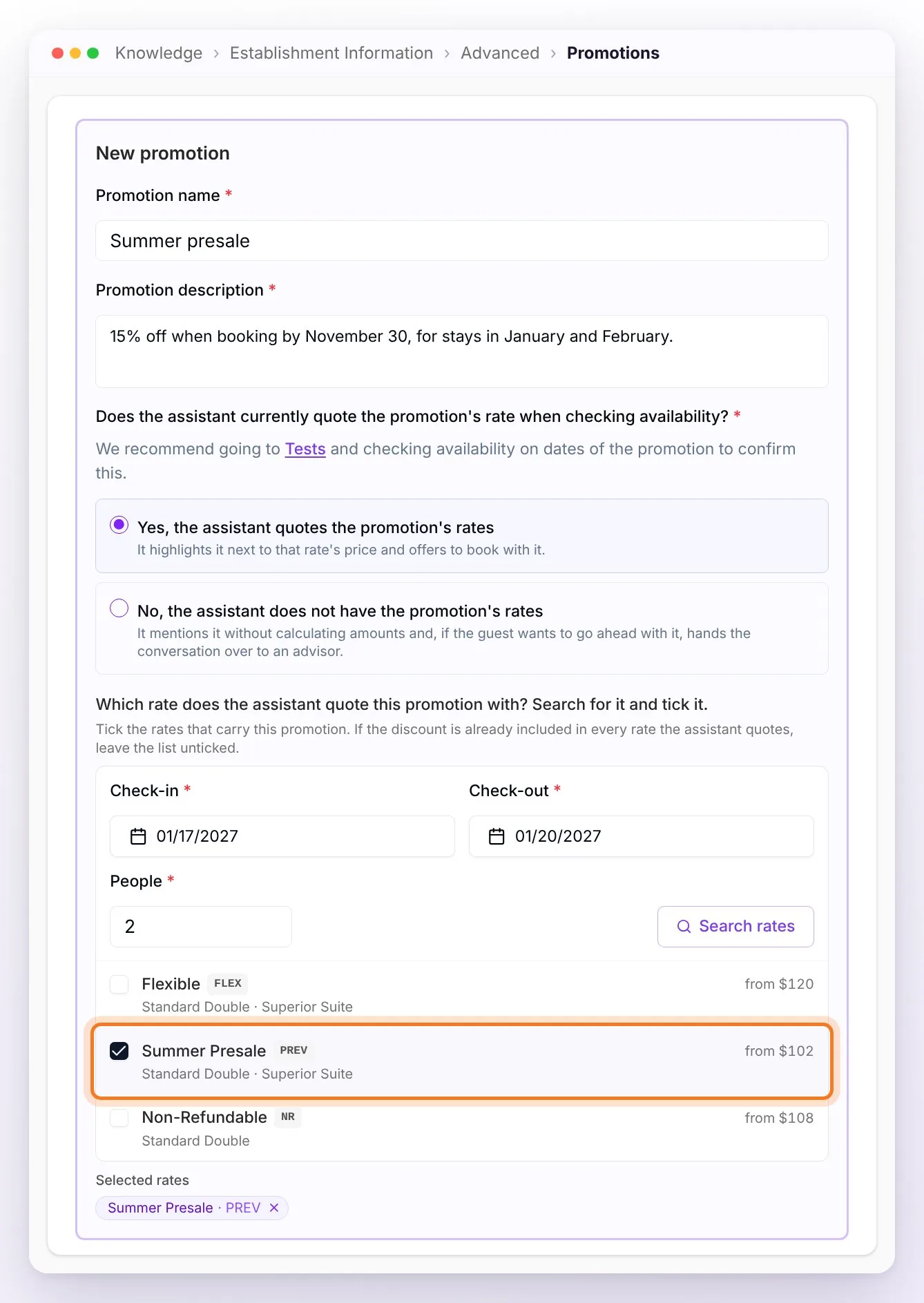
Answer the key question: Does the assistant currently quote the promotion's rate when checking availability? If you don't know, check availability on dates of the promotion in Tests (the form's link opens it in a new tab) or in the Knowledge test chat, as if you were a guest, and see which rates it quotes.
Yes, the assistant quotes the promotion's rates: pick the Check-in, Check-out and People and tap Search rates. It's the same query the assistant makes when quoting. Tick the rate that carries the promotion; if the discount is already included in every rate, leave the list unticked. The ones you tick appear under Selected rates.
No, the assistant does not have the promotion's rates: go on to the conditions. The assistant will present it without calculating amounts and an advisor closes the booking. Choose this option too if your hotel has no availability integration.
Set the conditions (all are optional: whatever you leave empty doesn't limit the promotion):
- Rooms it applies to: All rooms comes ticked; untick it to choose only some.
- Stay dates: the promotion applies when the requested check-in date falls in that range.
- Check-in days: for promotions that only apply if the check-in falls on certain days (for example, Sunday to Thursday).
- Booking period: the dates when the guest can ask for it; outside them, the assistant stops mentioning it.
- Number of people: a Minimum and a Maximum, for promotions only for couples or groups. In multi-room bookings, the minimum counts the whole group and the maximum counts each room.
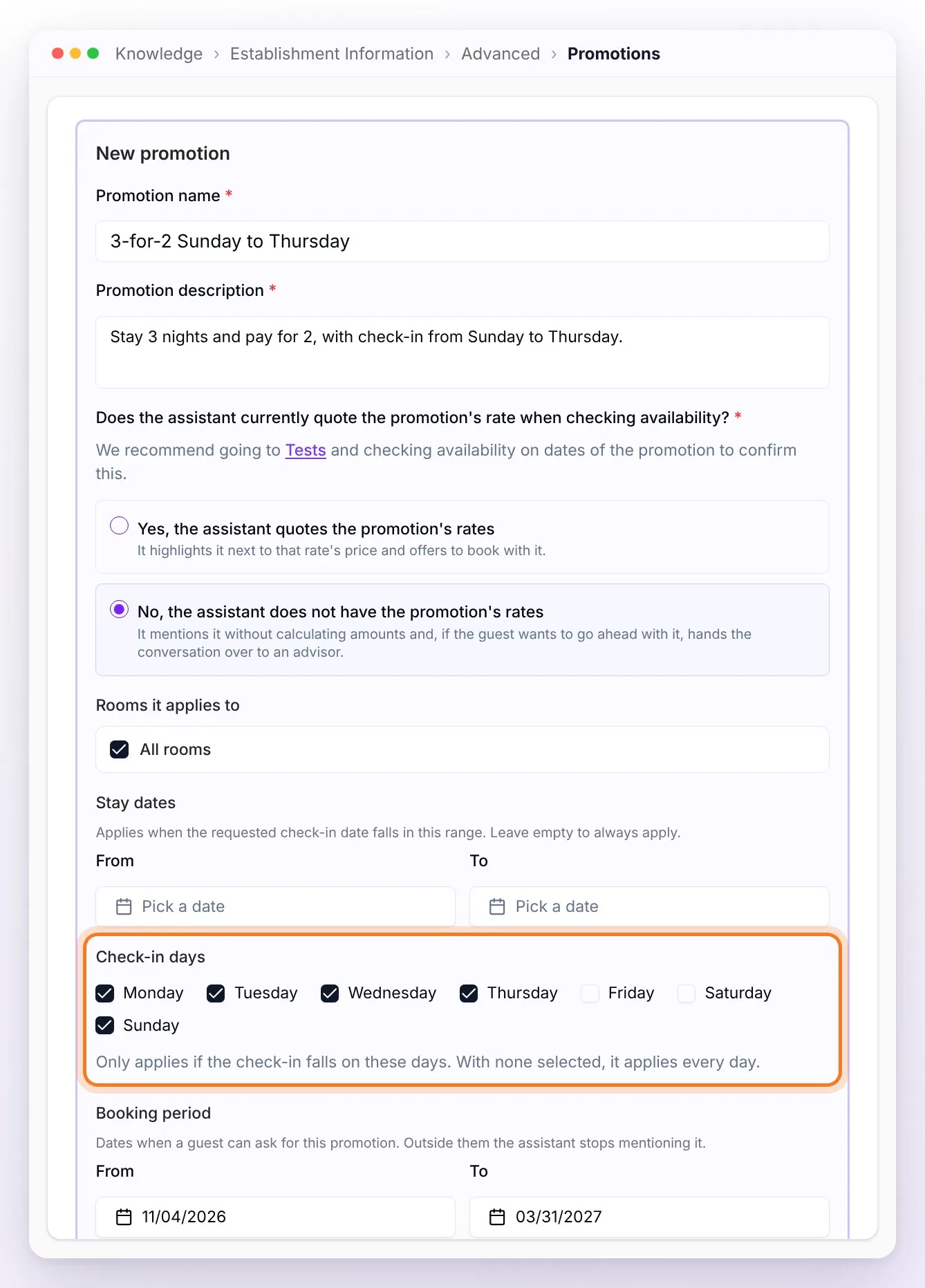
Tap Save. The promotion appears in the list with its label and its conditions.
⚠️ Always give the Booking period an end date. Without one, the promotion stays active, and if its rate stops showing up in your engine, the assistant hands the inquiry to an advisor.
What the guest sees
With the two example promotions loaded, a guest asks about Sunday, January 17 to Wednesday, January 20, dates on which both apply:
- The Summer presale is in your engine (Assistant's rate): the assistant highlights it with its rate's price and offers to book it.
- The 3-for-2 Sunday to Thursday isn't in your engine (Applied by an advisor): the assistant mentions it without calculating amounts and says that an advisor applies it. If the guest asks for it, the conversation goes to your team and the assistant sends your pause message.
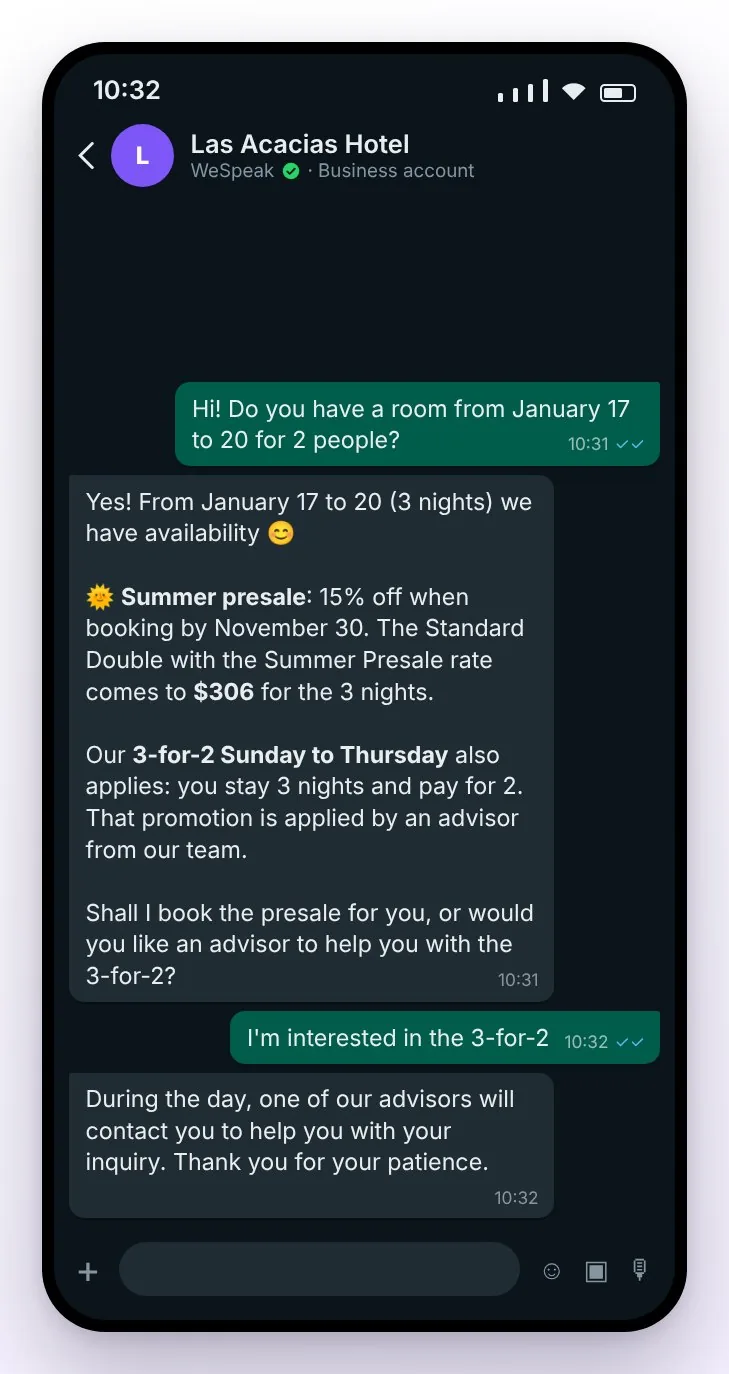
On dates where a promotion doesn't apply, the assistant doesn't mention it.
Testing, editing, pausing or deleting it
- Testing it: in Tests or in the Knowledge test chat, write as if you were a guest and ask about dates inside and outside the promotion.
- Editing it: tap the promotion's pencil (Edit).
- Pausing it without deleting it: while editing it, turn off Active and save. It's labeled Paused and the assistant stops mentioning it until you turn it back on.
- Deleting it: tap the trash can (Delete) and confirm in Delete this promotion?. It's no longer mentioned in quotes, and it can't be undone.
- When it expires, you don't need to do anything: the assistant stops mentioning it.
Frequently asked questions
Can the assistant calculate the promotion's discount?
No. With prices from your booking engine, the assistant never calculates discounts: it quotes with the prices your engine returns. If you want it to quote the promotion with its price, load it as a rate in your booking engine and tick it in Search rates. If your integration is compatible with WeSpeak Rates, you can create it as a derived rate and WeSpeak calculates the price.
My engine doesn't have the promotion's rate. Can the guest book it in the chat?
Not on their own: the assistant tells them about the promotion and, if they want it, hands the conversation to your team so an advisor can apply it and close the booking.
I have several hotels. Do I load the promotion just once?
No: each hotel has its own promotions. Load it in the profile of each hotel where it applies, from the hotel directory.
I had my promotions loaded in Extra Information. What should I do?
Move them to Promotions: there each one has its dates and conditions, and the assistant stops mentioning it when it expires. An Extra Information instruction doesn't expire, so delete it so there's no repeated or outdated information.
The promotion expired. Do I have to delete it?
There's no need: the assistant stops mentioning it on its own. You can delete it if you want to clean up the list.
How do I know whether my hotel can use WeSpeak Rates?
Ask your advisor: they'll tell you which integration your hotel has and, if there's one compatible with Rates for your system, how to change it. With Rates, the ideal is to create the promotion as a derived rate: the assistant quotes it with its price and the guest books it directly, without going through an advisor. The step by step is in Promotions with WeSpeak Rates.